Competitive first-person shooter titles demand precise mechanical inputs where fractions of a millisecond determine victory or defeat. Choosing between traditional mechanical boards and modern Hall Effect analog magnetic options can dramatically influence your counter-strafing accuracy, peeking speed, and overall desk mobility. Our guide to the Best Keyboards for Shooters evaluates 7 leading options for September 2026 to help you refine your tactical gaming setup.
Many competitive players mistakenly buy oversized boards with loud clicky switches that clutter desk space and slow down rapid directional changes. High-level tactical shooters benefit immensely from compact form factors that clear wide mousepad runways, alongside advanced switch sensors that reset immediately upon upward finger release. You can optimize your broader gaming station by exploring our guide on standing desk cable management systems to eliminate distracting wire resistance.
Understanding the critical performance metrics behind analog switch travel, rapid trigger sensitivities, and ultra-high polling rates will immediately improve your gameplay consistency. This breakdown provides the technical clarity necessary to select hardware that complements your tactical playstyle across titles like Valorant, Counter-Strike 2, and Apex Legends.





1. Hall Effect Magnetic Switches and Analog Sensing
Hall Effect switches utilize permanent magnets and electromagnetic sensors rather than physical metal leaf contacts to register key depressions. Because the sensor measures magnetic flux density continuously throughout the key stroke, the keyboard precisely tracks the exact depth of every keypress in real time. This contactless architecture eliminates mechanical friction, extends switch longevity, and removes physical debounce delays.
When evaluating analog magnetic switches, compare the travel range and resolution granularity across competitive models. Premium magnetic switches offer smooth linear travel between 3.6mm and 4.0mm, allowing you to configure precise actuation points from 0.1mm down to bottoming out. Traditional mechanical switches operate at fixed actuation points around 1.5mm to 2.0mm, which limits your ability to fine-tune trigger responsiveness.
For fast-paced tactical shooters, configure critical movement keys like W, A, S, and D with shallow actuation points between 0.2mm and 0.5mm. This setting ensures that your movement inputs register instantly with minimal finger pressure. Reserve deeper actuation points for volatile ability keys or ultimate activations to prevent accidental triggers during high-stress fire fights.
2. Rapid Trigger Technology and Dynamic Reset Points
Rapid Trigger technology fundamentally transforms how movement mechanics operate in modern competitive shooting titles. Unlike conventional mechanical switches that require the stem to rise past a fixed physical reset line before registering a new press, Rapid Trigger activates and deactivates the key dynamically based on travel direction. The instant you release downward pressure, the key resets immediately.
Check the minimum Rapid Trigger step distance when comparing models, which typically ranges from 0.01mm to 0.1mm in high-performance gaming boards. A lower step distance means the switch registers a stop or reset after a microscopic upward release of your finger. This allows players to counter-strafe and stop in place significantly faster in games like Counter-Strike 2 and Valorant.
A practical guideline is to calibrate your Rapid Trigger release sensitivity to approximately 0.05mm for primary movement keys. Setting the sensitivity too close to 0.01mm can occasionally cause minor finger tremors to accidentally trigger deactivations during smooth tracking. Experiment in practice range modes to find the ideal balance between instant stopping power and comfortable finger resting weight.
3. Polling Rates and Input Latency Standards
The polling rate represents how frequently the keyboard controller reports keystroke data back to your PC operating system each second. Standard gaming keyboards operate at a 1000Hz polling rate, which equates to a 1.0ms reporting interval. Advanced competitive boards push this ceiling to 8000Hz, slashing the reporting interval down to a mere 0.125ms for near-instantaneous transmission.
To understand the performance impact, note that 8000Hz polling reduces communication latency between your fingers and the game engine, synchronizing inputs tightly with high-refresh monitors. While a 1000Hz connection is already very fast, higher polling rates smooth out input jitter when executing frame-perfect strafe stops. Ensure your system CPU has sufficient background processing headroom to handle high-frequency USB data packet streams effortlessly.
If you play on a 240Hz or 360Hz gaming display, pair it with an 8000Hz magnetic keyboard to minimize cumulative input lag across your entire hardware chain. You can read more about ergonomic desk configurations and monitor alignment in our peripheral mounting and display setup guide to keep your reaction times sharp.
4. Form Factor and Desk Clearance for Low DPI Aiming
Keyboard layout size plays a monumental role in mouse maneuverability for low-sensitivity shooter players who rely on wide arm swipes. Full-sized keyboards with integrated number pads occupy substantial desk territory, frequently forcing your hands into an unnatural, wide posture. Choosing a compact form factor gives your mouse pad maximum breathing room for low DPI flick shots and continuous tracking.
Compare layouts such as 60 percent, 75 percent, Tenkeyless (TKL), and dedicated one-handed tactical keypads to match your workspace requirements. A 60 percent layout strips away dedicated arrow keys and navigation clusters, providing the smallest footprint for maximum mouse clearance. A 75 percent or TKL board retains dedicated arrow keys and function rows while still saving considerable desk width over full-sized peripherals.
Dedicated one-handed keypads offer the absolute maximum clearance by isolating only the primary gaming cluster. If you play exclusively first-person shooters and prefer an angled board placement, a 60 percent or keypad design allows your left wrist to remain neutral while your mouse hand sweeps across a giant cloth pad without ever bumping into plastic edges.
5. Rapid Tap and SOCD Resolution Handling
Simultaneous Opposite Cardinal Direction, commonly known as SOCD, refers to how keyboard firmware processes conflicting directional inputs such as pressing A and D at the exact same time. Advanced shooter firmware includes features like Rapid Tap or Last Input Priority, which automatically favors the most recent keystroke without requiring you to fully release the opposite key.
Evaluate whether the keyboard firmware includes customizable SOCD profiles and verify the specific tournament rules of the games you play. Built-in Rapid Tap features allow players to switch strafing directions instantaneously, generating razor-sharp jiggle peeking around corners. Different manufacturers implement this via proprietary web drivers or onboard profiles that can be toggled in seconds.
Always check game-specific anti-cheat regulations, as some tournament organizers restrict hardware-level SOCD automation while permitting analog Rapid Trigger movement. Having a keyboard with quick-toggle onboard memory allows you to easily switch between enhanced strafing profiles for casual play and standard input handling for strictly regulated competitive ladders.
6. Keycap Materials and Surface Texture
Keycap material directly affects finger grip, surface wear, and overall typing feedback during long competitive sessions. ABS plastic keycaps tend to develop an oily shine and slick surface over months of heavy use, which can lead to finger slippage during intense firefights. In contrast, durable PBT keycaps feature a textured surface that resists sweat, friction, and long-term degradation.
Examine whether the keycaps utilize double-shot molding or side-printed legends when comparing different models. Double-shot PBT keycaps fuse two layers of plastic together, ensuring the lettering will never fade regardless of how many millions of times you strike each key. Side-printed legends keep the top surface completely clean and smooth while allowing lower-positioned RGB illumination to shine directly toward the user.
If you tend to play in dark gaming environments, look for keycaps with clear legend transparency or high-contrast side printing. A textured PBT finish provides tactile confirmation that your fingers are centered on home row keys, preventing accidental misclicks when repositioning your left hand after reaching for utility binds.
7. Acoustic Dampening and Gasket Mount Structures
Internal keyboard construction significantly impacts the sound profile, keystroke feel, and physical fatigue experienced during marathon gaming nights. Traditional tray-mounted boards screw the circuit board directly into a rigid plastic shell, creating harsh bottom-out impact and hollow resonance. Gasket-mounted designs suspend the switch plate on flexible silicone or poron dampeners to soften every strike.
Compare the multi-layer acoustic foam packages included inside the chassis to gauge sound quality and vibration control. Quality boards feature 3 to 5 layers of dampening material, including EVA foam, IXPE switch pads, and silicone bottom sheets that absorb high-pitched switch clicks. This construction produces a deep, satisfying acoustic profile without disturbing teammates over open microphone channels.
For high-stress shooter matches where you repeatedly mash movement keys, a gasket-mounted structure reduces the shock transferred back into your fingertips and wrists. The added flex cushions aggressive bottoming out while maintaining a stable, solid foundation for rapid actuation consistency.
8. Driver Software and Web-Based Configuration Utilities
The configuration software determines how easily you can adjust actuation depths, remap key bindings, build complex macros, and customize lighting profiles. Heavy desktop software suites often consume background system resources, add unnecessary startup latency, and introduce potential driver conflicts during competitive play. Web-based configuration utilities represent a modern, streamlined alternative.
Assess whether a keyboard relies on local software installations or lightweight web drivers that connect directly through standard browser interfaces. Web-based drivers allow you to modify rapid trigger points and key assignments on any computer without installing bloatware. Once configured, onboard memory stores your custom profiles directly on the keyboard hardware itself.
Look for boards with onboard hardware controls or small OLED displays that permit real-time sensitivity adjustments on the fly. Being able to tweak your rapid trigger threshold between tournament rounds without alt-tabbing out of the game engine ensures continuous focus and zero software dependency.
9. Connectivity Modes and Signal Reliability
Connectivity determines signal reliability, input stability, and desk cable management flexibility across multiple gaming environments. High-performance wired USB-C connections remain the gold standard for zero-latency, interference-free transmission in competitive tournaments. Tri-mode keyboards expand versatility by offering 2.4GHz wireless and Bluetooth alongside standard wired operation.
When reviewing wireless options, check battery capacity ratings, which often range from 3000mAh to 4000mAh, and monitor wireless polling performance. A 2.4GHz wireless dongle provides near-wired latency for relaxed gaming, but activating intense RGB lighting can drain batteries rapidly. Wired connections eliminate battery management concerns entirely while supporting extreme 8000Hz polling frequencies.
Choose a detachable USB-C wired connection for dedicated esports rigs to maximize stability and minimize cable drag. For clean workstation setups, explore our recommendations in the furniture and comfort guide collection to maintain an organized, comfortable battlestation.
Key Architectural Specifications Compared
Understanding how technical switch specifications and polling rates translate to in-game advantages is critical when selecting hardware. The table below outlines key hardware characteristics across popular competitive keyboard formats.
| Form Factor | Switch Technology | Polling Rate | Primary Tactical Benefit |
|---|---|---|---|
| 60% Compact | Hall Effect Magnetic | Up to 8000Hz | Maximum desk space for low DPI mouse sweeps with sub-millimeter Rapid Trigger |
| 75% Layout | Linear Mechanical / Gasket | 1000Hz to 2.4GHz Tri-Mode | Dedicated arrow keys and function row with balanced acoustics and multi-device support |
| Tenkeyless (TKL) | OmniPoint 3.0 Analog Magnetic | 1000Hz to 8000Hz | Onboard OLED display, custom SOCD resolution, and full navigation cluster |
| Tactical Keypad | Hot-Swappable Mechanical | 1000Hz Wired | Isolated 42-key footprint with dedicated macro layout and integrated wrist rest |
Why You Should Trust Us
Our gear recommendations are rooted in rigorous technical analysis, verified specification tracking, and objective hardware evaluation. We closely examine switch datasheets, debounce architectures, dynamic actuation capabilities, and microcontroller polling rates across leading peripheral brands like Redragon, GravaStar, SteelSeries and more. This data-driven approach removes marketing hyperbole so you can invest in hardware that delivers genuine competitive utility.
We systematically monitor user feedback, firmware update histories, driver software stability, and build tolerances across varying price brackets. By continuously auditing new releases in the peripheral space, our database remains current and reliable for September 2026 and beyond. Readers seeking broader peripheral and workspace insights can explore our comprehensive hardware guides for additional setup recommendations.
Final Thoughts
Selecting the ideal keyboard for competitive shooters depends on whether you prioritize cutting-edge analog sensor customization, desk footprint reduction, or multi-device versatility. For players who demand the most advanced feature set on the market, the SteelSeries Apex Pro TKL Gen 3 Gaming Keyboard serves as the premier flagship option. With its OmniPoint 3.0 analog magnetic switches, Rapid Trigger responsiveness, Rapid Tap movement handling, and onboard OLED display, it delivers unrivaled customization for elite ranked matches.
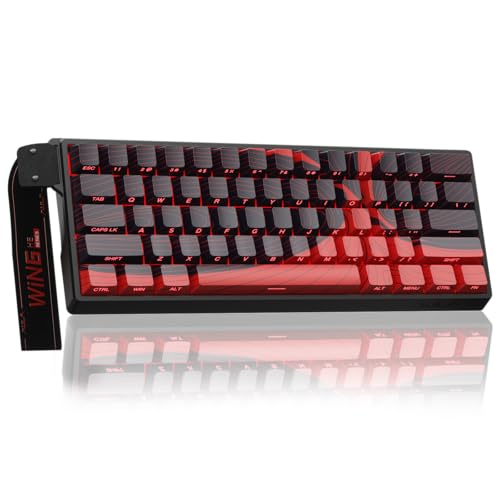
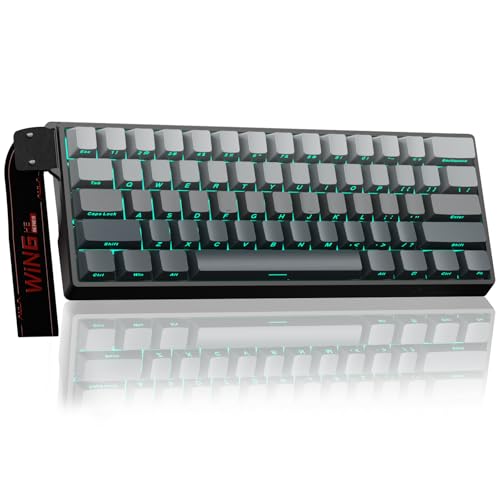
If you want the performance advantages of magnetic switches and an 8000Hz polling rate without spending flagship money, the Aula WIN60 HE – 60% Mechanical Gaming Keyboard is an exceptional value pick. Its lightweight web-based driver makes setting 0.02mm Rapid Trigger thresholds straightforward, while the compact 60 percent chassis frees up immense mousepad area for low-sensitivity flick shooting.
For dedicated esports specialists seeking maximum mouse clearance, the Redragon K585 Wired One-Handed RGB Gaming Keypad offers an isolated 42-key tactical layout with onboard macro profiles and hot-swappable switch sockets. Players looking for premium acoustic dampening and wireless flexibility should also consider the GravaStar Mercury K1 Lite 75% Wireless Mechanical, or step up to the refined AULA WIN60 HE MAX – 60% Mechanical Gaming Keyboard for ultra-fine 0.01mm step precision. You can discover more desk accessories and peripheral breakdowns in our general hardware and workstation archive.
Frequently Asked Questions
What makes Best Keyboards for Shooters different from standard mechanical keyboards in 2026?
The Best Keyboards for Shooters feature analog Hall Effect magnetic switches and Rapid Trigger technology rather than traditional static contact leaves. This allows the keys to dynamically actuate and reset the moment your finger changes direction, enabling significantly faster counter-strafing and stopping mechanics in competitive FPS titles.
How does Rapid Trigger technology work in first-person shooter games?
Rapid Trigger eliminates the traditional fixed mechanical reset point by using continuous magnetic tracking. The switch registers a key release the microsecond you lift your finger upward, allowing you to instantly stop moving in game without waiting for the switch to travel all the way back to the top.
Is an 8000Hz polling rate noticeable in competitive shooters?
An 8000Hz polling rate reduces the keyboard reporting interval from 1.0ms down to 0.125ms, which reduces input jitter and latency variance. While subtle, players using high refresh rate 240Hz or 360Hz gaming monitors will experience tighter input synchronization during rapid direction switches.
Why do many shooter players prefer 60 percent keyboard layouts?
A 60 percent layout removes unnecessary number pads, arrow keys, and navigation clusters to create a very small desk footprint. This extra clearance allows low-sensitivity players to make wide, unrestricted mouse swipes without colliding with the side of their keyboard.
What is the ideal actuation point setting for movement keys in Valorant or Counter-Strike?
Most competitive players configure their primary W, A, S, and D movement keys with a shallow actuation point between 0.2mm and 0.5mm. This setting registers movement commands almost instantaneously while minimizing physical travel distance.
Are magnetic Hall Effect keyboards durable over long-term gaming use?
Yes, Hall Effect switches are exceptionally durable because they rely on contactless electromagnetic sensors rather than bending metal contact leaves. Without physical friction points wearing down inside the switch housing, magnetic switches generally sustain over 100 million keystrokes without performance degradation.
What is Rapid Tap or SOCD resolution on modern gaming keyboards?
Rapid Tap, or Simultaneous Opposite Cardinal Direction resolution, prioritizes the most recent directional keypress when two opposing keys like A and D are held simultaneously. This allows players to execute instant direction changes and jiggle peeks without perfectly releasing the previous movement key.
Are web-based keyboard drivers better than downloadable desktop software?
Web-based drivers are highly advantageous because they run directly in your internet browser without consuming background RAM or CPU cycles on your gaming PC. You can easily adjust your actuation thresholds and lighting profiles on any computer and save them directly to onboard memory.
Can one-handed keypads replace standard gaming keyboards for shooters?
Dedicated one-handed gaming keypads provide all essential movement and weapon binds while taking up less than half the desk space of a standard board. They are ideal for dedicated FPS players, though they require a secondary keyboard for regular office typing and text chat.
Why are PBT keycaps recommended over standard ABS keycaps?
PBT keycaps feature a durable, textured surface that resists finger sweat and will not develop an oily shine over months of heavy gaming. Their textured finish improves finger grip during tense matches and ensures keycap legends remain crisp over millions of presses.