A cable tray that behaves perfectly under a stationary desk can turn into a problem the moment it’s mounted under a height-adjustable frame. The tray itself doesn’t move any differently, but the desk above it does — rising and falling through 20 or more inches of travel every time you switch between sitting and standing. Any cord that was cut to length for a fixed desktop position now has to survive that entire range without going taut, without snagging on a lift column, and without slowly working a plug loose. That’s the specific challenge a standing desk cable tray has to solve, and it’s different enough from a normal under-desk tray that it deserves its own buying approach rather than a generic one.
This guide is scoped to that problem. If your desk doesn’t move — or if you’re comparing a tray against a fully enclosed cable box or a broader cable management kit — our general cable tray guide covers mounting methods, materials, and weight capacity in more depth. Here, we’re focused on what changes when the desk itself is the moving part: mounting position relative to the lift columns, how much slack a cable needs to clear the full height range, and whether a fixed tray or a flexible cable spine handles that motion better.
Quick Answer
For most sit-stand setups, the 25” No Drill Under Desk Cable Management Tray with Clamp for Standing Desk is the strongest all-around pick — it’s rated highly by owners specifically running it on height-adjustable frames and mounts securely enough to travel with the desk through repeated height changes. If cable slack across the full travel range is your main worry, the Ultimate Setup Under Desk Cable Management Vertebrae for Sit Stand Desk is built specifically to expand and compress as the desktop moves, which solves the taut-cord problem more directly than a fixed tray. Budget shoppers can look at the Yecaye Metal Under Desk Cable Management Tray, Clamp-On Desk Shelf, while dual-monitor or dual-motor setups may prefer the KEEGH 16 in Under Desk Cable Management Tray, 2 Pack, since splitting the load across two shorter trays makes it easier to clear a dual-motor frame’s extra bracing.


Top Picks at a Glance
- Best Overall for Standing Desks: 25” No Drill Under Desk Cable Management Tray with Clamp for Standing Desk
- Best for Full Height-Adjustable Range: Ultimate Setup Under Desk Cable Management Vertebrae for Sit Stand Desk
- Best Extendable Design: No Drilling Extendable Under Desk Cable Management Tray with Clamp, 31 Inch
- Best Premium Build Quality: VIVO No Drill Clamp-on 17 inch Power Strip Cable Management Tray
- Best for Dual-Motor Frames (2-Pack): KEEGH 16 in Under Desk Cable Management Tray, 2 Pack
- Best Budget Pick: Yecaye Metal Under Desk Cable Management Tray, Clamp-On Desk Shelf
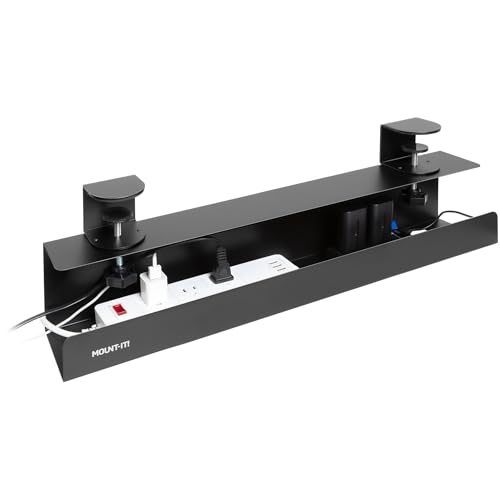
- Best for Glass-Top Standing Desks: Mount-It! Under Desk Cable Management Tray for Desk & Standing Desk
Why a Regular Cable Tray Can Fail on a Standing Desk
A plain under-desk tray is designed to hold a power strip and a bundle of cords in one fixed spot. That works fine when the desktop never changes height. On a sit-stand desk, the same tray has to travel up and down with the desktop while the cords running from it to the wall outlet, the docking station, or the floor stay anchored somewhere that doesn’t move. Push the desk to full standing height and a cord with no slack goes taut, pulling on whatever it’s plugged into. Lower the desk back to sitting height and the same cord goes slack again, which sounds harmless until it starts bunching up right where the lift column slides — the exact spot where a loose loop can get pinched or dragged into the mechanism. A standing desk cable tray needs to account for both extremes, not just the resting position most trays are photographed in.
The other failure point is physical interference. A tray mounted too close to a lift column can clear the frame just fine when the desk is halfway up, then clip the column’s telescoping sleeve as it retracts to full sitting height. On desks with anti-collision sensors, a stray cord or a tray edge that shifts into the sensor’s path can trigger false stops. None of this is a defect in the tray itself — it’s a mismatch between a tray built for a fixed desktop and a desk that isn’t fixed.
How Standing Desk Cable Trays Differ From General Cable Trays
Our broader cable tray guide walks through mounting methods, tray materials, and weight capacity for under-desk trays in general, and it notes that a tray should be able to handle a standing desk without straining or snagging. This article goes further, because “should work” and “reliably works through 25 inches of daily travel” are two different bars to clear. Everything here — mount placement, slack calculation, dual-motor clearance — is written around the assumption that the desk under the tray moves every day, sometimes several times.
If concealment matters more to you than open access, our desk cable box guide covers fully enclosed options with a lid, which some standing desk owners actually prefer specifically because a closed box keeps cords from shifting during height changes. And if you need to organize cable runs across an entire desk or room rather than just the space under one tray, our cable management kit guide covers multi-piece bundles of sleeves, clips, and ties that work alongside a tray rather than replacing it.
Fixed Trays vs. Flexible Cable Spines
Most standing desk cable trays fall into one of two designs. A fixed tray is a rigid wire basket or solid channel — it holds a power strip and cords in place, but the tray itself doesn’t change shape or length. It relies entirely on the cables inside it having enough slack to cover the desk’s full travel range. A flexible cable spine, sometimes sold under names like “vertebrae” or “cable chain,” is an articulated cover made of linked segments that lengthens as the desk rises and compresses as it lowers, so the covering itself absorbs the motion instead of asking the bare cable to stretch and coil on its own.
A spine-style product typically costs more than a comparable fixed tray and holds less loose gear — it’s built to manage cable length through motion, not to be a general storage shelf for a power strip and several adapters. A fixed tray is cheaper and holds more, but only performs well through a full height range if it’s mounted in the right spot and given deliberate slack. Neither design is universally better; it comes down to whether your priority is maximum capacity (fixed tray) or minimizing the chance of a taut or snagged cord at any point in the travel range (cable spine).
Where to Mount the Tray — Crossbar and Lift Column Placement
Mounting position matters more for a standing desk cable tray than for a stationary one, because the tray has to clear the frame at every height, not just one. The crossbar — the horizontal brace connecting the two legs under the desktop — is usually the best anchor point, since it’s fixed relative to the desktop and travels with it as a single unit. Centering the tray under the desktop, away from either lift column, keeps it clear of the telescoping tubes as they extend and retract.
On a single-motor frame with one driven leg and one static leg, there’s usually more open crossbar space to work with. On a dual-motor frame, both legs are driven, and there’s often additional bracing or a center support running between them, which narrows the usable mounting area. Check the clamp or bracket’s width against the actual clearance on your crossbar before mounting — a tray that fits a single-motor frame with room to spare can be a tight squeeze on a dual-motor frame with a busier undercarriage.
Cable Slack for the Full Travel Range
Even the best-mounted standing desk cable tray will strain a cord if there isn’t enough slack to cover the difference between your desk’s lowest sitting height and its highest standing height. A simple way to check is to raise the desk to its maximum height first, route the cable through the tray with a loose loop, then lower the desk to its minimum height and confirm the extra cable coils neatly inside or beside the tray rather than dragging on the floor or bunching against a lift column. Too little slack and the cord goes taut at standing height, gradually working plugs loose or straining the cord’s strain-relief point. Too much slack and the loose loop can sag low enough to catch on the column during a height change.
A flexible cable spine removes some of the guesswork here, since its segments expand and compress with the desk automatically. With a fixed tray, it’s worth rechecking slack any time you add a new cable or change desk height presets, since a setup that worked at one preset height doesn’t automatically work at a different one.
Dual-Motor vs. Single-Motor Frame Compatibility
Dual-motor standing desks lift both legs independently, which generally means faster, quieter, and more stable travel — but the frame underneath is busier than a single-motor desk’s. Extra bracing near the crossbar, a center support leg on wider desktops, or additional wiring for the second motor can all reduce the flat, unobstructed mounting surface a standing desk cable tray’s clamp needs to grip. Before buying a single long tray for a dual-motor desk, measure the actual clear span between obstructions rather than assuming a tray rated for a “standard” desk will fit.
This is where a 2-pack tray setup can help: two shorter trays, one mounted on each side of the crossbar, are often easier to fit around a dual-motor frame’s extra hardware than one long tray trying to span the whole width. It also lets you balance cable weight — monitor and dock cords on one side, power strip and chargers on the other — instead of concentrating everything in a single tray. If your setup also includes a keyboard tray or monitor arm that moves with the desk, our guides on standing desks cover frame types and motor configurations in more detail if you’re still comparing desks themselves.
Standing-Desk-Specific vs. Generic Trays
Some cable trays are designed and marketed specifically for standing desks — built-in clamp profiles sized for common sit-stand frame edges, flexible spine designs meant to travel with the desk, or products explicitly listed as compatible with a named brand’s frame. Others are general-purpose under-desk trays that happen to work on a standing desk too, without any design changes made specifically for the travel-range problem. Both can work well, but a tray explicitly built or tested for standing desk use is more likely to have already solved the mounting-clearance and slack issues covered above, rather than leaving you to work them out through trial and error.
How We Evaluated These Standing Desk Cable Trays
We started from Amazon listing data and verified customer feedback for each product, prioritizing trays explicitly marketed for or confirmed compatible with height-adjustable desks rather than generic listings that only mention “standing desk” in passing. We looked at mount type and clamp security, since a standing desk cable tray sees more repeated motion and vibration than one mounted to a stationary desk. We weighed material and stated capacity against realistic cable loads — a power strip plus monitor, dock, and charger cords adds up quickly on a dual-monitor setup. We also compared fixed-tray and flexible-spine designs side by side rather than assuming one approach is automatically better, since the right choice depends on whether capacity or travel-range flexibility matters more to your setup. Reported customer review counts and ratings shown throughout reflect the most recent verified data at the time of publication and can shift over time.
Common Mistakes When Choosing a Standing Desk Cable Tray
- Mounting the tray too close to a lift column, so it clears the frame at mid-height but clips the column at full sitting or full standing position.
- Leaving no slack in the cables, which pulls cords taut the first time the desk reaches full standing height.
- Leaving too much slack, which lets a loose loop sag into a lift column’s path during a height change.
- Buying based on reviews written for a stationary desk setup, without checking whether reviewers specifically confirmed standing desk use.
- Choosing a single long tray for a dual-motor frame without first measuring clearance around the extra crossbar bracing.
- Underestimating cable load on a dual-monitor or multi-device setup and picking a tray sized for a single power strip only.
Standing Desk Cable Tray Buying Checklist
- Confirm the tray is rated for or reviewed by owners using it on a height-adjustable desk, not just a stationary one.
- Measure your desk’s full travel range and check that cable slack covers both the lowest and highest height.
- Mount the tray centered on the crossbar, clear of both lift columns.
- Check clamp clearance against a dual-motor frame’s extra bracing before buying a single long tray.
- Decide between a fixed tray (more capacity) and a flexible cable spine (built-in slack management) based on your priority.
- Recheck cable routing any time you add a device or change your desk’s saved height presets.
- Verify the clamp or mounting method matches your desk edge thickness and material, including glass-top frames if applicable.
FAQ
Does a regular cable tray work with a standing desk that moves through its full height range?
It can, but only if it’s mounted away from the lift columns and the cables inside have enough slack to cover the difference between your lowest and highest desk height. A tray with no slack built in, or one mounted too close to a column, is more likely to snag or strain during a height change.
Where should I mount a cable tray on a standing desk?
Centered on the crossbar under the desktop, away from either lift column, is usually the safest spot. This keeps the tray clear of the telescoping columns as they extend and retract and lets it travel with the desktop as one unit.
How much cable slack do I need for a standing desk cable tray?
Enough that a cord doesn’t pull taut when the desk is at its highest standing position, but not so much that a loose loop sags into a lift column’s path when the desk is lowered. Checking slack at both extremes, not just the resting height, is the most reliable way to get this right.
Do dual-motor standing desks need a different cable tray than single-motor desks?
Not necessarily a different tray, but you should check clearance more carefully. Dual-motor frames often have extra bracing near the crossbar, which can narrow the flat mounting surface a standing desk cable tray’s clamp needs, making a 2-pack of shorter trays a practical alternative to one long tray.
What is a cable spine, and is it better than a regular tray for a standing desk?
A cable spine is a flexible, segmented cover that lengthens and compresses as the desk moves, rather than relying on the bare cable to have the right amount of slack. It’s a strong option if avoiding taut or snagged cords is your top priority, though it typically costs more and holds less loose gear than a fixed tray.
Will a standing desk cable tray fit a glass-top desk?
Some clamp-on trays are designed to work on glass desktops without excessive pressure on the glass edge, but not all are. Check that the specific tray you’re considering lists glass-top compatibility before mounting it to a glass standing desk.
Can I use a standing desk cable tray with a monitor arm or keyboard tray that also moves with the desk?
Yes, as long as the cable tray is mounted where it won’t interfere with the monitor arm’s or keyboard tray’s own mounting clamp, and the cable slack accounts for both accessories moving together with the desktop.
A standing desk cable tray only does its job if it’s chosen and mounted with the desk’s movement in mind, not just its resting position. Match the tray or cable spine to your frame type, give the cables enough slack for the full travel range, and keep the mounting point clear of the lift columns, and the tray should hold up through years of daily height changes without a snagged or strained cord.