A cable management kit is different from a single sleeve, a lone cable tray, or a hidden power strip box: it is a bundle of several tools sold together so you can tackle an entire desk’s worth of tangled cords in one purchase. A typical bundle mixes cable sleeves for bunching long runs, adhesive or screw-in clips for pinning cords to a desk edge, zip ties or reusable velcro straps for cinching loose sections, and small cord organizers for keeping charging cables separated. Some higher-end kits even throw in a short metal raceway or tray to gather everything at one exit point. Because so many pieces are involved, picking the right one comes down to matching the contents, the sleeve material, and the clip style to how many devices actually sit on your desk.
Based on current Amazon listings, the best all-around cable management kit for most home offices is the N NOROCME 192 PCS Cable Management Kit, thanks to its balanced mix of sleeves, clips, and ties plus one of the largest review counts in this category. Shoppers routing cords for several monitors, chargers, and a dock at once will get more mileage from one of the higher-capacity bundles below, while anyone on a tighter budget can go with the smallest option in this lineup.



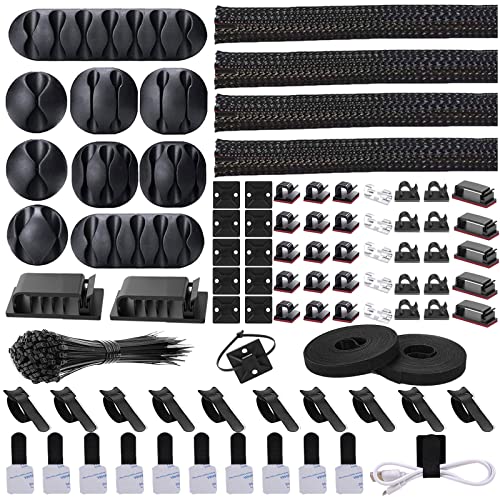

![[313Pcs] Cable Management Kit, 67 Adhesive Cable Clips, Topavatop Desk Cord Organizer, 22 Reusable Cable Strap, 4 Cable Sleeve Split, 200 Nylon Cable Zip Ties with 20 Mounts for TV Office Home, Black](https://m.media-amazon.com/images/I/51BFc07BAvL._SL500_.jpg "[313Pcs] Cable Management Kit, 67 Adhesive Cable Clips, Topavatop Desk Cord Organizer, 22 Reusable Cable Strap, 4 Cable Sleeve Split, 200 Nylon Cable Zip Ties with 20 Mounts for TV Office Home, Black")

Top Picks at a Glance
Here is a quick snapshot of the 8 cable management kits covered in this guide, sorted by the situation each one handles best.
- Best Overall: N NOROCME 192 PCS Cable Management Kit — a well-rounded mix of sleeves, clips, straps, and ties with one of the deepest review histories in this space.
- Best Budget: ZIIYAN 163 PCS Cable Management Kit — a smaller but still complete bundle at one of the lowest prices in this roundup.
- Best Premium: EUREKA ERGONOMIC 316PCS Under Desk Metal Cable Kit — the only pick here that includes a metal cable tray alongside sleeves and clips.
- Best for Multi-Device Desks: 494 PCS Cable Management Kit — the largest piece count in this guide, built for desks running several monitors and chargers at once.
- Best for Proven Reliability: Cord Management Organizer Kit 4 Cable Sleeve Split 192PCS — the highest review volume of any option on this list.
- Best for Home Office Setups: 311Pcs Cable Management Organizer Kit — a mid-size bundle that balances sleeve count with adhesive clips and ties.
- Best for Extra Accessories: [313Pcs] Cable Management Kit, 67 Adhesive Cable Clips, Topavatop Desk Cord Organizer — the widest mix of reusable straps and mounting hardware in this comparison.
- Best for Compact Desks: ELII 300PCS Cable Management Kit — a smaller footprint bundle that still covers sleeves, clips, straps, and ties.
What’s Actually Inside a Cable Management Kit
Every bundle in this roundup follows roughly the same formula, just in different proportions. You get a set of cable sleeves for bunching multiple cords into one thick tube, a stack of adhesive or screw-mount clips for pinning single cords along a desk edge or wall, a mix of nylon zip ties and reusable velcro straps for cinching loose bundles, and small cord organizers or holders for keeping charging cables from sliding off the desktop. A few kits also include a short raceway or metal tray as a bonus piece, though that is the exception rather than the rule. This is the core difference between a kit and a single-purpose product: this kind of bundle is built to handle the entire cord situation under a desk, from the thick power strip cable to the thin charging wires for a phone or earbuds, rather than solving one specific spot.
Piece counts across these bundles range from around 137 pieces up to nearly 500, and the number matters more than it might seem. A 137- to 200-piece kit is usually enough for a simple desk with a monitor, a computer tower, and a lamp. Once you add a docking station, multiple monitors, task lighting, and a few chargers, the math changes quickly, and a 300- to 500-piece kit gives you enough clips and ties to route each cord individually instead of running out halfway through the desk.
Cable Sleeve Material: Neoprene vs Spiral Wrap
The sleeves in one of these kits typically come in one of two materials, and the difference affects how easy the bundle is to live with over time. Neoprene sleeves are soft, stretchy fabric tubes, often closed with a zipper or velcro seam running the full length. They flex around bundles of different thicknesses and are simple to slide off if you need to add or remove a cord later. Spiral wrap sleeves, sometimes labeled “cable sleeve split” in the product listing, are made from a semi-rigid plastic strip that wraps around the cord bundle in a helix pattern. They hold their shape well and look tidy in a straight run, but adding a new cable usually means unwinding a section rather than just unzipping it.
If you expect to reconfigure your desk setup often, zippered neoprene sleeves are generally easier to work with. If your cord bundle is mostly set-and-forget, like a power strip cable and monitor cord that rarely change, the spiral wrap sleeves included in many kits do the job just as well and tend to cost less per unit.
Adhesive Clips vs Screw-In Clips: Which Mounting Style Holds Up
Almost every cable management kit on the market leans on adhesive-backed clips because they install in seconds and don’t require drilling into a desk or wall. The trade-off is that adhesive strength varies by surface. On a smooth painted or laminate desk edge, adhesive clips typically hold for months without issue. On raw wood, textured surfaces, or in rooms with big temperature swings, the same clips can loosen over time and need to be reset with fresh adhesive pads or a small dab of extra glue.
Screw-in clips are far less common in a standard kit, but a handful of the pricier bundles, including the EUREKA ERGONOMIC pick above, pair clips with a mounted tray that uses screws for a permanent hold. Screw-in mounting is more secure long term and is worth considering if you own your desk and don’t mind a couple of small holes. If you’re in a rental or don’t want to commit to permanent mounting points, sticking with the adhesive clips that come standard in most kits is the more practical choice.
Zip Ties vs Velcro Straps: One-Time Use or Reusable
The fastening pieces in one of these kits usually split between nylon zip ties and reusable velcro or hook-and-loop straps, and each one earns its place. Zip ties cinch down tight and hold a bundle firmly in place, which is useful for cords that are staying put permanently, like the run from a power strip to an outlet. The catch is that zip ties are meant to be cut off, not reopened, so every time you add a device or rearrange cords, you’re cutting and replacing that tie. Reusable velcro straps, which most kits include as a smaller bundle alongside the zip ties, can be opened and refastened as many times as needed, making them the better choice for any cord you expect to touch again soon, like a laptop charger or a USB cable you swap between devices.
A well-stocked kit gives you both types so you can decide case by case: zip ties for the permanent backbone of your cord routing, and velcro straps for anything still in flux.
Kit vs Buying Components Separately
It’s fair to ask whether a cable management kit is actually worth it compared to buying a pack of clips here and a roll of sleeve there. In most cases, the bundle wins on convenience and value. Buying sleeves, clips, and ties separately from three different listings usually costs more in total once you add up per-unit pricing, and you’re left guessing how many of each piece you’ll actually need. A kit bundles a tested ratio of components, so you’re not stuck with 200 zip ties and zero clips, or the reverse.
The one scenario where buying components separately makes more sense is when you already own most of what you need and are only missing one type of item, like extra adhesive clips or a longer sleeve. In that case, a standalone pack solves the gap without the extra cost of a full kit you don’t need. But for anyone starting from scratch under a messy desk, a complete kit is almost always the more efficient buy.
Cable Management Kits vs Cable Boxes vs Cable Trays: Picking the Right Tool
These three product types get mixed up constantly because they all live under the same desk, but they solve different problems. A cable management kit, the focus of this guide, is a bundle of multiple tools — sleeves, clips, ties, and organizers — meant to route an entire desk’s worth of cords from several devices. If your real problem is a messy pile of power strips and chargers that you just want hidden in one enclosed spot, a dedicated desk cable box is a better fit than trying to stuff everything into sleeves. If you specifically need a mounted shelf or basket to hold cords up off the floor along the length of your desk, a cable tray handles that single job better than any sleeve-and-clip bundle ever will.
Think of it this way: a kit like this is the toolbox, while a cable box and a cable tray are single-purpose tools. Many home offices end up using more than one — a kit to bundle and route individual cords, paired with a cable tray or cable box to handle the bulkier power strip. If your desk also has a hole for running cords through the desktop, a desk grommet pairs naturally with one of these kits to keep the entry and exit points tidy, and a surge protector mount can hold the power strip itself off the floor once your kit has the individual cords sorted.
Sizing a Kit to Your Desk Setup
Before ordering, count the devices actually plugged in at your desk: monitors, a computer or laptop dock, task lighting, speakers, a charger or two, and any peripherals with their own cables. A single-monitor setup with a handful of cords is usually well served by a smaller cable management kit in the 130- to 200-piece range. A dual-monitor or multi-device workstation, especially one with a docking station and several chargers, benefits from a larger bundle closer to 300 to 500 pieces so you don’t run short on clips halfway through the job.
If you use a standing desk, factor in cable slack. Cords routed too tight through sleeves or clips can get yanked or stretched every time the desk rises, so leave a little extra length in any kit’s sleeves and loop it loosely rather than pulling it taut. Reusable velcro straps are handy here since you can loosen and refasten them after you find the right amount of slack for your desk’s full height range.
How We Evaluated These Cable Management Kits
Every product in this guide was pulled from real, current Amazon listings rather than assumed specifications. We prioritized options with a strong volume of verified customer reviews, ratings of 4.2 stars or higher, and listed contents that were consistent between the title and the detailed bullet points, including exact sleeve counts, clip counts, and tie counts. We also looked for a spread across price points and piece counts, from compact budget kits under $10 to premium bundles that include a metal tray, so this guide reflects the actual range of kits shoppers will find today rather than a narrow slice of one price tier.
Common Mistakes When Buying a Cable Management Kit
- Buying by piece count alone: a 500-piece bundle isn’t automatically better if half the pieces are a size or type you’ll never use for your specific desk.
- Ignoring sleeve material: choosing spiral wrap sleeves when you plan to add or swap cords often makes routine changes more of a hassle than a zippered neoprene option would.
- Skipping the surface check: sticking adhesive clips onto raw wood or textured desk edges without testing adhesion first often leads to clips falling off within weeks.
- Cutting zip ties too tight: especially on a standing desk, cords cinched with no slack can strain or disconnect when the desk height changes.
- Overlooking what a kit can’t do: expecting one of these bundles to fully hide a bulky power strip the way a dedicated cable box does, or to replace a mounted cable tray, usually leads to disappointment.
Buying Checklist
- Count the devices and cords at your desk before choosing a piece-count size for your cable management kit.
- Decide whether neoprene or spiral wrap sleeves fit how often you plan to change your cord layout.
- Check whether your desk surface suits adhesive clips or if you’d rather commit to screw-in mounting.
- Confirm the bundle includes both zip ties and reusable velcro straps for a mix of permanent and flexible routing.
- If you use a standing desk, plan for cable slack when installing any kit.
- Compare the total price against buying sleeves, clips, and ties separately for your specific needs.
- Consider whether you also need a dedicated cable box or cable tray alongside your cable management kit.
FAQ
What comes in a typical cable management kit?
Most kits include cable sleeves for bunching cords, adhesive or screw-in clips for pinning individual cords in place, a mix of nylon zip ties and reusable velcro straps, and small cord organizers or holders. Some premium bundles also add a short raceway or metal tray.
How many pieces do I actually need?
A simple desk with one monitor and a couple of cords is usually covered by a smaller kit in the 130- to 200-piece range. Desks with multiple monitors, a docking station, and several chargers do better with a larger cable management kit closer to 300 to 500 pieces.
Is neoprene or spiral wrap better for a cable sleeve?
Neoprene sleeves with a zipper are easier to open and close when you need to add or remove cords, while spiral wrap sleeves hold their shape well for cord bundles that rarely change. Most cable management kits use one or the other, so match the choice to how often you rearrange your desk.
Will adhesive clips damage my desk or fall off over time?
Adhesive clips generally don’t damage smooth, painted, or laminate surfaces, but they can loosen over months on raw wood or textured desks, especially with big temperature swings. Testing a clip on a small spot first is a reasonable precaution before committing an entire kit to adhesive mounting.
Do I need a cable management kit if I already have a cable tray or cable box?
Often yes, since they solve different problems. A cable tray holds cords up off the floor and a cable box hides a power strip in one enclosed spot, but a kit is what actually bundles, routes, and secures the individual cords running to each device.
Are cable management kits safe to use with a standing desk?
Yes, as long as you leave enough slack in the cords before securing them with the clips, sleeves, and straps included in the kit. Cords pulled too tight can strain or disconnect as the desk moves through its full height range.