Traditional inkjet printers tie mobile professionals to heavy desks and require messy cartridge replacements. The emergence of modern thermal printing technology has transformed how traveling consultants, field technicians, and students handle physical paperwork. In September 2026, choosing from the 5 leading options allows you to produce sharp contracts and study guides wherever your work takes you.
Many mobile workers struggle with bulky equipment and unreliable connections while away from a standard office setup. Setting up a mobile workspace requires versatile gear, much like organizing a productive desk with standing desk cable management accessories for seamless cable routing. We analyzed the current marketplace from top manufacturers like Phomemo to help you identify the right device for your specific workflow.
This comprehensive evaluation breaks down vital technical attributes ranging from resolution and paper handling to wireless connectivity and battery longevity. By understanding these performance metrics, you can avoid common pitfalls like connectivity dropouts and poor print clarity. You will quickly discover which model delivers reliable document output without adding unnecessary bulk to your daily travel bag.


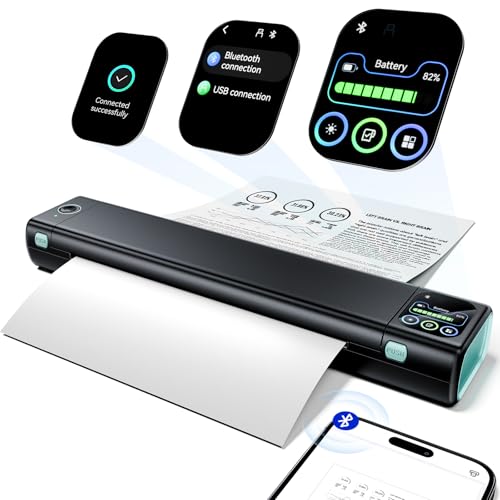
Selecting the right mobile printer requires understanding the core mechanisms behind thermal document generation. Modern inkless units use specialized thermal paper that reacts to precise heat pulses from a solid-state printhead. This engineering removes the need for liquid ink, toner cartridges, or replacement ribbons, creating a self-contained system ideal for mobile travel.
Printhead Resolution and Document Clarity
Print resolution is measured in dots per inch (DPI) and directly determines the crispness of text, barcodes, and graphical lines. Standard thermal printers often operate at 203 DPI, which works adequately for shipping labels but struggles with dense spreadsheets and fine legal print. Upgrading to a 300 DPI high-definition thermal printhead ensures that miniature fonts and detailed diagrams remain sharp and professional.
When comparing printheads, examine the density of the heating elements along the ceramic substrate. A 300 DPI printhead packs approximately 12 heating dots per millimeter, allowing for smooth curve rendering on complex company logos. Lower density heads tend to introduce visible stairstepping along diagonal strokes, which degrades the presentation of official contracts.
As a practical rule of thumb, always insist on a 300 DPI specification if your primary output consists of client agreements, invoices, or academic research papers. The slight increase in processing time is negligible compared to the massive improvement in readability. Clear print output prevents misinterpretations during client reviews and ensures that scanned copies of your printed pages retain high legibility.
Paper Size Versatility and Media Compatibility
Document requirements vary significantly depending on whether you are issuing field service receipts, travel itineraries, or formal multi-page reports. Top-tier mobile printers feature adjustable internal paper guides that accommodate standard 8.5 by 11 inch US Letter, A4, and smaller roll widths like 4.33 inches, 3.14 inches, and 2.08 inches. This flexibility transforms a single compact hardware unit into an all-around document and label station.
You must also consider the media format, specifically choosing between continuous roll paper, fan-fold sheets, and pre-cut single sheets. Thermal roll paper allows you to print continuous banners or variable-length notes without page breaks, while fan-fold paper lays completely flat without curl. Single-sheet thermal media mimics traditional office paper handling and works perfectly for individual document handoffs.
To calculate your media requirements, audit the types of documents you generate weekly. If your work involves legal filings or corporate proposals, choose a printer engineered for standard US Letter fan-fold paper to eliminate curled edges. For mobile inventory logging or quick field notations, smaller thermal roll formats deliver maximum convenience at minimal bulk.
Wireless Connectivity and Operating System Support
Seamless communication between your computing device and mobile printer is critical for stress-free operation in unpredictable environments. Modern thermal printers offer dual-mode connectivity through optimized Bluetooth for mobile devices and high-speed USB-C cables for traditional computers. Advanced units also incorporate standalone Wi-Fi networks supporting AirPrint and Mopria protocols for driverless printing.
Operating system compatibility requires careful verification before purchasing. Mobile printing over Bluetooth typically functions via dedicated iOS and Android apps, while laptop printing across macOS, Windows, ChromeOS, and Linux may require a direct USB-C connection or driver installation. AirPrint-enabled models provide a major workflow advantage by allowing direct printing from Apple devices without installing third-party software.
A reliable best practice is to test your printing workflow across both mobile and desktop setups before traveling. If you frequently print from an iPad or iPhone in coffee shops or airport lounges, selecting an AirPrint-compatible Wi-Fi model eliminates app dependency entirely. For mixed laptop fleets, verify that the manufacturer provides signed drivers for your specific Windows or macOS version.
Battery Capacity and Page Yield per Charge
Mobile productivity depends heavily on internal battery reserves, especially when working on remote jobsites or during long transit days. Portable inkless printers incorporate rechargeable lithium-ion cells typically ranging from 2600mAh to 3500mAh in capacity. This onboard energy powers both the internal processing unit and the high-draw thermal heating elements that create each printed character.
Battery performance is most accurately evaluated by continuous page yield rather than standby hours. A standard 2600mAh battery generally delivers between 150 and 200 continuous pages per full charge, whereas a larger 3500mAh cell easily exceeds 250 pages. Units equipped with USB-C power delivery ports allow you to recharge using standard laptop chargers or power banks, reducing the need for proprietary power bricks.
When planning your travel gear, balance battery capacity against recharging convenience. Traveling professionals working at hotel desks can plug into convenient desk grommet power outlets for continuous operation while reserving battery power for transit. Always aim for a printer that provides at least 200 pages per charge to ensure you never run out of power during critical off-site meetings.
Form Factor, Weight, and Travel Portability
The physical footprint of a portable printer dictates whether it becomes a permanent fixture in your daily bag or gets left behind at home. Most premium thermal printers adopt an elongated cylindrical or rectangular shape resembling a folded travel umbrella. Total device weight generally falls between 1.3 pounds and 2.2 pounds, keeping overall travel packs light and maneuverable.
Chassis dimensions directly impact how easily the unit slides into briefcases, laptop backpacks, or vehicle glove compartments. Slim designs measuring under 2.5 inches in depth leave ample space for other mobile office essentials. Pairing a compact printer with versatile portable laptop mount setups allows you to create an ergonomic mobile workstation in any hotel room or temporary conference area.
Before making a purchase, measure the dedicated accessory pockets in your daily commuter bag. If you travel frequently by air, prioritize printers weighing under 1.6 pounds to keep your carry-on luggage within airline weight limits. Investing in a protective travel case also prevents scratch damage to the internal printhead and motorized paper feed rollers.
Interactive Touchscreen Controls and Standalone Operation
The user interface on portable printers has evolved from simple flashing LED indicators to sophisticated interactive touchscreens. Smart digital displays provide immediate visual feedback on battery levels, Bluetooth connection status, paper alignment, and error codes. This visual guidance eliminates the frustrating guesswork often associated with headless travel gadgets.
Advanced full-touchscreen units take usability a step further by supporting standalone template previews and direct printing without opening a smartphone app. Users can store frequently used business forms, checklists, or inspection sheets directly in onboard memory. The screen also provides step-by-step troubleshooting tutorials if paper feeds incorrectly or needs repositioning.
If you regularly loan your printer to colleagues or need to print standardized forms quickly, choose a model featuring an onboard smart display. Standalone operation allows field workers to produce necessary documents in seconds without pairing their mobile phones. Clear display prompts also assist non-technical users in navigating paper adjustments quickly.
Printing Speed and Mechanical Throughput
Printing speed determines how rapidly you can produce multi-page document packets during client presentations or urgent meetings. Thermal printing speed is rated either in millimeters per second (mm/s) or seconds per page. Standard portable models produce a full US Letter page in approximately 12 to 15 seconds, while high-speed upgraded motors achieve full page output in just 7 seconds.
Mechanical throughput is governed by the thermal response time of the heating elements combined with precision motor drive algorithms. Faster printheads must heat and cool rapidly to prevent image ghosting and smudging as paper glides past the roller. Advanced speed modes reaching 100mm/s can generate up to 20 pages per minute, rivaling the pace of standard desktop inkjet units.
Consider your average print volume when evaluating speed specifications. For casual users printing one-page receipts or boarding passes, standard 12-second speeds are perfectly adequate. If your daily workflow demands 20-page legal briefs or contractor estimates on demand, investing in a high-speed thermal unit will save substantial time throughout your workday.
Acoustic Noise Levels and Vibration Dampening
Operating a noisy printer during a quiet client consultation, library study session, or shared workspace can create unnecessary disruption. Traditional mechanical printers generate loud gear chatter, paper feeder clicks, and printhead movement noise. Modern inkless thermal printers utilize refined stepper motors and solid-state heat transfer to reduce mechanical sound drastically.
High-quality portable models feature internal vibration-dampening structures and optimized motor algorithms that keep operational sound below 25 to 30 decibels. At this acoustic level, the printing process is barely audible above ambient room hum. The absence of vibrating ink carriage assemblies ensures smooth, silent paper feeding across all supported media sizes.
When selecting a printer for professional client-facing environments, review acoustic noise ratings carefully. A printer operating below 30 decibels allows you to print contracts discreetly during ongoing negotiations without interrupting the conversation. Quiet operation also makes late-night document printing in shared hotel rooms completely unobtrusive.
Data Privacy and Network Security Protocols
Handling sensitive client contracts, financial statements, and medical forms requires strict attention to document privacy and network security. Some wireless printers mandate persistent cloud accounts or upload document data to remote servers for processing. In contrast, secure portable thermal printers execute all rendering locally on the device hardware without external data collection.
Look for devices that establish direct peer-to-peer Wi-Fi or local Bluetooth channels without requiring personal registration or continuous internet connectivity. AirPrint and Mopria protocols operate over encrypted local network channels, ensuring that your confidential PDFs remain strictly between your device and the printer hardware. Local driver processing on computers also eliminates cloud interception risks.
For legal, healthcare, or corporate consultants, data isolation is a critical buying consideration. Choosing a thermal printer that operates completely offline safeguards proprietary client data against potential breaches. Confirm that the companion mobile software functions smoothly in offline airplane mode before deploying the printer for sensitive fieldwork.
| Feature Specification | Standard Travel Model | Advanced Smart Model | High-Speed AirPrint Model |
|---|---|---|---|
| Print Resolution | 300 DPI Thermal | 300 DPI Thermal | 300 DPI Thermal |
| Average Page Speed | 12 to 15 Seconds | 10 to 12 Seconds | 7 Seconds (100mm/s) |
| Battery Capacity | 2600mAh (150-200 pgs) | 3500mAh (200+ pgs) | 3500mAh (250+ pgs) |
| Supported Paper Widths | US Letter / A4 | 5 Widths (US Letter to 2.08″) | 4 Widths (US Letter to A5) |
| Wireless Connection | Bluetooth 5.0 / USB-C | Bluetooth / USB-C / Screen | 5GHz Wi-Fi / AirPrint / USB-C |
| Interface Type | Smart Digital Display | Large Full Touchscreen | Direct Button / Wi-Fi Signal |
Why You Should Trust Us
Our editorial team conducts rigorous technical research across digital printing technology, wireless communications, and mobile office equipment. We evaluate verified specifications, manufacturer engineering updates, and broad real-world performance patterns to build comprehensive, data-driven comparisons. This analytical approach ensures that our recommendations reflect genuine hardware reliability and functional value.
We focus entirely on practical utility, analyzing how each device operates under real remote work conditions. By standardizing our evaluation criteria across battery endurance, thermal printheads, and multi-format support, we eliminate marketing hype to deliver balanced insights. Our goal is to equip mobile professionals with the exact technical facts needed to make confident purchasing decisions.
Our guides undergo regular updates to reflect software revisions, firmware adjustments, and emerging hardware innovations. We remain dedicated to providing transparent advice that helps mobile professionals optimize their portable technology setups. We do not accept manufacturer incentives, ensuring our product evaluations remain objective and focused solely on user benefit.
Final Thoughts
Selecting the right mobile printer comes down to balancing paper flexibility, battery longevity, and ease of connection. For users seeking the most balanced performance and standalone convenience, the Phomemo M832D Touchscreen Portable Printer Inkless serves as our best overall pick due to its intuitive smart display, reliable 300 DPI output, and wide media support. Its lightweight 1.5-pound body fits effortlessly into any travel pack while delivering crisp document rendering on demand.
If you prioritize maximum affordability without sacrificing core functionality, the Phomemo M08D Portable Printer with Touchscreen is our top value recommendation. It provides solid US Letter document production and dependable battery performance in an ultra-compact package that fits easily into any travel pack alongside your other essential productivity guides. The smart digital display ensures you always know your exact battery level before printing critical travel itineraries.
For high-volume business travelers requiring rapid standalone workflow and true native networking, the Phomemo M810 Full-Touchscreen AirPrint stands out as the ultimate specialized pick. Its large interactive screen, robust AirPrint integration, and massive battery capacity allow direct document processing without tethering to a smartphone. Travelers who need ultra-fast 7-second output will also appreciate the Phomemo G100 Pro AirPrint Portable Printers for rapid multi-page printing on the go.
Upgrading your portable printing setup eliminates the stress of searching for print centers while on business trips. Match your typical document sizes and connection preferences to the detailed criteria above to ensure a seamless printing experience wherever your career takes you. A reliable thermal printer provides true independence from static office desks and keeps your daily business moving smoothly.
Best Inkless Portable Printers FAQs
How do inkless portable printers create text without ink cartridges?
Inkless portable printers utilize direct thermal printing technology. The internal printhead features microscopic heating elements that selectively apply heat to specialized thermal paper. The heat activates a chemical coating on the paper surface, instantly turning it dark to produce sharp text and graphics without any liquid ink, toner, or ribbon.
What is the top-rated option among Best Inkless Portable Printers in 2026?
The top-rated model in 2026 combines high-resolution 300 DPI printing, broad multi-size paper support, and long battery life. Options like the Phomemo M832D lead the category by offering an intuitive smart touchscreen, compact 1.5-pound travel weight, and seamless wireless connectivity for both mobile phones and laptops.
Can I print regular copy paper using an inkless thermal printer?
No, direct thermal printers cannot print on standard copy paper because regular paper lacks the heat-sensitive chemical coating required for image transfer. You must use thermal paper rolls, fan-fold thermal sheets, or pre-cut thermal paper. High-quality thermal paper is widely available and provides excellent contrast for professional documents.
How long do thermal prints last before they start to fade?
Modern high-grade thermal paper prints typically last between 5 and 10 years when stored properly in normal indoor conditions. To maximize longevity, keep printed documents away from direct sunlight, extreme heat, and oil exposure. Storing thermal documents in standard filing folders inside comfortable spaces with ergonomic office gear ensures lasting legibility.
Can I connect an inkless portable printer to my laptop via Bluetooth?
Most portable thermal printers reserve Bluetooth connectivity exclusively for mobile devices like iPhones, iPads, and Android smartphones. To print from a Windows, macOS, ChromeOS, or Linux laptop, you generally connect via the included USB-C cable and install the manufacturer’s desktop driver. However, Wi-Fi AirPrint models can connect wirelessly to Mac laptops.
What is the difference between thermal roll paper and fan-fold paper?
Thermal roll paper is continuous media rolled tightly around a core, which allows for custom print lengths but often retains a slight curl after printing. Fan-fold paper consists of pre-perforated sheets folded accordion-style in a stack. Fan-fold paper feeds straight through the printer and lays completely flat, making it ideal for formal agreements.
Are Best Inkless Portable Printers suitable for printing shipping labels?
Yes, many portable thermal printers excel at printing shipping labels, barcodes, and package slips. Models that support 4.33-inch and 3.14-inch paper widths can easily print standard mailing labels and receipts. The 300 DPI resolution ensures that barcode lines remain crisp and easily scannable by major courier scanning equipment.
How many pages can a portable thermal printer produce on a single charge?
Page yields depend on the battery capacity and the print density of your documents. Printers with a 2600mAh battery typically print between 150 and 200 standard pages per charge. Higher-capacity models with 3500mAh batteries can easily produce over 250 pages, which is more than sufficient for several days of off-site business meetings.
Do inkless portable printers support color printing?
Direct thermal inkless portable printers are designed exclusively for monochrome black-and-white printing. Because the technology relies on heat activating black dye capsules in the thermal paper, it cannot produce multi-color output. For text documents, contracts, schematics, and invoices, monochrome printing provides high contrast and exceptional reliability.
How fast do modern portable thermal printers print a full US Letter page?
Standard portable thermal printers take approximately 10 to 15 seconds to print a full 8.5 by 11 inch US Letter page. Upgraded high-speed models equipped with rapid thermal printheads can complete a page in as little as 7 seconds. This allows mobile professionals to print multi-page document packets quickly between client appointments.