Quick Answer: If your fingers keep clipping neighboring keys and your palm hangs off the edge of every wrist rest you’ve tried, the Logitech Ergo K860 Wireless Ergonomic Split Keyboard with Wrist Rest is the strongest all-around pick among ergonomic keyboards for large hands — it keeps a full-size key layout with standard spacing rather than shrinking it, and its pillowed wrist rest is deep enough to actually support a bigger palm instead of just the fingertips. If you want more separation than a fixed split allows, the adjustable-width Kinesis Freestyle2 or the fully tented Kinesis Advantage360 give you room to widen the gap further as your hands need it. The picks below cover a spread of price points, layouts, and switch types, all chosen specifically for spacing and support rather than for compactness.




Top Picks at a Glance
- Best Overall: Logitech Ergo K860 Wireless Ergonomic Split Keyboard with Wrist Rest — full-size key spacing with a curved split layout and a deep pillowed wrist rest.
- Best Premium: KINESIS Advantage360 Professional Split Ergonomic Keyboard — fully contoured, adjustably tented split board with the most physical room to spread out.
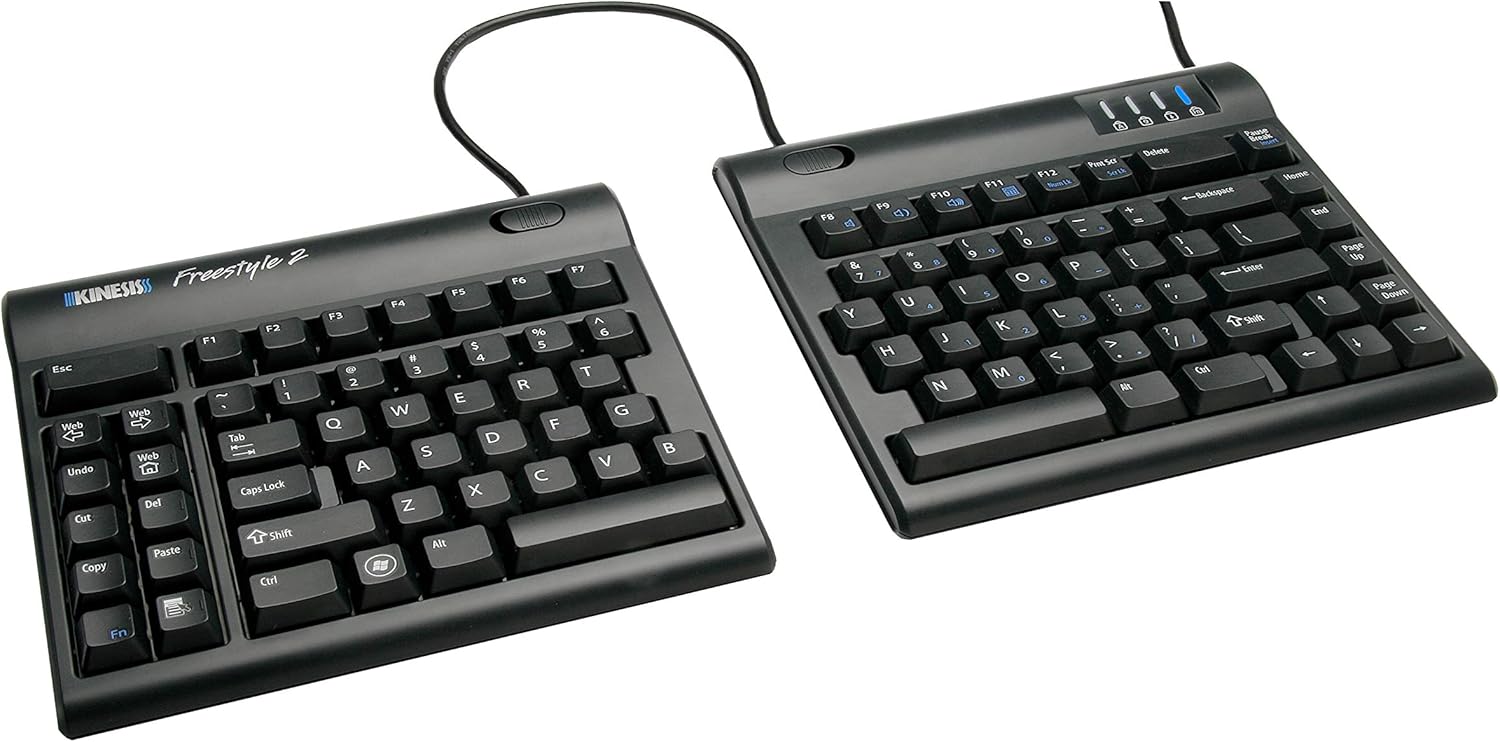
- Best for Widest Adjustable Spacing: KINESIS Freestyle2 Ergonomic Keyboard for PC — separates from 9 up to 20 inches, so you set the gap to match your shoulder and hand width.
- Best Budget: Logitech Wave Keys Ergonomic Wireless Keyboard with Palm Rest — full-size wave-shaped layout with a cushioned palm rest at a lower price point.
- Best for Larger Keycap Targets: ProtoArc EK01 Plus Backlit Bluetooth Ergonomic Keyboard, Full Size — full-size split design with a cushioned wrist rest and backlit keys.
- Best Wired: Perixx PERIBOARD-512B Wired Ergonomic Keyboard — no wireless lag or battery to manage, with a wide built-in wrist rest.
- Best for Deep Palm Rest: Arteck Split Ergonomic Keyboard with Palm Rest, USB Wired Backlit Keyboard — a broad, cushioned palm rest paired with backlit keys for low-light typing.
- Best Mechanical: KINESIS Freestyle Edge RGB Plus Split Mechanical Keyboard — hot-swappable mechanical switches with a detachable palm support and included lift kit.
What “Large Hands” Actually Means for Keyboard Fit
Amazon doesn’t let you filter keyboards by hand size, so it helps to know what you’re actually looking for before you start comparing listings. In practice, “large hands” usually means a longer palm-to-fingertip measurement, wider knuckle spread, or simply fingers thick enough that hitting one key cleanly without brushing the one next to it takes real effort on a standard board. A rough self-test: rest your hands on a standard keyboard in a natural typing position. If your fingertips are already crowding two keys at once before you’ve moved, or your palm extends well past the wrist rest that came with your current setup, you’re a strong candidate for ergonomic keyboards for large hands rather than a standard or compact layout.
This isn’t the same question as “does my wrist hurt.” Wrist pain can come from posture, desk height, or repetitive strain regardless of hand size, and a keyboard alone won’t resolve an existing injury — we keep language hedged around comfort and strain reduction rather than treatment claims for that reason. What ergonomic keyboards for large hands specifically solve is the physical mismatch between your hand and a board that was designed around an average-size hand, which shows up as mis-hits, cramped finger position, and an unsupported palm.
Key Spacing and Keycap Size: The Real Differentiator
Most standard keyboards use roughly 19mm center-to-center key spacing, sometimes called key pitch, and that number barely varies across brands. What does vary is how much a keyboard’s layout and curvature work with or against that spacing for a bigger hand. A tightly curved or heavily compacted ergonomic board can actually feel smaller in practice than a flat standard one, even with identical key pitch, because the stagger and curve pull your fingers closer together. That’s the trap a lot of large-handed shoppers fall into: they buy an “ergonomic” keyboard expecting more room and end up with something tighter than what they replaced.
The picks in this guide were chosen specifically because they preserve full-size spacing or, in the case of the adjustable-separation models, let you actively widen the gap between key clusters. The Logitech Ergo K860 and Logitech Wave Keys both keep a full standard layout rather than shrinking it, so your fingers land on individual keys the same way they would on a familiar full-size board, just with a gentler curve underneath. The Kinesis Freestyle2 goes further by letting you physically separate the two halves anywhere from 9 to 20 inches, which is the most direct way to add space for hands and shoulders that need more of it. None of the picks here rely on cramming more keys into a smaller footprint, which is the opposite of what shoppers comparing ergonomic keyboards for large hands are actually looking for.
Palm Rest and Wrist Support Depth for Bigger Hands
A narrow wrist rest is one of the most common complaints from people shopping for ergonomic keyboards for large hands, because a rest sized for an average palm leaves the heel of a larger hand hanging off the front edge, unsupported and pressing against the desk. Depth matters here as much as width — a rest that’s deep enough front-to-back gives the whole palm somewhere to sit, not just the first inch or two closest to the keys.
The Logitech Ergo K860’s pillowed wrist rest and the Arteck Split keyboard’s broad palm rest were both picked with this in mind; each is noticeably deeper than the thin foam strips bundled with many standard keyboards. The Kinesis Advantage360 and Kinesis Freestyle Edge RGB Plus take a different approach with detachable, adjustable palm supports rather than a fixed pad, which lets you position support exactly where your larger palm actually rests rather than accepting a one-size pad. If you already own a keyboard you like but the built-in rest feels too shallow, a separate keyboard drawer with a wider mounted tray can sometimes give you more room to add a standalone wrist rest alongside it, though for most large-handed typists, starting with a keyboard that already has a properly sized rest is the simpler fix.
Full-Size, Split, and Tented Layouts: Which Gives the Most Room
Three layout families show up repeatedly among ergonomic keyboards for large hands, and each handles hand size differently. Full-size flat ergonomic keyboards, like the Logitech Ergo K860 and Logitech Wave Keys, keep every key in a familiar position with a gentle curve or wave shape built in — there’s no learning curve, and the spacing stays standard throughout. Fixed-split keyboards, like the Perixx PERIBOARD-512B and Arteck models, break the board into two angled halves at a set gap, which opens up shoulder width without requiring you to relearn where anything is.
Adjustable-separation and tented boards go a step further. The Kinesis Freestyle2 lets you slide the two halves apart to whatever gap actually matches your hand and shoulder width, and the Kinesis Advantage360 adds true tenting — angling each half upward toward the center — on top of a contoured, bowl-shaped key well that gives fingers more vertical room to move without over-extending. For large hands specifically, more separation and tenting generally means less cross-body reaching and less crowding at the center of the board, where standard keyboards tend to be tightest. The trade-off is desk footprint and, with the fully split boards, a short adjustment period while your hands relearn the wider stance.
How This List Differs From Programmer and Small-Hand Ergonomic Keyboards
Search results for “ergonomic keyboard” tend to blend several very different shopping needs together, so it’s worth being explicit about where this guide to ergonomic keyboards for large hands fits. This article is built entirely around physical sizing: wider key spacing, larger keycap targets, deeper palm and wrist support, and full-size or tented split layouts that give a bigger hand room to move instead of cramping it the way a compact board can.
If your priority is coding-specific features rather than raw hand size — split layouts chosen for symbol access, programmable macro keys, or mechanical switches tuned for long coding sessions instead of ergonomic keyboards for large hands specifically — our companion guide to ergonomic keyboards for programmers covers that ground instead. And if you’re the opposite of this guide’s audience — someone with smaller hands who finds full-size and widely separated boards involve too much reach — our guide to ergonomic keyboards for small hands focuses on compact layouts, shorter key travel, and reduced reach distances instead. The selection criteria in that guide are close to the direct opposite of what matters here.
Mechanical vs. Membrane Switches for Bigger Fingers
Switch type is a secondary factor when shopping for ergonomic keyboards for large hands, next to spacing and rest depth, but it still affects how forgiving a keyboard feels under a heavier or larger finger. Mechanical switches, like the hot-swappable ones on the Kinesis Freestyle Edge RGB Plus, generally sit taller and register with a more defined actuation point, which some larger-handed typists find easier to hit accurately without bottoming out every keystroke. Membrane and scissor-switch boards, like the Logitech and ProtoArc picks, sit lower profile and feel softer underfoot, which some people prefer for quieter, lighter typing.
Neither switch type on its own solves a sizing problem — a mechanical board with cramped key spacing is still cramped, and a membrane board with generous spacing still has plenty of room. Think of switch type as a comfort preference you layer on top of the spacing and rest-depth decisions covered above, not a substitute for them, when narrowing down ergonomic keyboards for large hands.
How We Evaluated These Picks
Every keyboard in this guide was pulled directly from current Amazon search results for ergonomic keyboards for large hands and split keyboards, cross-checked for accurate product names, and filtered specifically for full-size key spacing, deep palm or wrist rests, or adjustable/tented separation rather than compact layouts. We prioritized listings with verified customer ratings and review counts, and deliberately spread the selection across price point, layout type, and switch type so the picks reflect genuine trade-offs instead of near-identical options. We did not physically test these keyboards ourselves; dimensions, separation ranges, and switch details reflect manufacturer listings and aggregated customer feedback available on Amazon at the time of research.
Common Mistakes to Avoid
The most common mistake when shopping for ergonomic keyboards for large hands is assuming any keyboard labeled “ergonomic” automatically means more room. Plenty of ergonomic boards are actually more compact than a standard keyboard, which works against a larger hand rather than for it — always check whether the listing mentions full-size spacing or a compact/60% layout before assuming it fits.
Another frequent error is ignoring wrist rest depth entirely and judging a keyboard only by its curve or split angle. A great split layout with a shallow, narrow rest still leaves a larger palm unsupported. Buyers also sometimes jump straight to a fully tented, widely separated board without considering the adjustment period — going from a standard keyboard to 20 inches of separation overnight can feel disorienting for the first week, even if it’s the right long-term fit. Finally, don’t overlook desk space; the wider and more tented options in this category take up noticeably more real estate than a standard board, so measure your desk before committing to the largest layout available.
Buying Checklist
Run through this list before ordering any of the ergonomic keyboards for large hands covered above, or before comparing them against a board you find on your own:
- Confirm the listing specifies full-size or adjustable key spacing rather than a compact/60% layout.
- Check wrist or palm rest depth, not just width, against how far your palm actually extends.
- Decide whether you need a fixed split, an adjustable-separation board, or full tenting based on how cramped your current setup feels.
- Consider switch type — mechanical for a firmer, more defined actuation, membrane or scissor for a softer, quieter feel.
- Measure your desk space before choosing a widely separated or tented layout.
- Factor in a short adjustment period if you’re moving from a standard board to a wider or tented one.
- Match connectivity (wired vs. Bluetooth/wireless) to how you actually use your workstation.
- Compare price against how often you type daily — a premium tented board pays off faster for heavy daily use.
What actually makes a keyboard suited to large hands?
Full-size or wider key spacing rather than a compact layout, a deep palm or wrist rest that supports the whole palm instead of just the fingertips, and either a full-size flat design or a split/tented layout that gives fingers more room to move without crowding.
Do ergonomic keyboards for large hands cost more than standard keyboards?
It varies widely. Full-size wave or curved boards like the Logitech Wave Keys sit close to standard keyboard pricing, while adjustable-separation and fully tented mechanical boards, like the Kinesis Advantage360, carry a significant premium for the extra hardware and customization involved.
Is a split keyboard necessary, or does a full-size flat layout work for large hands?
A split isn’t required. Among ergonomic keyboards for large hands, a full-size flat or gently curved keyboard with standard key spacing and a deep wrist rest can work well for many larger-handed typists. A split or tented layout becomes more useful if you also want to widen the gap between your hands beyond what a flat board allows.
How is this different from a keyboard chosen for wrist pain in general?
Wrist pain can stem from posture, desk height, or repetitive strain regardless of hand size, and no keyboard replaces proper ergonomic setup or medical guidance for an existing issue. This guide focuses specifically on physical fit — spacing, keycap room, and palm support sized for a larger hand — which may help reduce strain from cramped typing but isn’t a treatment for an existing condition.
Will an adjustable-separation keyboard feel strange at first?
Likely yes, especially if you’re used to a standard or fixed-split layout. Most people adjust within a week or two of consistent use. Starting at a moderate separation and widening gradually tends to be more comfortable than jumping straight to the maximum gap.
What if my hands are large but my desk is small?
Not every desk has room for the widest ergonomic keyboards for large hands. A full-size flat keyboard or a fixed-split model with a modest angle takes up less space than a fully separated or tented board, so it’s usually the better fit for a small desk. If desk space is tight, also consider whether a keyboard drawer could free up room on the desktop itself.
Choosing among ergonomic keyboards for large hands ultimately comes down to matching spacing, rest depth, and layout to how your hands actually sit while typing, not just picking whatever is labeled “ergonomic.” If you’re building out a broader ergonomic workstation around your new keyboard, our guide to desks for programmers covers desk sizing and layout considerations that pair well with a wider or tented keyboard setup. And if you’re shopping for someone else on your team with different sizing needs, our guides to ergonomic keyboards for programmers and ergonomic keyboards for small hands round out the rest of this 2026 ergonomic keyboard lineup.