

Choosing the Best 5K Monitors with Tilt and Swivel Stands can dramatically transform your daily creative workflow and physical comfort. Modern high-resolution screens provide pristine visual clarity that makes text razor sharp and fine design details effortless to inspect. Investing in a display with a fully articulating base ensures your screen adapts directly to your posture rather than forcing your neck to compromise.
Many professionals upgrade their workstations in September 2026 without realizing how much ergonomic flexibility impacts sustained productivity throughout long work sessions. Fixed stands often require aftermarket risers or third-party arms that clutter your desk and create unnecessary cable management challenges. Our guide compares 5 standout models to help you navigate critical specifications like color gamut coverage, high refresh rates, and versatile port selections.
Finding the optimal match requires balancing visual performance against physical adjustability and seamless host connectivity. Whether you manage demanding video editing timelines or multitask across multiple connected computers, the right panel delivers both aesthetic excellence and functional durability. For additional workspace setup ideas, you can explore our recommendations on ultrawide Arm, glare Filter, or laptop mount to optimize your viewing comfort.



Native Resolution and Pixel Density
Display resolution defines the exact pixel matrix of your panel and determines visual sharpness across every application. Standard 5K displays feature a native resolution of 5120 by 2880 pixels across a 27-inch diagonal, producing an exceptional density of 218 pixels per inch. Ultra-wide variations often utilize a 5K2K format measuring 5120 by 2160 pixels, offering expanded horizontal real estate with slightly lower vertical density.
Higher pixel density allows operating systems like macOS and Windows to render UI scaling with absolute fidelity and zero visible pixelation. When working with fine typography or intricate photo retouching, high pixel density eliminates jagged rendering artifacts completely. Lower resolution panels force software downsampling that can soften subtle details and cause visual fatigue during long editing sessions.
As a rule of thumb, target at least 200 pixels per inch if your work involves daily desktop publishing, code editing, or vector illustration. Choosing an ultrawide 5K2K option is ideal if you prefer timeline editing without adding a secondary monitor to your workspace. Make sure your graphics card or laptop chipset supports full 5K bandwidth over your preferred cable interface before purchasing.
Stand Ergonomics: Range of Tilt, Swivel, and Height Articulation
Ergonomic adjustability is the cornerstone of comfortable long-term computer usage and postural health. A high-quality monitor stand should provide broad tilt ranges, effortless horizontal swivel, and substantial vertical height travel. Having these mechanical adjustments built directly into the factory base eliminates the immediate need to purchase separate mounting arms.
Tilt adjustments allow you to eliminate overhead glare while aligning the screen perpendicular to your natural line of sight. Smooth horizontal swivel lets you share on-screen drafts with colleagues or reposition the display when shifting positions at a standing desk. Full pivot functionality is also valuable for programmers and editors who routinely rotate their screen into vertical portrait mode.
Look for stands with at least 110 millimeters of smooth height travel and a minimum tilt range between negative five and twenty degrees. To maintain a tidy setup around adjustable monitor bases, pairing your workstation with best standing desk cable trays helps route power and display cables safely during screen repositioning. Sturdy bases with smooth tension springs prevent unwanted monitor wobble whenever you type vigorously.
Connectivity Standards and Power Delivery
High-bandwidth display protocols are essential for transmitting raw 5K signals alongside fast data and high-wattage device charging. Modern 5K monitors incorporate Thunderbolt 4, Thunderbolt 5, USB-C with DisplayPort Alternate Mode, HDMI 2.1, or DisplayPort 2.1 connections. Understanding the specific bandwidth limits of your host laptop ensures you achieve full native resolution at maximum refresh rates.
Single-cable USB-C and Thunderbolt solutions streamline desktop setups by carrying video signals while simultaneously delivering up to 96 or 140 watts of power. This capability eliminates bulky external laptop power bricks and keeps your physical workspace clean and uncluttered. Daisy-chain support on Thunderbolt-equipped models also allows you to link a secondary high-resolution display without running additional cables back to your computer.
When evaluating connectivity, ensure the upstream power delivery matches or exceeds the continuous power requirements of your primary laptop. If you use multiple external peripherals like high-speed SSDs or webcams, integrated downstream USB hubs provide immediate access without needing separate dongles. Integrating best desk grommet outlets into your desk surface further enhances connectivity by supplying convenient auxiliary power right at your fingertips.
Color Space Coverage and Factory Calibration Standards
Color accuracy determines whether the colors you view on screen match real-world print outputs and digital delivery standards. Professional-grade monitors target wide color gamuts including 99 percent DCI-P3, 100 percent sRGB, and broad Adobe RGB coverage. Displays with Calman Verification or factory calibration reports guarantee consistent color reproduction straight out of the packaging.
A low Delta E value indicates that color deviation is imperceptible to the human eye under standard viewing conditions. Content creators working in commercial video production or color grading should look for Delta E measurements below two. Consistent panel uniformity across the entire viewing area prevents unwanted color shifts and brightness variations from edge to edge.
Verify whether the monitor includes hardware-level color calibration support and user-customizable color profiles. Hardware LUT storage lets the display maintain precise color profiles independently of operating system software updates. If you work primarily on Mac hardware, displays engineered with dedicated P3 Mac color matching ensure seamless visual parity with your laptop screen.
Refresh Rates and Adaptive Synchronization
Refresh rates determine how smoothly motion renders on your screen during high-speed desktop navigation and demanding gaming sessions. Traditional productivity displays operate at 60Hz, whereas cutting-edge 5K monitors now reach fluid speeds between 120Hz and 180Hz. Higher refresh rates reduce visual stutter and make cursor tracking feel instantaneous during intensive design work.
Adaptive sync technologies like NVIDIA G-Sync Compatibility and AMD FreeSync Premium dynamically synchronize the monitor refresh rate with your graphics processor output. This continuous synchronization eliminates distracting screen tearing, judder, and input latency across dynamic workloads. Dual-mode panels even allow users to toggle between full 5K resolution for visual precision and high refresh rates at 1440p for competitive gameplay.
If your daily routine blends creative tasks with interactive entertainment, prioritize monitors featuring at least 120Hz refresh rates and low pixel response times. Check that your display cable supports the required Display Stream Compression standards to handle high refresh rates at 5K resolution. For purely static office and administrative duties, a standard 60Hz refresh rate remains fully functional and cost-effective.
Integrated KVM Switches and Multitasking Features
Integrated Keyboard, Video, and Mouse switches allow users to control two independent computer systems using a single set of desktop peripherals. By connecting your keyboard and mouse directly to the monitor, switching input channels instantly redirects control to the active machine. This feature is particularly valuable for professionals who alternate between a corporate laptop and a personal creative workstation.
Picture-in-Picture and Picture-by-Picture modes enable simultaneous display of two distinct video sources across the same panel. This split-screen flexibility lets you monitor rendering progress or surveillance feeds on one half of the display while working actively on the other. Dedicated management software simplifies window tiling and custom grid arrangements with simple keyboard shortcuts.
When comparing KVM capabilities, look for auto-switching functionality that detects active input signals without requiring manual menu navigation. Ensure the monitor provides adequate downstream USB ports to support your mouse, keyboard, audio interface, and external storage drives simultaneously. Streamlined KVM functionality reduces desk clutter and eliminates the need for external hardware switch boxes.
Panel Finish and Glare Management
Surface coating significantly influences perceived contrast, black levels, and ambient reflection resistance in varied office lighting conditions. Traditional matte anti-glare coatings diffuse harsh reflections effectively but can introduce subtle graininess that softens ultra-fine text. Glossy and specialized nano-gloss finishes preserve deep black levels and vibrant micro-contrast while maintaining crisp optical clarity.
Ambient light sensors integrated into premium monitors automatically adjust screen brightness and color temperature to match room lighting changes. This continuous background adjustment prevents excessive eye fatigue in dimly lit evening offices while maintaining visibility in bright daylight. Choosing the right panel finish depends directly on how much direct light strikes your desk throughout the working day.
Select a matte coating if your desk sits directly opposite large sunlit windows or beneath unshielded fluorescent overhead fixtures. Opt for nano-gloss or low-haze treatments if you work in controlled ambient lighting where color depth and raw visual pop are paramount. Position your workstation perpendicular to window openings whenever possible to minimize direct specular reflections.
Operating System Compatibility and macOS Scaling
Operating systems handle display scaling differently, which directly impacts text legibility and user interface proportions on high-density screens. macOS is specifically optimized for pixel densities around 218 PPI, making native 27-inch 5K resolution the ideal standard for Apple computers. Windows offers granular percentage scaling that adapts smoothly to various resolution and display size combinations.
Running non-standard resolutions on macOS can trigger fractional scaling calculations that increase GPU rendering overhead and introduce subtle softness. A native 5K display runs at a perfect two-to-one integer scale factor in macOS, rendering menus and text with razor sharpness. Dedicated display software can also synchronize hardware controls like display brightness and speaker volume directly with your computer keyboard shortcuts.
Before selecting a display, confirm whether the manufacturer provides dedicated utility software for your primary operating system. Seamless software integration allows you to partition display real estate and update monitor firmware without navigating cumbersome on-screen display buttons. Matching the native resolution to your primary operating system architecture guarantees effortless setup and flawless visual performance.
Build Construction, Thermal Dissipation, and Warranty
High-resolution display controllers and internal power supplies generate considerable heat during continuous operation at elevated brightness levels. Robust chassis engineering with integrated ventilation channels dissipates internal heat efficiently without requiring noisy active cooling fans. Solid metal stand components ensure long-term structural stability and eliminate unwanted screen wobbling during daily height adjustments.
Manufacturer warranty coverage provides essential peace of mind when investing in premium display hardware for your professional studio. Leading display brands offer multi-year warranties that include zero bright dot guarantees and advance replacement services for defective panels. Generous warranty terms reflect manufacturer confidence in component longevity and backlight reliability over years of rigorous daily service.
Always inspect the physical footprint and base depth of the included stand to verify it fits comfortably within your desktop depth. Ensure the monitor supports standard VESA mounting patterns in case you eventually transition to articulating desk arms. Choosing a monitor built with premium materials ensures reliable performance and structural integrity throughout thousands of adjustment cycles.
| Display Type | Native Resolution | Target Pixel Density | Primary Ergonomic Strengths | Recommended Use Case |
|---|---|---|---|---|
| 27-Inch Standard 5K | 5120 x 2880 | 218 PPI | Height, Tilt, Swivel, Pivot | Graphic Design, Mac Creators, Text Editing |
| 40-Inch Curved 5K2K | 5120 x 2160 | 140 PPI | Height, Tilt, Swivel | Panoramic Multitasking, Video Timelines |
| 27-Inch High Refresh 5K | 5120 x 2880 / Dual Mode | 218 PPI | Height, Tilt, Swivel, Pivot | Creative Production, High-FPS Gaming |
| 27-Inch Color-Calibrated 5K | 5120 x 2880 | 218 PPI | Height, Tilt, Swivel, Auto KVM | Color Grading, Print Publishing, Photo Editing |
Why You Should Trust Us
Our editorial team evaluates display hardware and ergonomic office peripherals through objective technical analysis and verified manufacturer specifications. We analyze pixel density performance, color gamut accuracy ratings, connectivity bandwidth standards, and mechanical stand articulation ranges across the market. This rigorous data-driven methodology ensures our recommendations reflect real-world utility for creative professionals, developers, and remote workers.
We continuously update our buying recommendations to incorporate emerging connectivity standards like Thunderbolt 5 and high refresh rate panel innovations in 2026. Rather than relying on marketing claims, we cross-reference factory calibration reports, third-party verification benchmarks, and user satisfaction metrics. Our goal is to provide clear, actionable advice that helps you configure an efficient, ergonomic, and reliable workstation.
Our reviews maintain strict editorial independence, focusing entirely on hardware performance, ergonomic flexibility, and long-term value. We examine product lineups across various price tiers and specialized categories without commercial bias. You can trust our assessments to highlight both the strengths and trade-offs of every display we feature.
Final Thoughts
Choosing the right high-resolution display requires balancing pinpoint pixel clarity with the physical adjustments necessary for healthy daily posture. For creative professionals seeking Calman-verified color fidelity and robust USB-C connectivity, we recommend the ASUS ProArt PA27JCV 27 Inch 5K USB-C. Its factory-calibrated color accuracy, auto KVM feature, and comprehensive ergonomic stand make it an exceptional centerpiece for graphic design and video editing suites.
If your primary goal is maximizing multitasking productivity on a budget-conscious budget, the Samsung 27″ ViewFinity S8 (S80HF) delivers crisp 218 PPI clarity and full tilt and swivel versatility at an accessible price point. Mac creators desiring seamless macOS ecosystem parity and rich contrast should look closely at the BenQ MA270S 27” 5K 5120×2880 Nano Gloss Monitor, which offers dual Thunderbolt 4 connectivity and dedicated Mac color profiles.
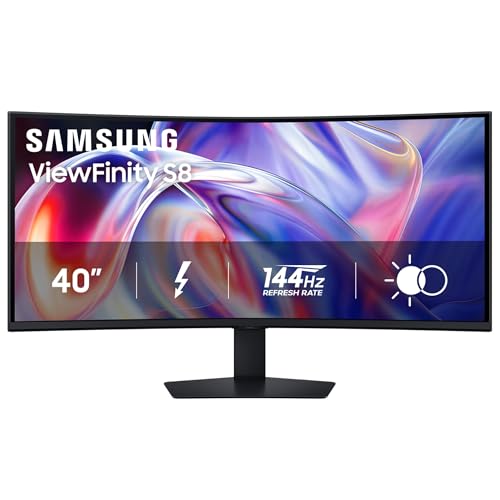
Users who demand an expansive panoramic workspace should consider the ultrawide Samsung 40″ ViewFinity S8 (S85TH) Curved Monitor with its cutting-edge Thunderbolt 5 interface and 144Hz refresh rate. Meanwhile, hybrid users who switch between design work and high-speed gaming will appreciate the dual-mode agility of the Samsung 27″ Odyssey G8 (G80HF) Gaming Monitor. For more ideas on outfitting your professional workspace with balanced ambient illumination, check our guide on best floor lamps for offices.
Frequently Asked Questions
What makes 5K resolution superior to standard 4K for desktop monitors?
A native 5K resolution of 5120 by 2880 contains roughly seventy-seven percent more total pixels than a standard 4K screen. On a 27-inch display, this density delivers 218 pixels per inch, matching the native scaling requirements of modern desktop operating systems. This extra pixel density produces sharper typography, crisper line work, and eliminates noticeable visual scaling artifacts.
Why is tilt and swivel stand adjustability important on a 5K display?
High-resolution displays require precise viewing angles to ensure optimal color consistency and contrast across the entire panel area. Built-in tilt and swivel adjustments allow you to align the screen directly with your eye level, preventing neck strain and reducing overhead reflections. Having these adjustments built into the factory stand saves valuable desk real estate and simplifies overall setup.
Can I connect a 5K monitor to my laptop using a standard HDMI cable?
Standard older HDMI ports lack the necessary bandwidth to carry uncompressed 5K video signals at standard refresh rates. To achieve full 5K resolution, your system requires HDMI 2.1, DisplayPort 1.4 with Display Stream Compression, DisplayPort 2.1, or Thunderbolt 4/5 connections. Always verify your computer hardware specifications to ensure your video output supports full native 5K bandwidth.
What is the difference between native 5K and 5K2K ultrawide resolution?
Native 5K displays feature a 16:9 aspect ratio measuring 5120 by 2880 pixels, delivering maximum vertical sharpness across standard 27-inch screens. In contrast, 5K2K displays feature an ultrawide 21:9 aspect ratio measuring 5120 by 2160 pixels across larger 34-inch to 40-inch panels. Ultrawide 5K2K panels provide extended horizontal timeline space for video editing but have slightly lower pixel density.
How does a 5K monitor improve macOS user interface scaling?
macOS is engineered around integer scaling, rendering UI elements at exactly double resolution on screens with approximately 218 pixels per inch. A 27-inch 5K monitor provides this exact pixel density, allowing macOS to render crisp Retina graphics without fractional scaling overhead. Running 4K displays on Mac often requires non-integer scaling that can consume additional GPU resources and slightly soften fine details.
What are the key advantages of Best 5K Monitors with Tilt and Swivel Stands in 2026 for creative work?
Modern Best 5K Monitors with Tilt and Swivel Stands in 2026 combine high-density panels with modern connectivity like Thunderbolt 5 and versatile KVM functionality. These displays offer broad color gamuts like DCI-P3, accurate factory calibration, and robust ergonomic adjustments straight out of the box. This combination allows creative professionals to edit high-resolution media with exact color fidelity and zero posture fatigue.
Do I need a dedicated graphics card to drive a 5K monitor at full resolution?
Most modern laptops with Apple Silicon chips or recent Intel and AMD processors with integrated graphics can drive a 5K display over Thunderbolt or USB-C. However, for demanding 3D rendering, video editing, or high refresh rate gaming, a dedicated graphics card ensures smooth and responsive performance. Always check that your system supports the appropriate DisplayPort Alt Mode or Thunderbolt generation.
How does an integrated KVM switch function on a high-resolution monitor?
An integrated KVM switch lets you connect a single keyboard, mouse, and other peripherals directly to the monitor USB hub to control two separate computers. When you switch the video input source between devices, the monitor automatically routes USB control to the active system. This eliminates the need for redundant peripherals and keeps your physical workspace organized and uncluttered.
Is a glossy or matte screen finish better for a 5K creative workstation?
Matte screen finishes excel at diffusing ambient glare in bright rooms with large windows or direct overhead office lighting. Glossy and nano-gloss panels preserve deeper black levels, richer contrast, and ultimate pixel sharpness in controlled lighting environments. Your choice should depend primarily on how much ambient reflection you experience in your specific workspace.
Can high refresh rate 5K monitors be used for competitive gaming?
Modern 5K gaming displays featuring dual-mode functionality allow users to switch between 5K resolution for sharp visuals and lower resolutions at high refresh rates for competitive action. These displays incorporate Fast IPS panels, adaptive sync compatibility, and ultra-low response times to eliminate ghosting and screen tearing. This versatile hybrid capability makes them ideal for both precision design work and fast-paced gaming.



