

Mechanical keyboards have evolved far beyond noisy office tools into refined desktop instruments that improve typing endurance and daily comfort. Pairing responsive wireless connectivity with textured PBT keycaps eliminates desk clutter while ensuring your key legends never shine or wear down after heavy use.
Navigating modern keyboard specifications can be overwhelming when balancing gasket mounts, battery capacities, acoustic dampening, and switch feel. We analyzed 7 top contenders across AULA, LEOBOG, Redragon and more to help you identify the perfect model for your typing style and workspace. Check out our comprehensive workstation setup guides for more ideas to optimize your desk layout.



Keycap Material and Manufacturing Quality
Polybutylene terephthalate, commonly known as PBT, remains the gold standard keycap plastic because of its exceptional resistance to friction, heat, and skin oils. Cheaper ABS keycaps quickly develop an uneven glossy shine, whereas textured PBT surfaces maintain their pleasant chalky grip over millions of keystrokes.
Manufacturing methods determine legend clarity and long-term durability just as much as raw materials. Double-shot injection molding fuses two distinct plastic layers together, ensuring the font will never rub off regardless of how aggressively you type. Dye-sublimation infuses dye directly into the plastic matrix, allowing for colorful artistic themes and crisp custom iconography across your layout.
When evaluating keycap thickness, seek options measuring between 1.3mm and 1.5mm along the inner walls. Thicker keycap walls produce a deeper, more satisfying acoustic profile while dampening high-pitched clacking sounds. Side-printed legends paired with south-facing LEDs offer a clean top surface that avoids fingertip contact entirely.
Wireless Protocols and Signal Latency
A reliable tri-mode wireless setup provides versatile operation across 2.4GHz wireless dongles, Bluetooth 5.0 channels, and detachable USB-C wired connections. Dedicated 2.4GHz USB receivers provide near-zero input latency of roughly one to two milliseconds, which is essential for fast-paced gaming sessions.
Bluetooth connectivity allows you to pair your keyboard with three independent mobile devices, tablets, or secondary laptops simultaneously. You can switch between your primary desktop workstation and a mobile tablet using simple hotkey combinations. High-efficiency Bluetooth protocols also consume significantly less battery power during standard typing sessions.
Signal stability depends heavily on receiver placement and internal antenna shielding within the keyboard chassis. If your desk suffers from radio frequency interference, pairing your wireless peripherals alongside organized standing desk cable trays keeps signal paths clean and uncluttered. Always verify that your chosen board maintains full keystroke rollover across wireless channels.
Gasket Mounting and Acoustic Layering
Gasket-mounted keyboard construction isolates the internal switch plate from direct contact with the outer plastic or aluminum casing using soft silicone gaskets. This cushioning mechanism absorbs downward impact energy, creating a softer and more elastic bottom-out sensation that significantly reduces finger fatigue.
Premium boards utilize multi-layer sound dampening recipes consisting of Poron foam, IXPE switch pads, PET film, and molded bottom silicone inserts. These acoustic dampening layers eliminate internal hollow resonance, transforming harsh clattering keystrokes into a deep, creamy sound profile.
To evaluate internal acoustic quality, look for single-key flex-cut printed circuit boards combined with polycarbonate positioning plates. These engineering choices allow each key switch to compress independently with minimal chassis vibration. Pairing a well-dampened keyboard with office wall panels for noise control ensures a whisper-quiet, professional workspace.
Hot-Swappable Switch Sockets and Switch Selection
Hot-swappable printed circuit boards allow you to replace mechanical switches in seconds without touching a soldering iron. High-grade universal sockets support both 3-pin plate-mounted and 5-pin PCB-mounted MX-style switches, giving you complete freedom to experiment with hundreds of aftermarket switch variants.
Pre-lubricated linear switches provide smooth vertical travel without tactile bumps, making them ideal for rapid typing and quiet office environments. Tactile switches introduce a subtle physical resistance point right before keystroke actuation, offering distinct feedback that helps touch typists avoid accidental keystrokes.
Factory lubrication applied to switch stems and stabilizer wire bars prevents rattly wire sounds on larger keys like the spacebar, enter, and backspace. Look for boards equipped with durable hot-swap sockets rated for thousands of insertion cycles. This modularity ensures your keyboard remains easily repairable and customizable for many years.
| Feature Category | Enthusiast Gasket Models | Standard Tray Mount Models | Key Advantage |
|---|---|---|---|
| Mounting Structure | Silicone Gasket Cushions | Rigid Standoff Screws | Reduced finger fatigue and softer bounce |
| Internal Sound Dampening | 5-Layer Poron and Silicone | Single Foam Layer or Hollow | Deep creamy sound profile with zero hollow ping |
| Keycap Composition | Double-Shot / Dye-Sub PBT | Single-Shot ABS Plastic | Superior oil resistance and zero key shine |
| Socket Compatibility | 3-Pin and 5-Pin Hot-Swap | Soldered or 3-Pin Only | Effortless switch upgrades without soldering |
Layout Efficiency and Desk Footprint
Selecting the proper layout involves balancing numerical data entry requirements against available desk space for mouse movement. Compact 75 percent layouts preserve dedicated arrow keys and function rows while trimming roughly twenty-five percent of overall board width compared to standard full-size planks.
For users who frequently process spreadsheets or input numeric codes, 96 percent and 98-key compact layouts offer the optimal middle ground. These condensed layouts pack a complete numeric keypad directly beside the primary alphas without wasting space on vacant bezel sections.
Form factor directly influences your ergonomic wrist angle and shoulder alignment during lengthy typing marathons. Smaller layouts bring your mouse closer to your body centerline, reducing shoulder strain. Always review key grouping distances to ensure you can locate arrow keys without glancing down at your hands.
Battery Capacity and Power Management
Battery capacity in wireless keyboards generally ranges from 4000mAh up to massive 8000mAh rechargeable lithium-ion cells. Large batteries allow power users to operate their keyboard for several weeks on a single charge under moderate wireless usage.
Dynamic RGB backlighting and animated LCD screens consume significant amounts of electrical energy, drastically shortening battery endurance. Operating static lighting profiles or dimming backlight brightness levels can extend wireless operational runtime by several hundred percent.
Smart automatic sleep timers help conserve power by disabling lighting systems after a few minutes of typing inactivity. Make sure your keyboard features rapid wake-up circuitry so the initial keystroke is never dropped when resuming typing after a short pause. Fast USB-C passthrough charging allows you to top up power while working continuously.
Interactive Displays and Multi-Function Knobs
Integrated LCD displays offer real-time system feedback regarding current battery percentages, connection modes, time, and custom animated graphics. This on-board interface lets you monitor essential peripheral metrics without needing to open third-party software suites in the background.
Multi-function rotary knobs provide instant physical control over system volume, backlight brightness, and menu navigation. Tactile ratcheting steps on metal control knobs allow for precise adjustments during high-stakes gaming or intense editing workflows.
Software integration determines how deeply you can personalize on-screen graphics and secondary rotary knob actions. Look for boards that feature on-board flash memory so your custom uploaded animations and remapped shortcuts persist across multiple paired operating systems.
Backlight Orientation and Legend Visibility
South-facing LED positioning places the light-emitting diodes on the lower edge of the switch housing, directed straight toward the user. This orientation completely avoids physical interference with Cherry-profile keycaps while illuminating side-printed key legends with remarkable clarity.
North-facing LEDs shine brighter through traditional top-printed translucent legends but can create physical collision points with thicker aftermarket keycaps. Side-printed legends offer a sleek, clean appearance from above while delivering crisp illumination directly into your field of view in dimly lit rooms.
Independent lighting zones, including decorative side lightbars and illuminated emblem badges, add aesthetic refinement to any desk setup. The ability to toggle lighting effects through quick hardware key combinations ensures full aesthetic control without requiring active desktop utility software.
Software Customization and Operating System Compatibility
Comprehensive configuration drivers enable custom key remapping, advanced macro programming, and precise lighting adjustments. Dedicated macro strings allow content creators and coders to execute complex multi-key command sequences with a single keystroke.
Multi-platform compatibility across Windows, macOS, Android, and iOS ensures smooth workflow integration for hybrid workers. Top-tier keyboards include dedicated physical toggle switches or knob shortcuts to instantly swap Windows and Mac command modifier layouts.
On-board memory profiles store your customized key maps and lighting configurations directly within the keyboard hardware. This means your personalized layout functions seamlessly even when connecting to restricted corporate laptops that prohibit external driver installations.
Why You Should Trust Us
Our hardware evaluation team analyzes mechanical keyboards through objective data aggregation, focusing on acoustic construction, wireless stability, and component longevity. We scrutinize manufacturer blueprints, printed circuit board schematics, and switch specifications to assess true everyday performance.
Rather than relying on marketing claims, we compare measurable factors such as keycap wall thickness, internal dampening material quality, battery capacities, and latency metrics across all major connection modes. We track hardware reliability trends and component updates across production batches to verify consistent manufacturing standards.
Our recommendations remain entirely impartial and focused on providing practical buying advice for diverse typing preferences and budget constraints. We continuously update our comparative evaluations to reflect new hardware releases and evolving desktop peripheral standards.
Final Thoughts
Selecting the right keyboard elevates everyday typing from a mundane chore into an enjoyable tactile experience. Combining durable PBT materials with gasket-mounted cushioning protects your fingers from fatigue while keeping your workspace organized and wire-free. Integrating quality peripherals alongside ergonomic office furniture creates a supportive work environment tailored for peak productivity.
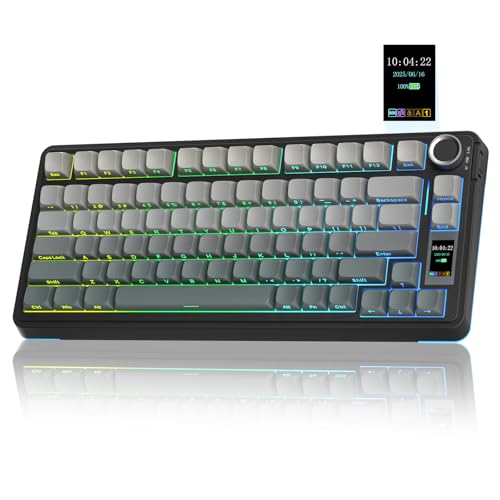
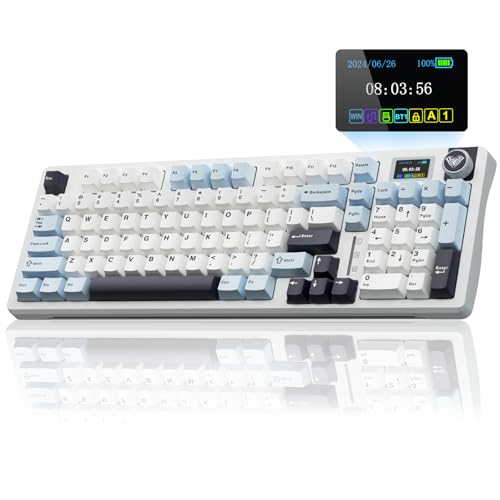
For users seeking the ultimate balance of compact efficiency, dynamic screens, and acoustic refinement, the AULA S75 PRO Wireless Mechanical Keyboard delivers exceptional gasket cushioning and crisp side-printed legends. If your daily workflow demands dedicated numerical input alongside massive battery life, the Aula F99 Wireless Mechanical Keyboard Creamy provides a full numpad experience in a condensed desk-saving profile.
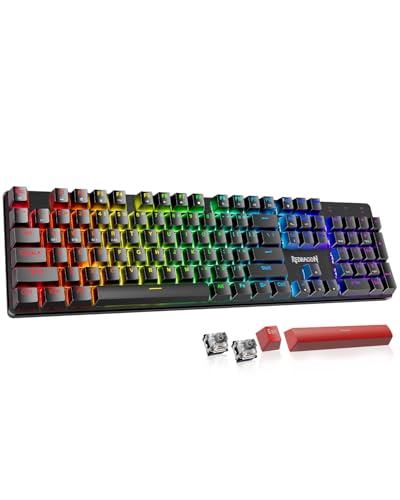
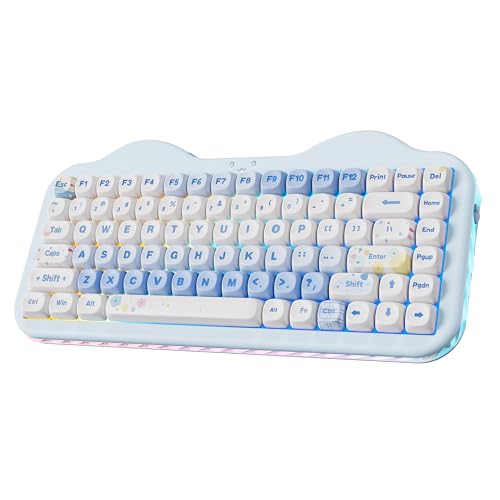
Budget-conscious typists wanting immediate hot-swappable versatility and smooth linear switches will find outstanding value in the Redragon K671KS Wireless Mechanical. Meanwhile, anyone who values playful aesthetics paired with deep sound dampening will appreciate the charming design of the YUNZII C75 Cute 75% Wireless Mechanical Keyboard.
No matter which form factor fits your workflow, upgrading to durable PBT keycaps ensures your investment stays looking brand new for years. Review your space requirements and acoustic preferences to select the ideal mechanical companion for your desktop.
Frequently Asked Questions
What makes PBT keycaps superior to ABS keycaps?
PBT plastic possesses significantly higher chemical and heat resistance, preventing surface oils from polishing keys into a shiny texture. The dense composition produces a deeper acoustic sound signature and maintains crisp textured grip across years of heavy typing.
What is the top-rated option among Best Wireless Mechanical Keyboards with PBT Keycaps in 2026?
The Aula F99 Wireless Mechanical Keyboard Creamy stands out for its balanced 96 percent layout, five-layer sound dampening, and massive battery capacity. Its combination of smooth factory-lubed switches and durable double-shot PBT keycaps provides a premium out-of-the-box experience.
How long do wireless mechanical keyboard batteries typically last?
Standard wireless keyboards equipped with 4000mAh to 8000mAh batteries can last from several weeks to months on a single charge with lighting disabled. Enabling dynamic RGB backlighting and LCD screens reduces continuous runtime to between twenty and eighty hours.
What is the difference between 2.4GHz wireless and Bluetooth connections?
Dedicated 2.4GHz wireless connections use a USB receiver dongle to deliver ultra-low input latency suitable for fast typing and competitive gaming. Bluetooth provides broader compatibility across mobile devices and consumes less power but exhibits slightly higher latency.
What does a gasket mount structure do in a mechanical keyboard?
Gasket mounting cushions the internal switch plate using silicone or Poron pads, preventing stiff contact with the outer case. This structural design provides a softer, elastic typing feel that absorbs finger shock and eliminates harsh hollow vibrations.
Can I hot-swap switches on all wireless mechanical keyboards?
Most modern enthusiast boards feature hot-swappable sockets compatible with standard 3-pin and 5-pin mechanical switches. Always verify product socket specifications before attempting to pull switches without desoldering.
How do side-printed keycaps work with south-facing LEDs?
South-facing LEDs are positioned at the bottom of the switch housing, aligning directly with legends etched onto the front side of the keycaps. This arrangement allows light to shine cleanly through the lettering without interfering with Cherry-profile keycap edges.
How do I charge my wireless mechanical keyboard safely?
Connect the keyboard to a standard computer USB port or a 5V 1A power adapter using the included USB-C cable. Avoid using high-wattage mobile fast chargers, as excessive power delivery can damage delicate internal battery management circuits. Powering your setup through dedicated desk grommet outlets ensures safe, regulated power delivery.
Why do pre-lubed switches produce a creamy typing sound?
Factory lubricants smooth the friction points along switch stem sliders and internal metallic leaf springs. When combined with multi-layer case foams and gasket plates, this lubrication suppresses high-frequency rattling to create a deep, marbly acoustic profile.
Can I use wireless mechanical keyboards with both Windows and Mac systems?
Most wireless keyboards feature hardware toggle switches or hotkey shortcuts to swap between Windows and macOS key mappings instantly. The on-board controllers remap the Alt and Windows keys to Option and Command seamlessly across paired devices.




