Data analysts, accountants, and creative professionals often face a frustrating compromise when choosing a modern computer setup. Traditional full-size keyboards clutter clean desktop surfaces with messy cables, while ultra-compact typing boards leave out the dedicated numeric keypads essential for rapid calculations.
Modern engineering has fundamentally eliminated this trade-off by combining high-capacity batteries with space-saving layouts. Choosing one of the Best Wireless Mechanical Keyboards with Number Pad allows you to maintain peak calculation speed while decluttering your desk space. Check out our ergonomic workspace guides to see how the right desk setup improves long-term typing posture.
In this guide for September 2026, we evaluate 10 standout models representing major manufacturers like RK ROYAL KLUDGE, Keychron, AULA and more. Whether you require open-source firmware programmability, multi-device Bluetooth switching, or ultra-smooth factory-lubricated switches, our detailed breakdown helps you make an informed decision.




1. Layout Efficiency and Desk Space Management
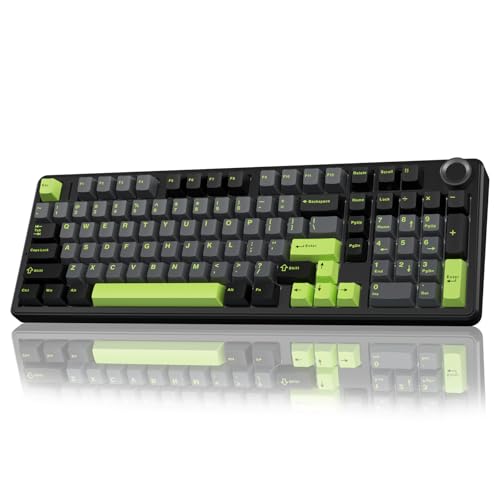
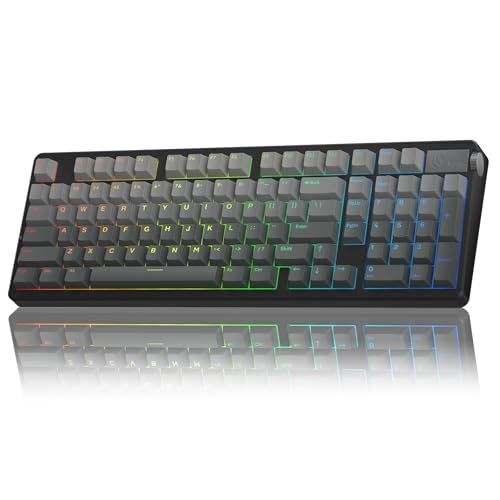
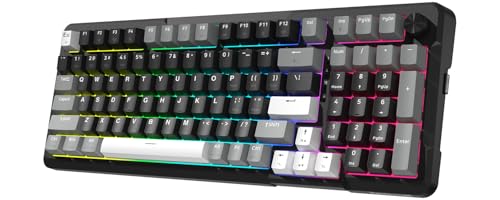
Keyboard layouts have evolved far beyond standard 104-key rectangular slabs. Modern full-function keyboards primarily come in traditional 108-key builds, 1800-compact formats, or streamlined 96 percent configurations. Understanding how each layout condenses keys determines whether you save physical desk space or maintain muscle memory.
A standard 108-key board separates the navigation block, arrow keys, and numeric pad with distinct physical gutters. In contrast, a 96 percent layout presses the numeric cluster directly against the primary typing zone while retaining almost all input functionality. This design saves roughly two inches of horizontal desk footprint, leaving greater clearance for mouse movement.
When selecting a layout, pay attention to the size of the zero key on the number pad. Some condensed layouts shorten this key to standard single-switch width to fit compressed arrow clusters, which requires minor adaptation for touch typists. If your daily workflow relies heavily on ten-key entry, ensure the layout preserves standard mathematical operator positioning.
Reducing keyboard width also brings your mouse closer to your natural shoulder line, reducing shoulder abduction strain. Organizing desktop accessories alongside standing desk cable trays creates an expansive, ergonomic workstation suitable for all-day typing comfort.
2. Wireless Tri-Mode Connectivity and Input Latency
Wireless keyboards in this category universally offer tri-mode flexibility, encompassing Bluetooth channels, 2.4GHz dongles, and USB-C wired links. Having multiple connection paths ensures compatibility across desktop computers, lightweight laptops, and mobile tablets.
The 2.4GHz wireless connection operates through a dedicated USB receiver, achieving a 1000Hz polling rate identical to competitive wired gaming peripherals. This near-instant 1-millisecond response time prevents missed inputs during rapid data processing or high-speed gaming. Bluetooth connections consume less energy and support pairing across up to three separate devices simultaneously.
Look for keyboards with clearly labeled physical toggle switches for connection modes rather than complex multi-key combinations. Hardware toggles let you swap from an office workstation to a personal laptop instantly without navigating operating system menus. Reliable boards also include onboard magnetic storage slots to prevent losing the miniature wireless receiver.
If you regularly work across mixed environments containing macOS, Windows, and Linux devices, verify operating system layout support. Leading options include specialized toggle switches that automatically remap command and alt keys to match target system standards.
3. Gasket Mounting Architecture and Acoustic Sound Profiles
Internal structural design directly shapes how a mechanical keyboard feels and sounds beneath your fingers. Older keyboards mounted switches into rigid metal top plates, creating harsh bottom-out impact and hollow internal reverberation. Modern mechanical keyboards rely on sophisticated gasket-mounted suspensions that isolate the internal typing assembly.
Gasket construction suspends the switch positioning plate between soft silicone or Poron foam tabs along the perimeter of the casing. This mechanical separation allows the entire internal plate to flex slightly downward with every keypress, creating a softer landing for your fingertips. The result is significantly reduced joint fatigue over eight-hour workdays.
To eliminate hollow echoes, high-grade boards incorporate up to five distinct sound-dampening layers. These materials include IXPE switch pads, Poron plate foams, PET acoustic films, and molded silicone bottom dampeners. This layered dampening transforms clack-heavy keypresses into deep, pleasant keystrokes commonly described as creamy or thocky.
If you share an office with coworkers, layered acoustic dampening prevents clattering mechanical noises from disturbing colleagues. Single-key slotted circuit boards further dissipate acoustic vibrations before sound escapes the outer casing.
4. Mechanical Switch Varieties and Hot-Swappable Sockets
The mechanical switches soldered or seated beneath your keycaps define resistance, travel distance, and sensory feedback. Linear switches glide downward smoothly without interruption, making them popular for rapid typing and quiet office use. Tactile switches produce a subtle physical bump at actuation, providing tactile verification that helps prevent missed inputs.
Hot-swappable printed circuit boards represent an essential feature for long-term keyboard value. A hot-swap PCB features specialized pin sockets that let you pull out and replace individual switches without handling a soldering iron. This allows you to repair a single malfunctioning switch in seconds or swap your entire layout to a different switch style.
Always verify whether the keyboard supports both 3-pin and 5-pin mechanical switch designs. Universal 5-pin compatibility ensures you can install virtually any aftermarket MX-style switch from specialty manufacturers. Factory pre-lubricated switches and factory-tuned stabilizers also eliminate scratchiness right out of the retail package.
For high-volume calculation tasks, linear switches with operating forces around 40 to 45 grams provide effortless movement. Heavier tactile switches around 50 to 55 grams prevent accidental presses if you rest your fingers heavily on the keycaps.
5. Keycap Materials, Manufacturing, and Height Profiles
Keycaps form your direct physical touchpoint, influencing both tactile grip and aesthetic longevity. Budget keyboards commonly utilize ABS plastic keycaps, which gradually develop a greasy shine and lose their printed letters after several months. Premium mechanical keyboards feature double-shot PBT keycaps molded from two distinct layers of resilient plastic.
Double-shot injection molding ensures key legends never rub off because the lettering is part of the physical key structure rather than surface paint. PBT material maintains a fine, textured matte surface that resists skin oils and heavy daily wear. Side-printed legends paired with south-facing LEDs create a clean look while maintaining total legibility from normal seated angles.
Keycap ergonomic profiles also alter typing comfort across long work shifts. Standard OEM and Cherry profiles feature sculpted, angled rows that mimic the natural arc of reaching fingers. Taller spherical profiles like MDA or OSA provide wider top contact areas, giving your fingertips extra landing space during rapid number entry.
Pairing an ergonomic keycap profile with proper monitor alignment keeps your wrists and neck in neutral alignment. Implementing laptop mount and monitor arm setups allows your typing station to support long-term posture health.
6. Battery Capacity and Power Conservation Features
Wireless peripherals require substantial battery power to maintain stable radio connections and vibrant LED backlighting. Battery capacities in full-size wireless boards range dramatically from compact 4000mAh cells to massive 8000mAh dual-battery arrays. A larger battery reduces how often you need to tether the keyboard with a charging cable.
RGB backlighting consumes substantial electrical current, reducing continuous wireless runtime from several hundred hours down to roughly 40 to 60 hours. High-capacity 8000mAh models can run for over 300 hours with backlighting disabled, delivering months of typical daily office productivity on a single charge cycle.
Evaluate the keyboard sleep timer behavior and power-saving sleep protocols before buying. Premium controllers enter low-power sleep states after brief inactivity and wake instantly upon the first keypress without dropping the initial character. Rapid USB-C charging allows the internal battery to recharge fully during lunch breaks.
Visual battery indicators are equally vital for preventing unexpected mid-task shutdowns. High-end keyboards communicate remaining battery percentage through onboard LCD screens, custom light bars, or shortcut-activated LED backlight pulses.
7. Firmware Programmability and Software Ecosystems
Deep hardware customization turns a standard full-size keyboard into an automated productivity engine. Key remapping allows you to reassign seldom-used keys into dedicated shortcuts for launching spreadsheets, pasting copied values, or triggering complex workflow macros. Advanced software suites also let you build multi-layer layouts accessible via custom modifier keys.
Open-source firmware like QMK paired with the VIA or Keychron Launcher web interface represents the gold standard in keyboard customization. Web-based configuration tools run directly inside your internet browser, saving remaps directly onto onboard memory. This eliminates the need to install corporate-restricted background utility software on company computers.
Proprietary Windows driver suites offer rich RGB lighting effects and macro editors, though some lack native macOS or Linux companion software. If you switch operating systems daily, ensure that keybindings configured in the software save permanently to onboard flash storage.
Macro customization is particularly helpful for data entry specialists. You can map repetitive accounting sequences or specialized mathematical characters to a single macro key on the top hotkey row.
8. Physical Control Knobs and Smart Status Displays
Hardware rotary knobs and integrated color LCD screens have become staple features on modern wireless mechanical boards. Metal rotary encoders provide tactile stepping that lets you adjust system volume, mute calls, or tweak backlight intensity without reaching for mouse controls.
Smart LCD screens display essential real-time diagnostic data directly on the top corner of the keyboard casing. These miniature displays showcase active connection modes, battery percentages, current operating system layouts, and time stamps. Many companion tools even allow you to upload custom animated GIF graphics to personalize your workspace aesthetic.
When selecting a board with a control knob, verify whether the knob functions as a clickable button as well as a dial. A clickable knob lets you switch quickly between volume control, brightness adjustment, and media playback control. Some enthusiast models also provide interchangeable knob styles to match custom desktop color themes.
Integrated displays streamline troubleshooting by clearly showing which Bluetooth device slot is currently paired. This eliminates the guesswork of flashing LED indicator codes when switching between multiple connected computers.
9. Incline Adjustability and Ergonomic Stability
The physical chassis design and base height of a mechanical keyboard directly influence wrist comfort during long writing sessions. Full-size keyboards housing acoustic dampening layers naturally sit slightly taller than low-profile membrane office boards. A low front chassis height prevents excessive wrist extension during natural resting postures.
Dual-stage folding feet on the underside of the base plate provide multiple typing angles, typically ranging from 4 degrees to 9 degrees. This adjustability allows you to tailor keyboard slope to match your desk height, chair armrest position, or palm rest preferences. High-friction rubber feet along the base prevent the board from sliding during aggressive typing.
If you prefer typing without an external palm rest, look for boards featuring a front lip height under 20 millimeters. Sculpted keycap profiles work in tandem with slight elevation to create a comfortable, neutral hand position.
Sturdy internal structures also prevent casing flex when pressing keys firmly on the outer numeric pad. Solid structural integrity ensures that every key strike across the wide 100-key chassis feels uniform and satisfying.
| Layout Profile | Key Count | Horizontal Footprint | Number Pad Format | Best Practical Use |
|---|---|---|---|---|
| Standard 108-Key | 108 Keys | Full Width (445-450mm) | Standard Spaced Pad + 4 Hotkeys | Dedicated Accounting and Fixed Desktops |
| Compact 98% Layout | 98-100 Keys | Condensed (390-405mm) | Integrated Pad with Volume Knob | Hybrid Productivity and Mixed Workstations |
| Condensed 96% Layout | 96-97 Keys | Ultra-Compact (380-395mm) | Condensed 0-Key with Navigation Cluster | Space-Saving Desktops and Traveling Professionals |
Why You Should Trust Us
Our review process centers on comprehensive specification analysis, structural teardowns, and real-world performance metrics. We evaluate mechanical switches, mounting systems, wireless latency measurements, and battery endurance across diverse daily workloads. Our goal is to provide unbiased, factual advice that simplifies complex peripheral hardware.
We closely examine manufacturer component sheets, internal PCB designs, acoustic foam layering, and firmware compatibility records. By comparing models across clear performance criteria, we highlight genuine mechanical advantages rather than superficial marketing claims. Every product recommendation reflects rigorous hardware scrutiny designed to serve your daily workflow.
Our comparative database is dynamically maintained to provide current hardware recommendations throughout 2026. We continually track firmware stability updates, switch performance changes, and new chassis designs to ensure our guides deliver dependable purchasing advice.
Final Thoughts
Selecting the right wireless mechanical keyboard elevates everyday computing tasks by combining ergonomic tactile typing with essential number pad efficiency. Modern multi-layer sound dampening and high-capacity wireless batteries have transformed these productivity tools into comfortable daily companions. Upgrading desktop power delivery with desk grommet outlets ensures your wireless peripherals charge effortlessly whenever needed.
For users seeking an uncompromising premium typing experience with open-source firmware flexibility, we recommend the Keychron V5 Max Custom Wireless Mechanical. Its compact 96 percent footprint saves valuable desk space while offering web-based QMK remapping and refined acoustic foam construction for effortless data workflows.
If you prefer an intuitive visual screen paired with outstanding multi-device switching, the RK ROYAL KLUDGE S98 Wireless Mechanical Keyboard delivers an impressive top-mounted build with a multifunctional rotary dial and colorful diagnostic display. For budget-conscious typists wanting full 98 percent functionality and smooth pre-lubricated switches, the Redragon K742 Wireless Mechanical Gaming Keyboard stands out as a dependable value option.
Consider your personal daily typing requirements, desk dimensions, and connection preferences when choosing your ideal board. Investing in a hot-swappable, gasket-mounted keyboard ensures reliable performance, customizable tactile feedback, and lasting typing comfort throughout 2026.
Frequently Asked Questions
What makes the Best Wireless Mechanical Keyboards with Number Pad worth buying in 2026?
Modern wireless mechanical keyboards combine multi-device wireless freedom with the data-entry speed of a dedicated number pad. Advanced multi-layer gasket mounting and pre-lubricated switches deliver exceptional acoustic comfort that traditional office keyboards cannot match.
How does a 96 percent keyboard layout differ from a standard full-size keyboard?
A 96 percent layout removes the empty space separating the main typing area, arrow keys, and numeric keypad. This compressed arrangement preserves nearly all functional keys while reducing overall keyboard width by approximately two inches to save desktop space.
Are 2.4GHz wireless connections fast enough for gaming and rapid typing?
Dedicated 2.4GHz USB wireless receivers deliver a 1000Hz polling rate, providing a 1-millisecond input response time. This performance matches high-end wired keyboards, eliminating noticeable latency during intense gaming or high-speed data entry.
What does a hot-swappable mechanical keyboard circuit board do?
A hot-swappable PCB features push-fit sockets that let you remove and replace mechanical switches using a small switch puller. You can customize your typing feel or replace individual worn switches without touching a soldering iron.
Why are gasket-mounted keyboards quieter and more comfortable to use?
Gasket mounting uses soft silicone or foam pads to isolate the internal switch plate from the rigid outer casing. This structure cushions bottom-out impact, softens finger fatigue, and eliminates hollow echoing sounds during extended typing sessions.
How long do wireless mechanical keyboard batteries typically last on a charge?
Battery longevity depends heavily on LED backlighting usage and internal battery capacity. With RGB lighting active, high-capacity boards run for 40 to 60 hours, while disabling backlights extends operation to over 300 hours on a single charge.
What are the practical advantages of double-shot PBT keycaps over ABS plastic?
Double-shot PBT keycaps use two molded plastic layers, ensuring that the printed letters never wear away or fade. PBT plastic also resists finger oils, preventing the unpleasant shiny surface that cheaper ABS keycaps develop over time.
Can I use these wireless keyboards seamlessly across Windows and Mac computers?
Most modern wireless keyboards feature hardware toggles or key shortcuts that instantly switch between Windows and macOS layouts. This automatically swaps the positions of the Alt and Windows keys to match Mac Option and Command functions.
Why should you look for QMK or VIA firmware support in 2026?
QMK and VIA firmware allow you to remap keys and program complex macros through a simple web browser interface. All customizations save directly to the keyboard onboard memory, working instantly on any computer without background software installations.
How do rotary knobs and smart LCD screens improve daily workflow?
Rotary knobs provide instant hardware control over audio volume, media playback, and lighting adjustments without interrupting your screen focus. Smart LCD screens display critical connection modes, active operating systems, and remaining battery life at a quick glance.