Creating believable stop motion animation requires precision, patience, and absolute hardware stability. When shooting thousands of sequential frames, any shift in automatic lighting or autofocus can ruin an entire day of physical animating. Choosing the Best Webcams for Stopmotion in September 2026 gives you the manual controls needed to keep every frame identical.
Standard conference cameras often struggle with macro tabletop scenes because their automatic firmware adjustments fight against your studio lighting. Investing in the right capture tool eliminates frame flicker and keeps clay or brick characters razor-sharp. Our comprehensive studio gear and workspace guides provide additional setup strategies to complement your animation station.
We analyzed 7 capable models from leading brands like Stopmotion Explosion, Logitech, OBSBOT and more to determine which devices offer the finest sensor stability. This guide breaks down the core technical criteria that separate amateur capture devices from professional animation tools.


Manual Focus Control and Hardware Lens Rings
Autofocus is disastrous for frame by frame capture because the lens hunts for targets whenever hands enter the scene. A physical manual focus ring or a robust software lock guarantees that your focal plane remains locked on tiny miniature details. Hardware rings offer tactile precision that digital sliders inside operating system menus cannot always match.
When evaluating focus mechanisms, look for smooth barrel rotation with enough resistance to prevent accidental shifts. Lenses designed with stepped gear rings allow micro adjustments down to millimeter tolerances, which proves crucial for close up puppet expressions. Digital focus overrides can work well if the underlying driver does not reset after system reboots.
A practical rule of thumb is to calibrate focus using high contrast grid cards placed right at your character mark. Once the focal point is locked, avoid touching the camera housing directly to maintain millimeter consistency throughout the scene.
Exposure and White Balance Lock Capabilities
Frame flicker occurs when automatic exposure meters detect minor lighting variations and adjust sensor shutter speeds between captures. Cameras suited for stop motion must allow absolute locking of shutter speed, aperture, ISO gain, and Kelvin color temperatures. Without these manual overrides, your finished playback will display distracting brightness pulses.
Examine whether the camera driver exposes standard UVC controls to third party stop motion software packages. High end studio webcams feature dedicated utility panels where exposure values can be locked to numerical values rather than dynamic percentages. Pairing manual exposure with dedicated balanced studio lighting fixtures eliminates ambient variance entirely.
Always verify that auto white balance can be disabled completely before purchasing. Setting your color temperature to a fixed Kelvin rating prevents subtle color casts from shifting across sequential character movements.
Sensor Resolution and Optical Clarity
Stop motion projects benefit heavily from high resolution sensors because higher pixel counts provide freedom for digital cropping and reframing. Full HD 1080p sensors represent the functional minimum for crisp playback, while native 4K sensors capture fine textures on miniature clothing. Clean glass optics prevent chromatic aberration along the edges of small scale armatures.
Multi element glass lenses maintain sharp contrast across the entire frame compared to cheap plastic alternatives. When comparing resolution numbers, ensure the webcam outputs uncompressed or low compression video streams rather than heavily artifacted MJPEG signals. Uncompressed data streams preserve sharp character silhouettes that make rotoscoping and background compositing far simpler.
If you plan to export finished animations in 1080p, capturing at native 4K provides four times the pixel density for digital pans and stabilization. This extra overhead lets you simulate moving camera tracks without physically shifting your rig.
Mounting Rigidity and Thread Compatibility
Physical movement is the enemy of consistent frame capture. Standard monitor clips are insufficient for animation sets because slight desk bumps or floor vibrations will displace your camera angle. A webcam with an integrated standard quarter-inch tripod thread allows secure mounting onto rigid articulated arms or heavy desktop stands.
Look for solid metal mounting brackets or heavy duty base attachments that lock down with tightening screws. Using sturdy cable management trays prevents heavy USB cords from tugging on your camera mount during prolonged shoots. Any mechanical flex in your mounting arm will introduce frame drift over hundreds of individual photos.
A reliable test is to tap your work table firmly while viewing live onion skinning in your capture software. If the live feed misaligns with your previous frame, your mounting setup requires additional reinforcement or clamping weight.
Software Integration and Driver Architecture
Dedicated frame grabbing software packages interact with webcams through specific direct capture protocols. Cameras adhering strictly to Universal Video Class standards allow third party applications to take direct control of sensor parameters. Proprietary camera apps that lock manual controls behind closed ecosystems can limit your animation software options.
Check if the webcam manufacturer provides driver support across your specific operating system platform. Certain webcams store locked exposure values on a host computer, meaning settings can vanish if your software disconnects unexpectedly. Cross platform drivers ensure that you can move your production rig between operating systems without losing custom camera calibrations.
Before committing to a production schedule, run a continuous fifty frame capture test in your chosen software. Confirm that software onion skinning updates instantly without frame buffer latency or video stream freezing.
Field of View and Optical Distortion
Wide angle lenses designed for group video calls often produce barrel distortion that bends straight miniature architecture. For tabletop animation and brickfilms, a narrower field of view between 65 and 78 degrees delivers natural perspective with straight vertical lines. Ultra wide 90 degree views require digital cropping that can degrade overall image resolution.
Selectable field of view presets allow you to adapt the camera framing to different set dimensions quickly. Narrow diagonal fields of view keep the focus tightly locked on your characters while naturally blurring distant background clutter. Flat plane lenses with minimal edge distortion preserve parallel lines in miniature cityscapes and indoor sets.
If your camera only offers wide angles, position the rig further back from the set and utilize digital zoom crops. This technique flattens visual perspective and prevents miniature props from appearing bulbous or distorted on camera.
| Webcam Model | Resolution | Focus Mechanism | Mounting Interface | Manual Locking Controls |
|---|---|---|---|---|
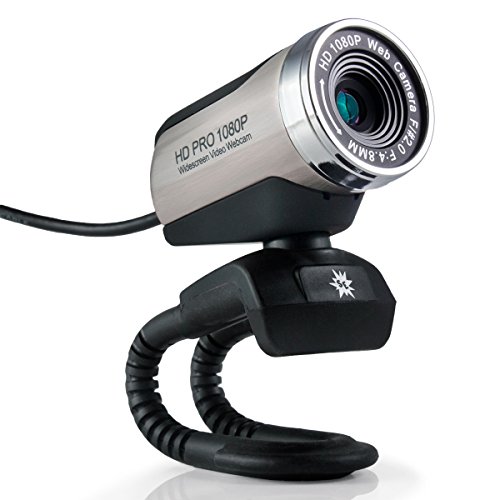
| Stopmotion Explosion HD Pro | 1080p FHD | Manual Focus Ring | Flex Arm Base | Full Driver Lock |
| Elgato Facecam 4K | 4K UHD @ 60fps | Fixed Studio Focus | 1/4 Inch Thread | Onboard Memory Lock |
| Logitech C920x HD Pro | 1080p FHD | Software Autofocus Lock | Tripod Ready Clip | Logi Options App |
| OBSBOT Meet 2-4K | 4K UHD | AI / Software Lock | Magnetic & 1/4 Inch | OBSBOT Center App |
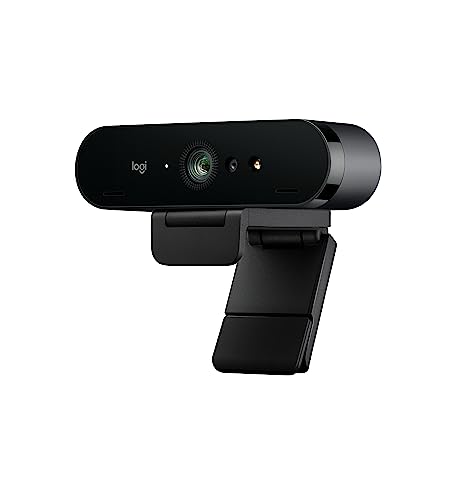
| Logitech 4K Webcam | 4K UHD | Software Autofocus Lock | Detachable Clip | Logi Tune Utility |
Sensor Dimensions and Signal Noise Management
Larger physical image sensors gather more light photons per pixel, resulting in cleaner shadow details and lower digital noise. In stop motion, digital grain in dark set corners will shift randomly from frame to frame, creating visible visual buzzing. Larger sensors, such as half inch CMOS designs, produce exceptionally clean gradients across solid clay or plastic surfaces.
Examine sensor dimensions when comparing high resolution models, as dense megapixel counts on tiny sensors often introduce high noise levels. Advanced back illuminated sensors provide superior signal to noise ratios without requiring scorching hot studio lights. Maintaining low sensor gain settings ensures that dark areas on your animation set remain deep and static.
Keep your camera sensor ISO gain at its absolute minimum value and increase external light output to achieve clean frames. Bright physical lighting combined with low electronic gain creates the cleanest possible animation sequence.
Onboard Memory and Persistent Settings Storage
Webcams featuring internal flash memory can store hardware calibrations directly on the camera circuitry. This prevents exposure profiles, color temperatures, and crop framing from resetting when switching software or restarting your computer. Hardware level persistence saves hours of frustrating recalibration during multi day shoots.
Standard consumer webcams depend entirely on background operating system services to maintain active setting overrides. When these software services crash or update, the webcam often reverts to default automatic exposure modes mid production. Dedicated content creation cameras eliminate this hazard by saving all look parameters directly onto onboard flash chips.
For long term projects, document your exact software values in a production notebook as an extra precaution. Having written records of your color temperature and shutter settings ensures continuity across long production schedules.
Thermal Management and Long Session Stability
Stop motion production requires cameras to remain powered on and streaming video for several hours at a time. Inadequate internal heatsinks can cause miniature camera sensors to overheat, resulting in color degradation and increased thermal image noise. Stable heat dissipation keeps the internal electronics cool and prevents unexpected hardware disconnects.
Look for camera housings engineered with aluminum bodies or passive thermal vents that draw heat away from the sensor. Webcams with robust thermal designs maintain consistent image output from the first frame in the morning to the final shot at night. Heat resistant lens assemblies also avoid optical defocusing caused by thermal expansion inside the lens barrel.
Ensure your production studio maintains adequate air circulation around the camera body during extended shooting sessions. Keeping the camera away from hot incandescent stage lights preserves sensor longevity and maintains uniform color accuracy.
Why You Should Trust Us
Our evaluation process focuses strictly on the specialized technical requirements of sequential frame capture and miniature cinematography. Rather than treating webcams as simple video calling tools, we examine driver stability, sensor noise profiles, and manual control locking under demanding studio conditions. We analyze direct hardware feedback, lens element quality, and software compatibility to identify tools that deliver consistent professional results.
We continuously verify driver behaviors across various operating system updates to ensure our recommendations remain reliable and up to date. Our team checks manufacturer specifications and user reports from real animation workflows to confirm long term hardware reliability. This data driven approach gives you transparent and unbiased hardware guidance tailored directly to stop motion production.
Final Thoughts
Choosing the right capture device transforms your stop motion workflow from a constant battle against flicker into a smooth creative process. For professional animators seeking uncompressed clarity and onboard setting retention, the Elgato Facecam 4K, 4K60 Studio Webcam stands out as our top overall recommendation. Its large sensor, prime glass lens, and dedicated flash memory ensure that locked lighting parameters remain rock solid across multi day film shoots.
If you are just beginning your animation journey or teaching students the craft, the Stopmotion Explosion: Complete HD Stop Motion kit offers unmatched value. It provides a dedicated manual focus ring, flexible mounting options, and straightforward software designed specifically for tabletop brickfilms. Another excellent entry level pick is the Stopmotion Explosion USB 2.0 HD Pro Widescreen, which delivers reliable manual focus optics on a modest budget.
For creators needing ultra compact hardware with advanced sensor dynamics, the OBSBOT Meet 2-4K Webcam for PC with 1/2″ Sensor offers stellar light capture and magnetic mounting versatility. Meanwhile, the reliable Logitech C920x HD Pro PC Webcam Full 1080p/30fps continues to serve as a dependable workhorse for general hobbyists. Mounting your gear securely on articulated monitor and camera arms will give you the rock solid stability required for professional results.
Frequently Asked Questions
What features define the Best Webcams for Stopmotion in 2026?
The most critical features are manual exposure locking, manual focus control, and sturdy mounting options. A camera must allow you to disable all automatic firmware adjustments so every captured frame maintains identical brightness and focus.
Why does automatic exposure ruin stop motion animations?
Automatic exposure constantly shifts sensor brightness based on minor movements on set or your hands entering the frame. These rapid micro changes create severe brightness flickering during playback, making the animation look unstable.
Is 4K resolution necessary when choosing Best Webcams for Stopmotion in 2026?
While 1080p is sufficient for standard video projects, 4K resolution provides significant advantages for digital reframing and cropping. Capturing in 4K allows you to add simulated camera zooms and pans in post production without losing visual quality.
Can I use manual focus rings with standard animation software?
Yes, physical manual focus rings operate independently of your computer software. You physically turn the lens barrel until your miniature subject is sharp, ensuring the focus distance will never change automatically.
How can I prevent light flicker during long frame capture sessions?
You can prevent flicker by closing window blinds, using consistent artificial LED studio lights, and locking camera shutter speed and white balance. Eliminating all dynamic ambient light sources is essential for steady sequential frames.
What is the most versatile connection type for studio webcams?
Direct USB-C and USB 3.0 connections provide the highest data bandwidth for uncompressed video streams. These modern interfaces ensure low latency live view feeds, which makes positioning armatures between frames much easier.
Can I mount animation webcams to standard photographic tripods?
Most studio quality webcams include standard quarter-inch screw threads on their base clips. This allows you to mount the camera directly onto heavy tripods, overhead rigs, or articulating desk arms for maximum rigidity.
What is the most budget friendly option among Best Webcams for Stopmotion in 2026?
Dedicated manual focus models from Stopmotion Explosion offer exceptional value by combining essential manual rings with direct software compatibility. They provide everything needed to start animating without the cost of high end studio cameras.
Does sensor size matter when shooting miniature claymation figures?
Larger sensors capture more light with less electronic noise, keeping solid clay textures smooth and clean. Smaller sensors often produce digital grain in shadowed areas, which can cause distracting visual noise across sequential frames.
How do webcam drivers affect manual setting persistence?
Standard drivers may reset your manual adjustments whenever the webcam is disconnected or when the computer reboots. Advanced studio webcams with onboard flash memory save locked settings directly to the camera hardware to prevent accidental resets.