

Servers, network switches, storage devices, and communications equipment can all suffer when unstable power reaches sensitive components. A suitable surge protector helps manage sudden voltage spikes while giving your installation enough outlets, cord length, and overload protection.
We reviewed 5 models for this guide in September 2026, including rackmount PDUs and conventional office power strips from TRIPP LITE, Belkin, StarTech.com. The main mistake shoppers make is choosing by outlet count alone, without checking rack compatibility, joule rating, circuit capacity, or diagnostic indicators.
This guide explains how to compare those specifications and where each design makes sense. If your workspace also needs cleaner cable routing, our guide to standing desk cable trays covers practical ways to keep power and data cables organized.


How to Choose Best Surge Protectors for Servers
1. Rack Compatibility and Form Factor
The first decision is whether you need a rackmount power distribution unit or a freestanding strip. A rackmount model keeps connections near server hardware, reduces loose cables, and uses valuable rack space efficiently.
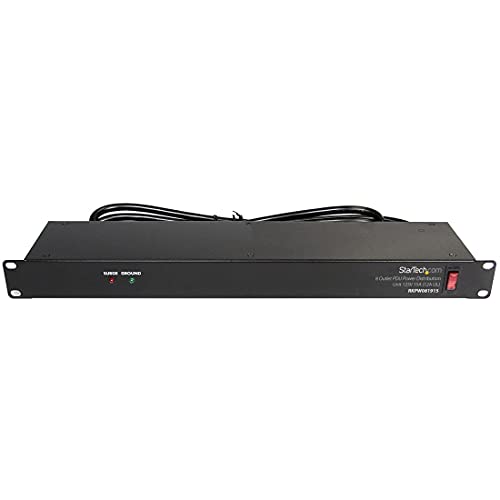
Check the mounting width, rack depth, orientation, and required rack units before ordering. The StarTech 8-Outlet 1U PDU, 120V/15A, Surge fits standard 19-inch racks that are at least four inches deep, while some units can also mount vertically or on a wall.
Measure the available space rather than assuming every 1U product is interchangeable. A horizontal 1U unit works well when front access matters, but a vertical installation may preserve horizontal rack space in a crowded cabinet.
2. Electrical Rating and Load Capacity
Voltage and amperage determine how much equipment the protector can safely support. A 120-volt, 15-amp circuit has a theoretical capacity of 1,800 watts, but continuous server loads should remain comfortably below that limit.
Add the rated wattage of every connected device, including servers, monitors, switches, storage units, and accessories. For a continuously operating installation, keeping the calculated load near 80 percent or less leaves useful headroom for startup demand and future equipment.
Do not confuse outlet quantity with electrical capacity. Twelve outlets do not make a circuit stronger than eight outlets, and plugging a power-hungry device into a crowded strip can still trip the breaker.
3. Surge Energy Rating
The joule rating describes how much surge energy a protector is designed to absorb before its protective components wear out. A higher figure generally provides more energy-handling capacity, though it does not guarantee protection against every lightning event.
Compare joule ratings alongside the intended environment and connected equipment. The Eaton Tripp Lite IBAR12ULTRA 12 Outlet 1U offers a substantially higher network-grade rating than basic office strips, making it more suitable for valuable rack hardware and electrically noisy areas.
Use the rating as one part of the decision, not as a standalone score. A properly grounded circuit, building-level surge protection, and safe cabling remain important because a power strip cannot eliminate every electrical threat.
4. Outlet Layout and Spacing
Outlet count matters when several servers, network devices, and accessories share one connection point. However, spacing can matter just as much because oversized adapters may block neighboring sockets.
Rack PDUs often place outlets across the front, rear, or both sides, allowing short equipment cords to reach nearby connections. The Eaton Tripp Lite IBAR12ULTRA 12 Outlet 1U uses separate front and rear outlet groups, which can make a dense rack easier to arrange.
Sketch your equipment layout before buying and count plugs rather than devices. A server with redundant power supplies may need two outlets, while a switch, modem, monitor, and storage enclosure can quickly consume the remaining capacity.
5. Circuit Breaker and Reset Controls
A resettable circuit breaker interrupts power when connected equipment draws too much current. This protects the strip and circuit from overloads, although it does not replace a correctly sized building circuit or an uninterruptible power supply.
Look for an accessible breaker, power switch, and reset control that you can operate without unplugging the rack. The StarTech 8-Outlet 1U PDU, 120V/15A, Surge includes a built-in breaker with power and reset switches, simplifying recovery after an overload.
Keep the protector below its continuous load limit even if the breaker has not tripped. If a breaker activates repeatedly, remove equipment and investigate the load rather than repeatedly resetting it.
6. Filtering and Electrical Noise Control
Some protectors include filtering that reduces electromagnetic or radio-frequency interference traveling through the power line. This feature can matter for audio equipment, older electronics, and installations where switching power supplies create noticeable noise.
Compare whether a product merely provides surge suppression or also separates connected devices into filtered banks. The Eaton Tripp Lite IBAR12ULTRA 12 Outlet 1U uses isolated filter banks designed to limit line noise between groups of connected equipment.
Filtering should not be treated as a substitute for clean circuit design. If servers reboot, networking drops, or audio equipment hums, check grounding, cable routing, and the building supply before blaming the power strip alone.
7. Cord Length and Plug Orientation
Cord length determines whether the protector can reach a wall receptacle without an unsafe extension chain. A longer integrated cable can also make a mobile rack or workbench easier to reposition during installation.
Check the plug shape when the receptacle sits behind furniture or inside a shallow cabinet. Flat or angled plugs can reduce clearance problems, while a straight plug may be preferable when the outlet is open and cable strain matters.
Choose enough length for a relaxed route with no sharp bends or tension. Avoid connecting surge protectors to one another, since daisy chaining complicates load calculations and can create avoidable safety concerns.
8. Status Indicators and Safety Certifications
Status lights provide a quick way to see whether the unit has power, whether surge protection remains active, and whether a wiring fault is detected. These indicators are especially helpful when the protector sits behind a rack or desk.
Safety certification is another useful screening tool, particularly for equipment operating continuously. The Belkin 8-Outlet Surge Protector w/ 8 AC Outlets is described as independently lab tested and UL safety certified, while its outlet safety covers help close unused sockets.
Read the indicator instructions because a dark light can mean different things across designs. Test the wall receptacle and confirm grounding before connecting expensive equipment, especially in older buildings.
9. Warranty and Connected Equipment Coverage
A warranty can indicate how confidently a manufacturer stands behind the product, but coverage terms vary widely. Review exclusions, registration requirements, claim deadlines, and whether connected equipment coverage applies to business or server use.
Do not assume a large coverage figure guarantees reimbursement after a failure. Documentation, proof of proper installation, and evidence that the equipment was connected according to instructions may be required.
For a server room, prioritize clear support procedures and durable construction over promotional wording. Keep purchase records, installation details, and equipment serial numbers together so any future claim is easier to document.
10. Matching the Protector to the Installation
The best choice depends on whether the protector serves a rack, home office, workstation, or small communications cabinet. Rack equipment benefits from organized mounting and short cable paths, while a desktop setup may value flexible placement and widely spaced outlets.
Use this quick comparison when narrowing the options:
| Installation need | Useful feature | What to verify |
|---|---|---|
| Standard server rack | 1U rackmount chassis | Rack width, depth, and mounting hardware |
| Dense equipment layout | Multiple outlet groups | Front and rear access, plug spacing |
| Office workstation | Long cord and spaced outlets | Plug orientation and safety certification |
| Electrical noise concern | Isolated filtering | Filtering description and diagnostic lights |
For additional workspace planning, the guide to desk grommet outlets may help when power access needs to be routed through a work surface. Make the electrical plan first, then choose the protector that fits it.
Why You Should Trust Us
We shortlisted these products by comparing manufacturer-stated specifications, outlet layouts, rack compatibility, cord design, safety features, protection ratings, and warranty information. We also considered whether each model suits a server rack or a less demanding office installation.
Our comparison separates verified features from assumptions. We do not claim to have physically tested these products, and we avoid presenting dynamic marketplace information as permanent evidence of performance.
Because availability and specifications can change, the comparison should be checked against the current product listing before purchase. That transparent approach helps keep recommendations useful across different installations and refresh cycles.
Final Thoughts on Best Surge Protectors for Servers
Our best overall choice is the Eaton Tripp Lite IBAR12ULTRA 12 Outlet 1U because it combines rack compatibility, twelve outlets, isolated filter banks, diagnostic lights, a resettable breaker, and a durable metal housing. Its long cord and flexible mounting options also help when a cabinet layout changes.
For a balanced rack installation, consider the Uncategorized equipment guides alongside the standing desk cable management guide. Those resources can help coordinate power placement with the rest of your workspace.
Our best value pick is the Belkin 8-Outlet Surge Protector w/ 8 AC Outlets because it provides widely spaced outlets, a long flat-plug cord, safety covers, UL certification, and substantial surge energy capacity in a compact format.
For a smaller workstation or network corner, the Belkin Surge Protector Power Strip 6 AC Outlet is a practical specific-use option. Its long cable and six outlets suit monitors, laptops, small networking devices, and peripherals where rack mounting is unnecessary.
Choose the StarTech 8-Outlet 1U PDU, 120V/15A, Surge when straightforward rack installation, steel construction, LED indicators, and a six-foot integrated cord matter most. The Belkin 12-Outlet Surge Protector Power Strip w/ 12 is better suited to a desk or workbench that needs many widely spaced connections.
FAQs About Best Surge Protectors for Servers
Do servers really need a dedicated surge protector?
A dedicated protector can organize connections and add surge suppression, overload protection, and status monitoring. It cannot replace an uninterruptible power supply when continued operation during an outage is essential.
Can a surge protector prevent server downtime?
It may reduce damage from certain spikes and overloads, but it does not keep equipment running during a power failure. Pair it with properly configured backup power when uptime requirements are strict.
Are rackmount PDUs safer than desktop power strips?
Rackmount PDUs are not automatically safer, but they often provide better organization and more suitable installation for server cabinets. Safety depends on correct electrical loading, grounding, certification, and proper use.
What does a joule rating tell me?
The joule rating indicates how much surge energy protective components are designed to absorb. Compare it with the equipment value and installation risk, while remembering that grounding and building protection remain important.
Should every server use a separate outlet?
Not necessarily, because a properly rated PDU can safely distribute power across several devices. Calculate the total continuous load and leave headroom for startup demand and additional equipment.
Can I connect a UPS to a surge protector?
Follow the UPS manufacturer instructions because connection rules differ by design. In many installations, equipment connects to the UPS output directly, avoiding unnecessary chains of protective strips.
Are filtered outlets useful for networking equipment?
Filtering may help reduce certain forms of conducted electrical noise, although networking reliability also depends on grounding and data cabling. Treat filtering as an additional feature rather than a complete power-quality solution.
What is the top-rated option among Best Surge Protectors for Servers in 2026?
The Eaton Tripp Lite IBAR12ULTRA 12 Outlet 1U stands out for its rackmount design, high surge capacity, isolated filter banks, and diagnostic indicators. Your final choice should still reflect the rack dimensions and electrical load.
How do I know whether a PDU fits my rack?
Confirm the rack width, mounting type, available depth, and open rack-unit space. Also check whether the included ears and hardware support your cabinet configuration before installing equipment.
Can I use a household surge strip for a server?
A household strip may work for a light workstation, but it can be awkward in a rack and may provide fewer management features. Server cabinets usually benefit from a purpose-built rackmount unit with clear load and status information.




