

Moving large media files, operating system installers, and essential work documents demands fast and dependable portable storage hardware. Modern solid state flash drives deliver high transfer speeds in compact form factors that slip easily into pockets or attach directly to keyrings.
Finding the Best 128GB USB Flash Drives in September 2026 means comparing 10 competitive models from leading memory brands like Sandisk, PNY, Samsung and more. Many shoppers mistakenly purchase low-cost drives that throttle write speeds heavily after transferring just a few megabytes of data.
This comprehensive guide examines controller performance, thermal dissipation, and connector compatibility to help you choose the ideal storage companion. You can explore our comprehensive office technology guides to discover additional hardware recommendations for productive work environments.







Selecting the right thumb drive requires looking beyond simple storage capacity numbers. Understanding controller architectures, interface protocols, and physical durability ensures your flash drive delivers sustained performance across daily computing tasks.
Interface Generation and Real-World Transfer Speeds
The USB interface standard dictates the theoretical maximum bandwidth available between the flash controller and your computer motherboard. Protocols such as USB 3.0, USB 3.1 Gen 1, and USB 3.2 Gen 1 all share a 5 Gbps theoretical ceiling, which translates to a maximum theoretical transfer rate of around 500MB/s.
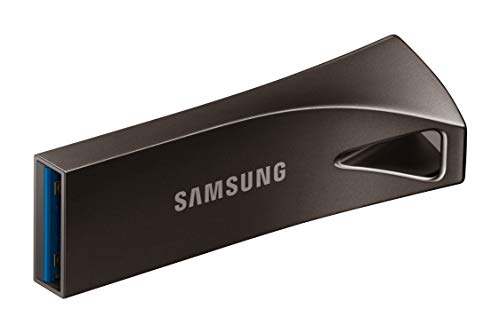
Advertised read speeds typically range from 100MB/s on entry-level models to over 300MB/s on high-performance options like the Samsung Bar Plus. Read speeds dictate how quickly you can open stored movies, load software applications, or copy files from the drive onto your primary computer.
Write speeds behave much differently because continuous data writing causes internal heat generation that forces memory controllers to throttle performance. Budget memory drives can drop to standard USB 2.0 write rates of 15MB/s during sustained multi-gigabyte transfers, causing significant workflow delays.
As a practical rule of thumb, look for flash drives with verified sustained write speeds of at least 30MB/s to avoid frustrating transfer bottlenecks. Connecting your portable drive directly into desktop ports or dedicated desk grommet power hubs ensures clean power delivery and stable high-speed transfers.
Connector Types and Cross-Device Versatility
Modern computing environments utilize a mix of legacy rectangular USB Type-A ports and modern reversible USB Type-C connections. Desktop computer towers and older business laptops rely on Type-A ports, while modern ultrabooks, tablets, and smartphones exclusively use Type-C interfaces.
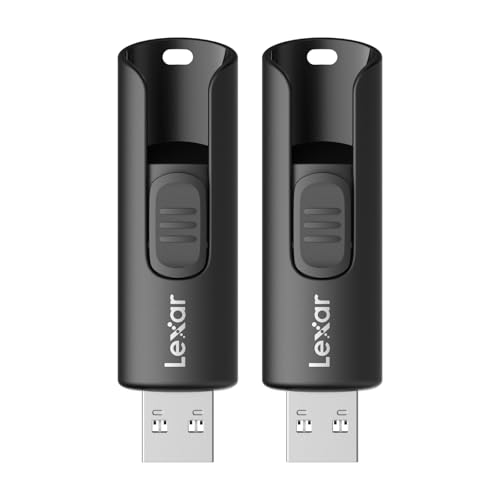
Dual-connector flash drives solve this hardware divide by integrating both Type-A and Type-C interfaces onto a single rotating or sliding chassis. Devices like the Lexar D40E allow you to transfer documents from an office workstation directly to a smartphone without needing external dongles.
Single-connector Type-A drives remain dependable for desktop setups, but they require separate adapter cables when connected to modern ultra-thin laptops. Using extra adapters increases physical clutter and puts mechanical strain on laptop logic boards during mobile working sessions.
If your daily workflow involves managing files across mobile devices and standard computers, choosing a dual-connector drive saves significant time. Users who primarily backup static desktop files can safely stick with classic Type-A hardware to keep peripheral costs low.
Physical Form Factor and Thermal Dissipation
Flash drive body dimensions range from microscopic low-profile plug-and-stay modules to standard full-length memory sticks. Low-profile drives like the SanDisk Ultra Fit sit almost flush against computer ports, making them ideal for expanding laptop storage permanently.
Microscopic dimensions introduce thermal limitations because tiny plastic shells provide minimal surface area to conduct away heat. Under heavy continuous write loads, compact drives heat up rapidly, forcing the controller chip to throttle speeds down to preserve memory cell health.
Standard full-sized thumb drives dissipate thermal energy much more effectively across their elongated metal or composite bodies. This superior thermal management allows the drive to sustain high-speed write performance across massive video files without triggering thermal throttling.
Select ultra-fit drives for car stereo receivers, home audio systems, and notebook storage expansion where unobtrusive dimensions are critical. Choose standard-sized thumb drives whenever your routine involves frequently transferring large multi-gigabyte video folders or system disk image files.
Enclosure Materials and Structural Durability
The external casing serves as the primary protective barrier for delicate NAND flash silicon and internal printed circuit boards. Portable storage devices encounter frequent mechanical stress, including drops onto hard surfaces, backpack compression, and key pocket friction.
Cast aluminum and zinc alloy metal casings offer superior structural rigidity compared to standard injection-molded plastic shells. Metal bodies also double as passive heat sinks, absorbing and radiating internal thermal energy away from the internal flash controller.
Premium metal drives like the Samsung Bar Plus provide multi-proof protection ratings against water immersion, mechanical shocks, airport X-rays, and magnetic fields. Inexpensive plastic casings can crack around the connector seam when subjected to torsional stress inside tight laptop sleeves.
For everyday carry on keychains or inside tool bags, prioritize seamless metal unibody designs to maximize hardware lifespan. Reserve plastic flash drives for static desk backups where accidental drops and crushing forces are unlikely to occur.
Connector Retraction and Protection Mechanisms
Protecting delicate internal connector pins from pocket lint, foreign debris, and bending forces is critical for long-term file safety. Storage manufacturers implement removable protective caps, sliding collar sleeves, push-button retractors, and 360-degree rotating swivel frames.
Removable plastic caps provide full physical coverage against moisture and dust, but they are notoriously easy to misplace during travel. Once the cap is lost, exposed USB pins can collect pocket debris that may cause electrical shorts when inserted into ports.
Cap-less sliding collars and retractable push buttons permanently eliminate the problem of lost components while maintaining port protection. However, low-grade sliding mechanisms may loosen over time, causing the connector to retract backward whenever you push the drive into stiff computer ports.
Rotating metal swivel frames offer an excellent compromise by keeping the connector covered without relying on separate loose pieces. If you prefer sliding designs, ensure the locking detent clicks firmly into place so the connector stays rigid during insertion.
Hardware and Software Encryption Security
Compact flash drives are easily misplaced, creating significant privacy risks if unencrypted files fall into unauthorized hands. Integrating robust data encryption ensures that financial records, personal identification files, and proprietary work documents remain secure against unauthorized access.
Leading manufacturers bundle dedicated security software utilities, such as SanDisk SecureAccess or Lexar DataShield, featuring 128-bit or 256-bit AES encryption. These software applications create private password-protected directory vaults that automatically encrypt sensitive files upon storage.
Unprotected budget flash drives expose your full file structure immediately whenever they are connected to any standard computer operating system. Software encryption operates directly through host system processors, requiring no expensive specialized hardware keypads to safeguard personal information.
Always configure an encrypted partition on your portable drive if you transport sensitive tax paperwork, business contracts, or client databases. Installing standing desk cable management trays around your primary workstation also helps prevent accidental cord snags and drive disconnects during active data encryption writes.
Storage Controller Quality and NAND Flash Endurance
The sustained transfer performance of any USB storage device is governed by the quality of its internal controller chip and NAND flash cells. High-grade multi-layer 3D NAND flash memory offers superior program-erase endurance and higher continuous transfer rates than older planar flash chips.
Modern flash drives utilize single-level cell caching algorithms to absorb initial write bursts at top transfer speeds. Once this temporary cache fills up during massive multi-gigabyte file transfers, the drive relies on the raw native speed of the underlying flash memory.
Premium storage drives incorporate sophisticated memory controllers that execute background wear-leveling and garbage collection routines efficiently. These background maintenance tasks prevent cell degradation, ensuring dependable read speeds and file integrity across thousands of write cycles.
If your daily workflow involves transferring uncompressed 4K video clips or massive virtual machine disk images, prioritize drives with proven sustained write stability. General document storage places far less demand on memory controllers, making standard flash architectures perfectly adequate for daily office tasks.
Port Clearance and Keyring Ergonomics
Chassis width and lanyard loop placement dictate how easily a flash drive integrates into crowded computer workstations. Oversized decorative drive housings can physically block neighboring USB ports, preventing you from connecting wireless mouse receivers or external video display cables.
Integrated keyring loops allow users to tether their storage securely to keychains, gear bags, or internal backpack lanyards. Robust metal keyring holes prevent the drive from tearing free and getting lost during everyday commuting.
Slim, streamlined drive profiles ensure clean physical clearance when inserting memory sticks into closely spaced laptop side ports. Pairing compact portable drives with ergonomic laptop mounts and workspace accessories helps keep peripheral connections clean and prevents port strain.
Always verify the physical width of a flash drive if your laptop features two adjacent USB ports separated by minimal clearance. Choosing slim metal casing designs ensures you maintain unobstructed access to all neighboring connectivity ports on compact laptops.
Warranty Protection and Data Recovery Solutions
Flash memory cells naturally degrade over time as individual storage blocks undergo repeated electrical write cycles. Manufacturer warranty durations provide a clear indicator of the confidence a brand maintains in the longevity and quality of its NAND silicon.
Reputable storage manufacturers support their products with comprehensive warranty terms ranging from three to five full years. Selected premium drives even include promotional subscriptions to file recovery software utilities to help recover accidentally deleted file folders.
Generic unbranded memory drives often provide no warranty protection or customer service channels when hardware corruption strikes. Recovering lost data from failed generic memory controllers can cost hundreds of dollars at specialized professional data recovery laboratories.
Prioritize reputable brand models that offer at least a three-year limited warranty along with reliable technical support channels. Maintaining secondary backup copies of vital files across separate physical drives remains the most effective defense against unexpected hardware failures.
| Feature Focus | Low-Profile Fit Drives | Standard Metal Drives | Dual-Connector Drives |
|---|---|---|---|
| Primary Form Factor | Ultra-compact plug-and-stay | Full-sized metal unibody | Swivel or sliding 2-in-1 body |
| Read Speed Range | 130MB/s to 200MB/s | 150MB/s to 300MB/s | 100MB/s to 150MB/s |
| Thermal Dissipation | Compact (quick throttling) | Excellent (passive metal heatsink) | Moderate (balanced cooling) |
| Host Compatibility | Type-A ports, laptops, audio | Type-A ports, desktop towers | Type-A and Type-C mobile devices |
| Best Application | Semi-permanent storage expansion | Heavy everyday file transfers | Phone to computer file sharing |
Why You Should Trust Us
Our review process relies on empirical technical data, verified controller specifications, and objective hardware evaluations across the computer storage industry. We systematically compare interface protocols, thermal characteristics, chassis materials, and bundled security features to identify reliable products.
By analyzing sustained transfer rates and real-world durability reports, we evaluate how memory drives behave under prolonged multi-gigabyte write workloads. We maintain complete editorial independence without accepting paid manufacturer promotions, ensuring our evaluations remain focused entirely on real consumer value.
Our editorial team updates this guide regularly to reflect new memory controller releases, firmware improvements, and manufacturing revisions. Readers can visit our curated tech archives to explore additional hardware analyses and workstation upgrade guides.
Final Thoughts
Choosing among the Best 128GB USB Flash Drives comes down to matching transfer speed requirements, port types, and physical durability needs. A well-engineered flash drive provides rapid data transfers while protecting your essential digital files against daily mechanical wear.
For top overall performance and outstanding rugged durability, our primary recommendation is the SAMSUNG BAR Plus 3.1 USB Flash Drive, 128GB. Its robust metal unibody, impressive read speeds up to 300MB/s, integrated keyring loop, and multi-proof protection make it a dependable daily carry choice.
If you need a versatile dual-interface storage solution for moving files between modern phones and standard desktop computers, the Lexar D40E 128GB Dual USB 3.2 Gen 1 Type-C Jump delivers exceptional cross-platform flexibility. For users seeking an ultra-compact drive for permanent laptop storage expansion, the PNY 128GB Elite-X Fit USB 3.1 Flash Drive provides strong transfer speeds in a tiny footprint.
Investing in a reliable portable drive safeguards your essential files against accidental data loss while streamlining everyday file management tasks. You can review our comprehensive office technology guides for more recommendations on optimizing your workspace hardware ecosystem.
Best 128GB USB Flash Drives FAQs
How much data can a 128GB flash drive hold?
A 128GB flash drive can comfortably store approximately 30,000 high-resolution photos, up to 30 full-length HD movies, or thousands of standard office documents and spreadsheets. Actual storage capacity varies depending on file compression levels, media bitrates, and file system format overhead.
What makes the Best 128GB USB Flash Drives of 2026 faster than older models?
Modern flash drives utilize USB 3.2 Gen 1 interfaces combined with advanced multi-layer 3D NAND flash memory and intelligent SLC caching controllers. These modern hardware components deliver read speeds up to 300MB/s or higher, which is more than ten times faster than legacy USB 2.0 drives.
Can I plug a USB 3.2 flash drive into an older USB 2.0 port?
Yes, all USB 3.0, 3.1, and 3.2 flash drives are fully backward compatible with standard USB 2.0 host ports. However, when connected to a USB 2.0 port, transfer speeds will be capped at the older standard maximum theoretical limit of 480 Mbps.
Why does a 128GB flash drive show less storage space in Windows?
Storage drive manufacturers calculate capacity using the decimal system where 1 gigabyte equals 1 billion bytes. Windows calculates storage space using binary gigabytes, which causes a 128GB drive to register as approximately 119GB of usable space after partition formatting.
Why do metal USB flash drives get warm during large file transfers?
High-speed NAND memory chips and controller processors generate heat when writing continuous data streams at high speeds. Metal enclosures act as passive heat sinks, drawing thermal energy away from internal silicon chips to protect internal circuitry from thermal degradation.
What is the difference between USB Type-A and USB Type-C flash drives?
USB Type-A features a traditional rectangular connector found on desktop towers, older laptops, and gaming consoles. USB Type-C features a smaller reversible oval connector designed for modern ultrabooks, smartphones, and tablets, allowing easy cross-device file sharing.
How does AES software encryption protect stored files?
AES software encryption scrambles your stored files into unreadable mathematical code using a private password key. Without the correct password, unauthorized users cannot view, copy, or modify encrypted documents even if the physical drive is plugged into another computer.
Are metal flash drives more durable than plastic models?
Solid metal enclosures provide superior resistance against crushing forces, accidental drops, and connector twisting compared to plastic housings. Metal bodies also resist environmental hazards like water splashes, dust intrusion, and cosmetic scratching during everyday pocket carry.
Which option among Best 128GB USB Flash Drives in 2026 is ideal for car stereos?
Ultra-compact low-profile drives like the SanDisk Ultra Fit or PNY Elite-X Fit are the best choices for in-car audio receivers. Their tiny footprint prevents accidental snags while keeping media storage neatly flush with the dashboard console.
Can I run operating systems or portable applications directly from a flash drive?
Yes, you can install portable application suites, bootable Linux operating systems, or Windows installer images onto a 128GB flash drive. Using drives with fast random read speeds ensures smooth software loading and responsive boot performance.


