

Modern workstation setups demand hardware that balances physical tactile performance with striking visual aesthetics. Choosing hardware with integrated display screens and vivid keycap legends changes how your workspace feels and operates daily.
While standard computer peripherals focus strictly on standard input, recent innovations introduce full-color GIF screens, vibrant backlighting, and crisp laser-etched legends. Desk workers often struggle to balance visual appeal with structural durability and typing comfort across 5 competing models in September 2026.
This detailed guide analyzes how custom visual elements integrate into premium mechanical keyboards without compromising ergonomic typing standards. Pair your visual workstation upgrades with proper desk accessories like our recommended standing desk cable management systems for an organized desktop footprint.



Integrated Color Multimedia Displays and Custom GIF Playback
Dedicated multimedia display screens introduce real-time visual feedback and custom graphics directly onto your keyboard frame. Small oblique-angled screens present animated GIFs, system metrics, and connection modes without taking up primary monitor space.
When evaluating integrated displays, check software compatibility alongside screen resolution and refresh rates. Quality models offer specialized configuration software to upload personal image files, monitor battery percentages, and display active operating system profiles.
Make sure the onboard display angle matches your natural sitting posture to avoid awkward head tilting during long typing sessions. A display tilted at an upward angle ensures high visual readability while your hands rest naturally over the home row.
Keycap Legend Crispness and High-Contrast Visual Legibility
Clear legend printing directly impacts typing speed, aesthetic cleanliness, and low-light visual recognition. Laser-etched and double-shot injection molded legends resist daily finger oil abrasion while maintaining razor-sharp character definition over millions of keystrokes.
High-contrast lettering ensures that key markings remain legible under varying ambient office lighting conditions. White lettering against deep anodized plates or high-contrast dark keycaps prevents eye strain during intensive documentation work.
Compare keycap materials carefully before finalizing your peripheral purchase. PBT plastics provide durable matte textures that resist greasy shine, whereas laser-etched ABS keycaps offer crisp edges and distinct status visibility.
Backlighting Profiles, Optical Diffusers, and Visual Illumination
Backlighting systems provide essential illumination while setting the aesthetic mood for your entire desktop workspace. Modern boards offer multiple lighting zones, dynamic RGB wave animations, and solid single-color modes suited for corporate desks.
Review the optical diffuser design and LED placement beneath each mechanical switch housing. South-facing LED switches provide superior visual brightness when paired with custom artisan keycaps and thick molded plastic profiles.
Balance visual lighting modes with overall power delivery and ambient eye comfort. Investing in balanced desk illumination such as office floor lamps helps reduce glare from high-brightness keyboard LEDs.
Anodized Metal Top Plates and Structural Desk Presence
The visual silhouette of a keyboard relies heavily on its structural frame materials and surface finishing. Anodized aluminum top plates provide a sleek metallic sheen that complements minimalist modern office hardware.
Metal top plates deliver more than just attractive surface reflections across your desktop. They add substantial mass that prevents unwanted desk sliding while typing at rapid speeds throughout the workday.
Look for bead-blasted or brushed surface treatments that actively resist fingerprints and minor surface scuffs. A rigid metallic foundation keeps key switches perfectly aligned, preserving uniform key gaps and an orderly visual grid.
Acoustic Dampening and Switch Sound Profiles
Visual elegance should always be matched with refined acoustic performance during daily typing sessions. Gasket-mounted keyboard designs isolate the interior switch plate with soft silicone dampers to absorb harsh mechanical vibrations.
Compare linear and tactile switch profiles depending on your shared office environment. Silent linear switches eliminate sharp clicking noises, while tactile brown switches deliver satisfying physical feedback without disrupting nearby coworkers.
A quiet, vibration-free typing experience prevents audio distractions in open working spaces. Pairing quiet acoustic switches with office wall panels creates an optimal quiet working environment.
Layout Proportions, Ergonomic Profiles, and Desk Space Efficiency
Keyboard layout choices define both visual proportions and physical desk organization. Compact 75 percent layouts retain crucial function rows and directional navigation keys while saving valuable mouse movement space.
Full-size standard keyboards offer dedicated numeric keypads and dedicated quick-access multimedia keys. These larger layouts cater specifically to data entry professionals who require rapid mathematical input and instant volume adjustments.
Evaluate your available desk surface before choosing between a space-saving compact board and a full-size layout. Compact layouts create a visually uncluttered desk surface that integrates smoothly with monitor mounts and desk pads.
Dedicated Hardware Shortcuts and Integrated Status LEDs
Dedicated visual indicators for Caps Lock, Num Lock, and Scroll Lock prevent costly typing mistakes. Tasteful LED indicator lights built directly into key switch housings give immediate confirmation without distracting peripheral vision.
Additional dedicated buttons for calculator launching, volume muting, and web navigation streamline daily office tasks. Having dedicated hardware controls eliminates complex multi-key combinations during fast-paced work sessions.
Check whether shortcut visual icons are clearly labeled on the secondary keycap legends. Clear visual iconography saves time and reduces learning curves when switching between different computer operating systems.
Hot-Swappable PCB Versatility and Long-Term Customization
Hot-swappable circuit boards allow users to change mechanical switches without soldering iron equipment. This mechanical versatility lets you customize typing resistance and acoustic feedback across different key zones.
Look for five-pin universal switch sockets that support both plate-mounted and PCB-mounted switch variants. Universal compatibility ensures effortless upgrades with custom aftermarket switches whenever personal typing preferences evolve.
Hot-swap capability extends the usable lifespan of your keyboard investment significantly. If a single switch fails over years of heavy use, you can replace it in seconds without replacing the entire board.
Visual and Functional Feature Comparison
Comparing physical specifications side by side clarifies trade-offs between layout size, switch style, and visual display options. Understanding how these features interact helps you choose hardware that fits your daily typing workflow.
| Feature Category | Compact Multimedia Display Boards | Full-Size Mechanical Office Boards | Ultra-Slim Scissor Switch Boards |
|---|---|---|---|
| Visual Interface | Onboard color GIF screen and multi-zone RGB | Integrated key-cap status LEDs and anodized finish | Low-profile status LEDs and slim silhouette |
| Switch Mechanism | Hot-swappable mechanical POM switches | Factory-lubricated mechanical switches | Scissor-action SX membrane switches |
| Desk Footprint | Space-saving 75 percent layout | Standard full-size 100 percent layout | Full-size slim profile layout |
| Acoustic Profile | Gasket-mounted deep acoustic dampening | Linear silent or tactile sound profiles | Whisper-quiet low travel keystrokes |
Reviewing these structural specifications ensures your selected model aligns with both your workspace design and daily typing volume.
Why You Should Trust Us
Our review team evaluates computer peripherals through rigorous spec analysis, manufacturer engineering documentation, and verified user feedback. We systematically examine build materials, switch longevity ratings, keycap printing durability, and display software compatibility.
We maintain complete editorial independence and do not accept promotional payments to favor specific peripheral brands. Our comparative rankings rely on objective performance benchmarks, structural rigidity assessments, and real-world workspace usability.
Our database updates continuously to reflect current manufacturing revisions and firmware capabilities across all featured models. This persistent data verification ensures that our recommendations deliver lasting value for modern productive environments.
Final Thoughts
Finding the ideal keyboard requires balancing personalized visual flair with rock-solid typing ergonomics. Whether you prefer custom animated graphics or minimalist office refinement, today’s hardware market offers versatile choices for every desktop aesthetic.
For users who desire interactive visual graphics and customizable screens, the Womier SK80 75% Keyboard with Color Multimedia serves as our top recommendation. Its integrated color screen, vibrant backlighting modes, and gasket-mounted acoustic design deliver exceptional custom flair.
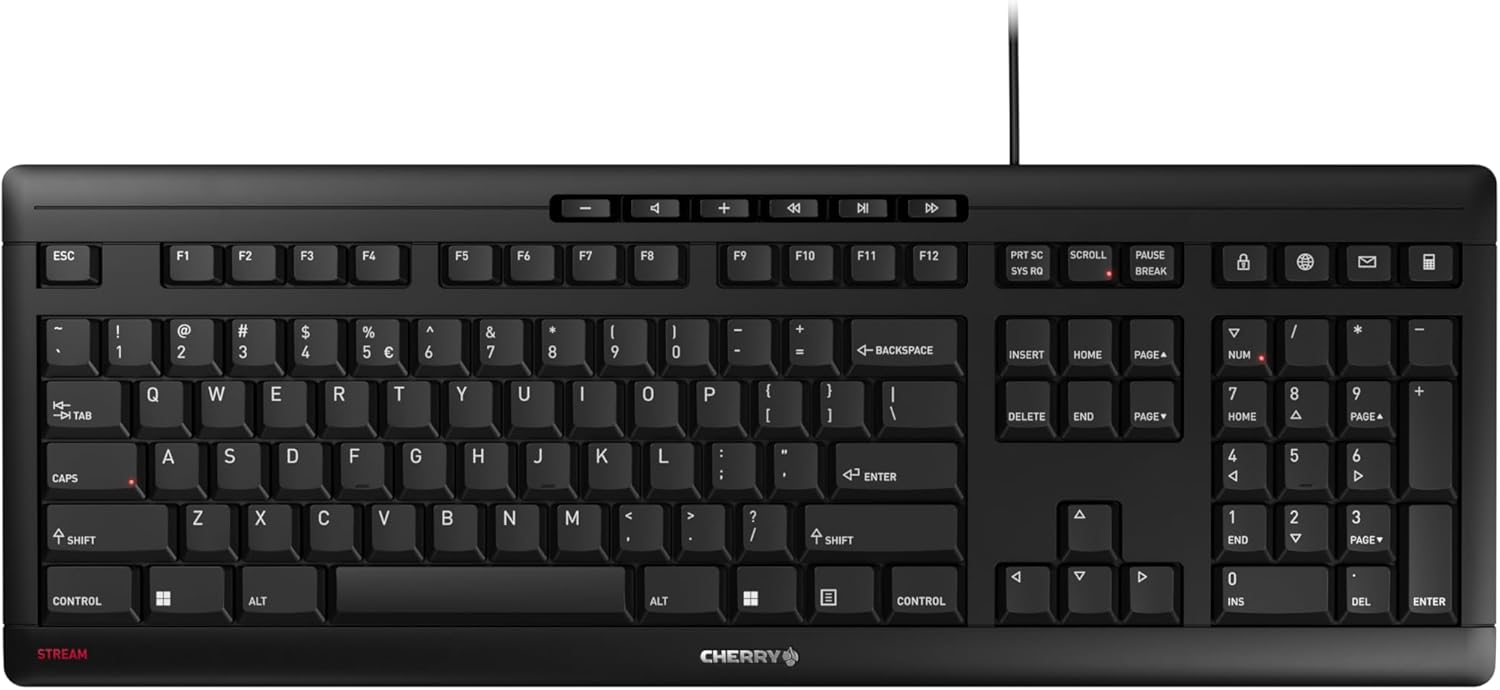
If you require a whisper-quiet, ultra-slim profile for professional office tasks, the Cherry Stream Keyboard | Wired Slim Whisper Quiet represents outstanding daily value. Its scissor-switch mechanism and clear status LEDs provide reliable performance without visual clutter.
For heavy typists demanding long-lasting mechanical switches in a sleek metallic housing, the Cherry KC 200 MX Wired Mechanical Office Keyboard excels as our premier office mechanical pick. Explore our comprehensive furniture and comfort guide to build an ergonomic workstation around your chosen keyboard.
Frequently Asked Questions
What makes Best Images for Keyboards important for desktop aesthetics in 2026?
Visual aesthetics and custom displays personalize your workstation while providing practical feedback. Upgrading your visual desk layout alongside ergonomics like laptop mounts and monitor arms creates an organized, enjoyable environment.
How do integrated color multimedia displays function on modern mechanical keyboards?
Integrated color screens connect to onboard microcontrollers to show system stats, battery levels, and custom animations. Users can configure display settings and upload image files through companion desktop software.
Can you upload custom animated GIF files to keyboard display screens?
Yes, compatible keyboards allow users to import animated GIF files directly through their companion driver software. These animations loop smoothly on the integrated display to showcase personal artwork or custom status graphics.
How do laser-etched keycap legends compare to double-shot keycaps for visual longevity?
Laser-etched keycaps burn crisp character outlines into the surface that resist daily wear. Double-shot keycaps mold two plastic layers together, making legend fading virtually impossible over millions of keystrokes.
What is the visual and acoustic difference between linear silent red switches and tactile brown switches?
Silent red switches offer smooth travel without audible clicks, making them visually discreet and acoustically quiet in shared offices. Tactile brown switches provide a subtle physical bump at actuation for precise typing confirmation without noisy clicks.
Why are gasket mount keyboard designs preferred for acoustic and visual comfort?
Gasket mount designs suspend the internal switch plate using flexible silicone or foam pads. This mounting style reduces harsh vibrations, creates a softer typing bounce, and produces a deeper, cleaner sound profile.
How do status LED indicator lights improve daily office typing productivity?
Integrated status LEDs provide immediate visual confirmation for active lock keys directly beneath your fingers. This visible feedback prevents capitalization errors and unwanted numeric keypad mistakes during rapid data entry.
Are 75 percent keyboard layouts practical for full-time office work?
Compact 75 percent keyboards preserve essential arrow keys, navigation buttons, and top-row function keys in a space-saving frame. They free up valuable desktop space for mouse movement while keeping all critical shortcut keys accessible.
How does an anodized metal top plate enhance keyboard durability?
Anodized metal plates undergo electrochemical finishing to produce a corrosion-resistant and scratch-resistant surface. This rigid plate reinforces the overall chassis, preventing structural flexing while maintaining a premium metallic look.
Is hot-swappable switch support necessary for everyday keyboard users?
Hot-swap support is not mandatory for casual typing, but it offers immense long-term value and customization freedom. It allows you to swap faulty switches instantly or test different switch weights without buying a new keyboard.


