Finding the right desk clock sounds simple until you start browsing Amazon and realize how many options exist — analog dials, digital LED displays, wood-finished models, and compact travel-style units. For a home office or shared workspace, the best picks share a few traits: they’re easy to glance at, they don’t distract you with ticking, and they fit into a small footprint without stealing space from your keyboard or monitor stand. Based on the options currently available, a wooden digital model with large numbers and a quiet movement is the safest all-around choice for most desks, while analog and premium wood options suit people who want a quieter or more decorative look.




Top Picks at a Glance
Here’s a quick summary of 7 desk clocks worth considering, organized by the use-case each one fits best. Every model here is a genuine option for a desk or dual-purpose surface, not just a bedside table.
- Best Overall: DreamSky Wooden Digital Desk Clock with Large Numbers
- Best Budget: Amazon Basics Small Digital Oval Clock
- Best Premium: AYRELY Handcrafted Solid Wood Desk Clock
- Best Silent Analog: AYRELY 4.5″ Analog Retro Desk Clock
- Best for Easy Reading: Peakeep Large Display Digital Clock
- Best for Style: AYRELY 5.3″ Vintage Metal Analog Clock
- Best Compact Multi-Feature: 3-in-1 Compact Digital Clock
Analog vs Digital Desk Clocks: Which Fits Your Desk?
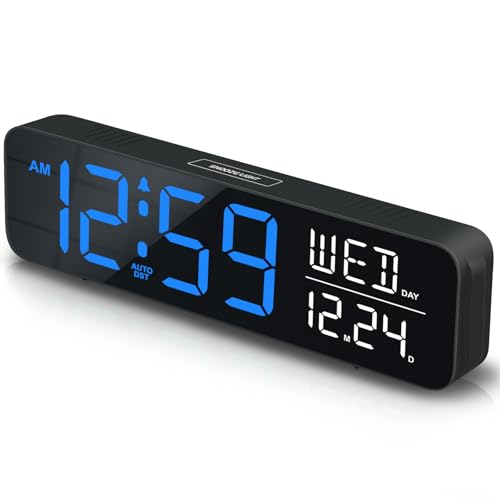
The first real decision when shopping is display type. A digital clock shows the time in large, easy-to-read numbers, and many models add extras like temperature or day-of-week readouts. That makes them a strong fit for anyone who wants to check the time in a split second during a video call or between tasks, without squinting at small hands on a dial.
An analog option, on the other hand, uses a traditional face with hour, minute, and sometimes second hands. These tend to look more decorative and less “electronic,” which appeals to people who want their workspace to feel calm rather than lit up with a glowing screen. The trade-off is that reading an analog dial takes a fraction of a second longer, and small units can be harder to read from across a room.
Neither style is objectively better — it comes down to how you use the space. If you’re in and out of meetings all day, a bold digital display, like the Peakeep large-display model, removes any guesswork. If your desk doubles as a reading or writing area where you want less visual noise, a quiet analog piece such as the AYRELY retro dial can blend in more naturally.
Why Silent, Non-Ticking Movement Matters in an Office
One detail that’s easy to overlook until it drives you slightly crazy is the ticking sound. Many analog models use a standard quartz movement that produces an audible tick every second — fine in a busy kitchen, but distracting in a quiet home office or during a recorded call. That’s why “silent” or “non-ticking” movement is one of the most useful phrases to look for when comparing a desk clock against another.
A silent movement typically uses a continuous sweep second hand instead of a stepping motion, which eliminates most of the audible clicking. It won’t necessarily be dead silent in an already-quiet room, but it’s a meaningful upgrade over a standard tick if you spend long hours at your desk. The AYRELY retro pick and a couple of other compact models on this list specifically advertise non-ticking movement, which is worth confirming in the product description before choosing an analog desk clock.
Digital displays sidestep the ticking issue entirely since there’s no mechanical movement to hear, which is one reason digital desk clocks are often the default recommendation for shared offices or open-plan workspaces where any extra noise gets noticed.
Power Source: Battery, USB, or Plug-In
These clocks are powered a few different ways, and the right choice depends on where your desk sits relative to an outlet. Battery-powered models — usually running on AA or AAA cells — are the most flexible because you can place one anywhere on the desk without worrying about cord length or outlet access. Most analog options and several compact digital models fall into this category.
USB-powered units plug into a computer, monitor, or USB hub, which is convenient if your desk already has a powered hub within reach. It also means one less battery to replace, though it ties the clock’s location to wherever the cable can comfortably reach. Some digital desk clocks, including wood-finished picks like the DreamSky model, offer both a battery backup and a USB or adapter option, giving you flexibility if the power goes out or the cable gets unplugged.
Plug-in models that rely on a wall adapter tend to offer brighter, more feature-rich displays, but they need a nearby outlet and a bit more cable management on a crowded desk. Before buying, it’s worth checking your setup: if outlets are scarce, a battery-powered desk clock will save you a headache.
Size and Footprint: Choosing the Right Fit for Small Desks
Desk space is usually at a premium, especially on smaller home-office desks or standing desks with limited surface area. A clock that’s too large will crowd your keyboard, monitor arm, or paperwork, while one that’s too small can be hard to glance at from across the desk. Most compact units measure somewhere between three and six inches across, which is enough to read comfortably without taking up excessive real estate.
If your workspace is on the smaller side, look for a listing described as “compact” or “small,” such as the 3-in-1 digital clock in this guide, which is built specifically to sit unobtrusively near a keyboard or monitor base. Larger digital desk clocks with big display panels are worth the extra footprint only if you genuinely need to read the time from a distance — for example, in a shared office where the same clock also serves nearby desks.
It also helps to think about height and shape. A slim, low-profile design is easier to tuck beside a monitor, while a taller mantel-style piece works better on a credenza or shelf just behind the desk rather than directly in your workspace.
Extra Features Worth Considering (Temperature, Calendar, Alarm)
Beyond simply telling time, many modern models pack in additional features. Indoor temperature readouts are common on digital displays and can be genuinely useful in an office that lacks a visible thermostat. Calendar or day-of-week readouts help on busy weeks when it’s easy to lose track of which day it is, especially for anyone working irregular hours or from home.
Alarm functions are worth a second thought for desk use specifically. If your clock will only ever sit in an office, a loud alarm may be unnecessary, and a simpler display-only model could be all you need. But if the same unit will also serve double duty near a couch, guest room, or home office that occasionally functions as a sleeping space, an alarm feature adds flexibility without extra cost.
USB charging ports built into some models are a nice bonus, letting you charge a phone or small accessory without hunting for another outlet. As with any added feature, it’s worth asking whether you’ll actually use it — a busy display loaded with buttons and modes can be more distracting than a clean, simple readout if you only ever check the time.
Style and Material: Matching Your Desk Clock to Your Workspace
A desk clock is one of the few accessories that sits in view all day, so material and finish matter more than they might for other office gear. Wood-finished models, like the DreamSky and AYRELY picks featured here, tend to suit warmer, natural-toned setups and blend well with wood desks or shelving. Metal and vintage-style analog pieces lean into a more retro or industrial look, which pairs nicely with a minimalist or classic office aesthetic.
Plastic and mirrored digital units are usually the most budget-friendly and often the most compact, prioritizing function over decor. If your workspace already has a defined style — modern minimalist, cozy wood-toned, or retro-industrial — choosing a clock that matches will make the whole desk feel more intentional rather than like a random collection of gadgets.
Color also plays a role. Muted tones like black, walnut, or brushed metal tend to age better visually than bright plastic finishes, which can look dated after a year or two of daily use.
Desk Clock vs Bedside Alarm Clock: What’s the Difference?
Browsing Amazon, you’ll notice a lot of overlap between products marketed as desk models and those marketed as bedside alarm clocks. In practice, many of these are the same type of device — a digital display with an alarm function — simply photographed and described for a different room. The key difference to watch for is size and lighting: units built specifically for nightstands sometimes have very dim, amber-toned displays meant to avoid disturbing sleep, which can be harder to read under bright office lighting.
When shopping, check whether the listing mentions adjustable brightness or a daytime-visible display. A clock designed primarily for a dark bedroom may look washed out under office lights, while one built for daytime use stays legible whether your workspace is bright or dim. Several of the picks in this guide, including the wood-finished and large-display digital models, are described as suitable for both living spaces and desks, making them safe choices either way.
How We Evaluated These Picks
Every product featured in this guide comes from actual Amazon listings, reviewed for how well it fits real office and home-office desk use rather than purely bedside or wall-mounted purposes. We looked at display type (analog or digital), movement noise where mentioned, power source, stated dimensions, extra features, and overall customer rating and review volume as a signal of real-world reliability. Listings marketed exclusively as wall clocks or purely as nightstand alarm clocks with no desk-appropriate sizing were excluded. This is a buying guide built from publicly available product data, not a hands-on lab test, so we encourage checking the latest specifications and current customer reviews directly on each Amazon listing before purchasing.
Common Mistakes When Buying a Desk Clock
- Choosing an analog model without checking whether it has a silent or non-ticking movement, then being distracted by ticking all day.
- Picking a unit that’s too large for the available desk space, crowding out the keyboard or monitor.
- Selecting a plug-in model without confirming there’s a nearby outlet, or a battery version without checking battery type and availability.
- Assuming every “alarm clock” listing is meant for a nightstand, when many work equally well — or better — on a desk.
- Overlooking display brightness on digital models, which can cause glare on video calls or feel too dim under bright office lighting.
- Buying based on looks alone without checking real customer reviews for accuracy, durability, and true noise level.
Desk Clock Buying Checklist
- Decide between analog and digital display based on how quickly you need to read the time.
- Confirm silent or non-ticking movement if you’re considering an analog option for a quiet office.
- Check power source (battery, USB, or plug-in) against your desk’s outlet access.
- Measure your available desk space before choosing a size — compact models suit small desks best.
- Decide which extra features (temperature, calendar, alarm, USB charging) you’ll actually use.
- Match the material and finish to your existing desk setup and office style.
- Read recent customer reviews for real-world notes on brightness, noise, and build quality.
Frequently Asked Questions
Is an analog or digital desk clock better for an office?
It depends on your priorities. Digital displays are faster to read at a glance and often include extras like temperature or date, making them a practical default for busy workdays. Analog dials look more decorative and, with a silent movement, can feel calmer on a desk, but they take slightly longer to read precisely.
Are silent or non-ticking desk clocks completely quiet?
Non-ticking models use a smooth sweep movement that greatly reduces or eliminates the audible tick compared to a standard quartz mechanism. In an extremely quiet room, some very faint mechanical sound may still be detectable up close, but it’s a significant improvement over a clock with an audible tick every second.
Should I choose a battery-powered or USB-powered desk clock?
Battery-powered models are more flexible since they can sit anywhere on the desk without a cable, while USB-powered units skip battery changes but need to stay near a power source. If your desk has limited outlets or USB ports, a battery-powered option is usually the simpler choice.
What size desk clock works best for a small desk?
Most compact models in the three-to-six-inch range work well on smaller desks without crowding your keyboard or monitor. Larger digital displays with big panels are better suited to shared spaces or desks with more surface area to spare.
Do I need a desk clock with an alarm or temperature display?
Only if you’ll actually use those features. An alarm is useful if the same unit also serves a nearby seating or rest area, and a temperature readout can be handy in an office without a visible thermostat. If you only need to check the time, a simpler display-only model avoids unnecessary buttons and settings.
Can a bedside alarm clock be used as a desk clock?
Many can, as long as the display is bright enough to read under office lighting and the size fits your desk. Some bedside-focused models use very dim displays meant for dark bedrooms, so check the listing for adjustable brightness or daytime visibility before repurposing one for desk use.
A desk clock is a small addition, but it’s one of the few accessories you’ll glance at dozens of times a day, so it’s worth matching the display type, noise level, and size to how you actually work. If you’re rounding out the rest of your setup, other small desk accessories worth adding include a desk mirror clip for quick appearance checks between calls, or a light bar for your desk to reduce screen glare during long work sessions. Whichever model you choose for 2026, prioritizing a legible display, manageable size, and the right power source will keep your desk clock useful long after the initial purchase.