Quick Answer
The best sit stand desks are not just the ones with the strongest motor — they are the ones you actually use to switch positions throughout the day. If a sit stand desk is slow, noisy, or requires re-adjusting the height every single time, most people quietly stop bothering and the desk becomes a very expensive stationary table. The features that matter most for building a real sit-stand habit are reliable memory height presets, a reasonably quick transition, and enough desktop stability that standing feels comfortable rather than wobbly. Among the 8 sit stand desks we compared for 2026, the FLEXISPOT EN1 One-Piece Standing Desk stands out as a strong all-around pick because its one-touch memory presets make it genuinely easy to return to the same sitting and standing height without thinking about it.



Top Picks at a Glance
- Best Overall: FLEXISPOT EN1 One-Piece Standing Desk
- Best Budget: Claiks Electric Height Adjustable Standing Desk
- Best for Frictionless Transitions: Huuger Electric Standing Desk with Power Outlets and USB-C Port
- Best Premium: AODK Standing Desk with Drawers and Keyboard Tray
- Best for Shared or Multi-Zone Workspaces: Korfile L Shaped Standing Desk
- Best for Heavy-Duty Setups: 60 x 28 Inch Electric Standing Desk with Double Beam Frame
- Best for Small Spaces: HUANUO Small Electric Standing Desk
- Best for Quiet Operation: Veken Electric Standing Desk with Drawers
Why Alternating Between Sitting and Standing Matters
The entire point of a sit stand desk is movement, not standing itself. Staying in any single position — seated or standing — for hours at a stretch keeps your muscles static and your joints locked into the same angles. Alternating between sitting and standing throughout the day introduces small, regular shifts in posture and muscle activity that a fixed desk simply cannot offer. Some research on prolonged sitting suggests that breaking up long stretches of stillness may help support circulation and reduce the stiffness that builds up after hours at a desk, though this kind of desk is a tool for adding movement variety, not a medical treatment, and results vary from person to person.
This is exactly why the growing interest in sit stand desks isn’t really about the desk hardware — it’s about behavior. A desk that never gets adjusted after the first week delivers none of the benefit that motivated the purchase in the first place. The rest of this guide focuses on what actually makes people use one consistently, plus real product picks that support that goal.
How Much Should You Sit vs Stand? A Practical Ratio
A commonly referenced starting point for a sit stand desk routine is roughly a 1:1 to 2:1 ratio of sitting to standing — for example, standing for about 20-30 minutes out of every hour, then sitting back down. This isn’t a strict medical rule, and no single ratio fits every job, body type, or flooring situation, but it’s a reasonable framework to start from rather than guessing.
Two mistakes are common when people first set one up. The first is standing for the entire day right away, which often leads to sore feet, lower back fatigue, and a bad first impression of the whole category. The second is the opposite problem: setting the desk to standing height once and then never touching it again, which defeats the purpose just as thoroughly as never standing at all. A more sustainable approach is to start with short standing intervals — 10 to 15 minutes a few times a day — and gradually extend them as your body adjusts, using your own comfort level as the guide rather than a fixed number.
The practical takeaway is that a sit stand desk only pays off if you’re actually cycling between positions on some kind of regular rhythm, whether that’s tied to the clock, to natural breaks in your workday, or to specific tasks like calls versus focused writing.
Building the Habit: Making Position Changes Automatic
Buying a sit stand desk solves the hardware problem, not the behavior problem. The habit of actually switching positions has to be built the same way any other habit is — by attaching it to a consistent cue and removing friction from the action itself. A few approaches that tend to work well in a home or office setting:
- Anchor transitions to existing routines. Standing up right after a scheduled meeting ends, after finishing a coffee, or at the top of every hour gives your brain a repeatable trigger instead of relying on willpower alone.
- Use memory presets instead of manual adjustment. If switching positions means holding a button and watching a display for 15-20 seconds, that small hassle adds up over dozens of transitions a week. A one-touch preset removes that friction almost entirely.
- Keep a visible reminder. A phone timer, a sticky note, or simply glancing at the desk’s height display can be enough to interrupt “just five more minutes” thinking that quietly turns into three hours.
- Pair standing time with lower-focus tasks. Email, phone calls, and reading are usually easier to do standing than deep, heads-down work, so matching the position to the task can make transitions feel natural rather than forced.
None of this requires expensive equipment, but the desk itself plays a real role: one that’s slow, clunky, or hard to reset to your preferred heights makes every one of these strategies harder to stick with.
Desk Features That Actually Support the Habit
Not every spec on a sit stand desk listing matters equally for habit formation. A few features consistently make the difference between a desk that gets used daily and one that quietly settles into a single fixed height:
Memory height presets. Most desks in this category ship with two to four programmable presets, letting you save a sitting height and a standing height and jump between them with one button press. This is arguably the single most important feature for habit-building, since it removes the need to eyeball or manually dial in a height every time you want to switch. The AODK Standing Desk with Drawers and Keyboard Tray and the Huuger Electric Standing Desk with Power Outlets and USB-C Port both build their control panels around quick, repeatable preset access rather than manual adjustment alone.
Reasonable transition speed. A desk that takes 30-40 seconds to travel its full range can feel like a chore if you’re changing positions several times a day. You don’t need the fastest motor on the market — that’s a deeper rabbit hole covered in our electric standing desks guide, which focuses specifically on motor configuration and lift speed. For this guide, the practical point is simpler: a desk that responds promptly encourages more frequent switching, while a sluggish one discourages it.
Low operating noise. A desk that hums or grinds loudly enough to interrupt a call or disturb someone nearby makes people hesitant to adjust it mid-workday. Quieter motors, like the one on the Veken Electric Standing Desk with Drawers, remove that hesitation, particularly in shared offices or open floor plans.
Built-in outlets and cable-friendly design. If raising or lowering the desk means unplugging cords or shuffling items off the surface first, that’s one more small barrier to switching positions. Desks with integrated power outlets, USB ports, or tidy cable routing reduce that daily friction.
This guide intentionally stays at the level of “does this feature make switching easier,” rather than comparing single-motor versus dual-motor mechanics in depth — that comparison lives in our broader adjustable height desks guide, which is a better starting point if you want a general overview of the whole category before narrowing down by habit-focused features.
Choosing the Right Size and Stability for Comfortable Standing
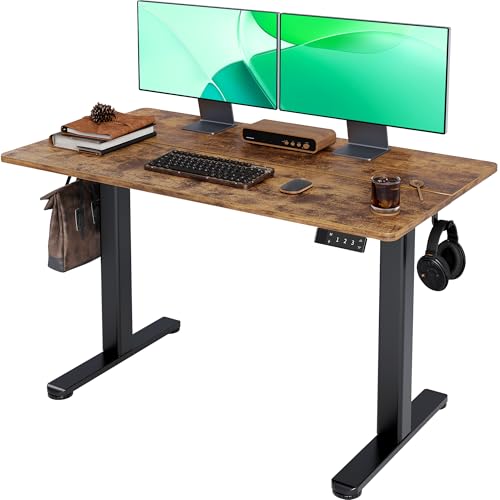
A sit stand desk that wobbles at standing height is uncomfortable to work at and undermines the habit you’re trying to build — nobody wants to stand at a desk that shakes every time they type. Before comparing prices, check the desktop size against your actual monitor and keyboard setup, and confirm the desk’s height range comfortably covers both your seated and standing positions. Most electric standing desks in the 45-55 inch width range suit a single monitor and laptop setup well, while wider or L-shaped models like the Korfile L Shaped Standing Desk give you room to separate a monitor zone from a writing or secondary task area, which can be useful if you split your day between different types of work.
Weight capacity matters too, especially if your desk carries multiple monitors, a docking station, or a full desktop tower. The 60 x 28 Inch Electric Standing Desk with Double Beam Frame is built with a reinforced frame specifically to stay steady under heavier loads at full height, which is worth prioritizing if your setup is on the heavier side. If floor space is tight, a compact model such as the HUANUO Small Electric Standing Desk still delivers a full sit-to-stand height range without demanding a large footprint.
Standing comfort also depends on what’s under your feet. A desk that’s stable and at the right height still feels better paired with supportive flooring — our anti-slip pad guide covers accessories that can make longer standing intervals more comfortable, which ties directly back into the habit-building goal of this guide rather than the desk hardware itself.
Common Mistakes When Building a Sit-Stand Habit
- Standing all day right after buying a sit stand desk. Jumping straight to hours of continuous standing often causes soreness and makes people abandon the routine within a week or two.
- Never using the memory presets. Manually adjusting height every time adds enough friction that many people simply stop switching positions after the first few days.
- Setting the desk once and forgetting it. A desk parked permanently at standing height offers the same lack of variety as one that’s never raised at all.
- Ignoring desk noise and speed. A slow or loud desk quietly discourages frequent adjustments, especially in shared or open workspaces.
- Skipping supportive flooring. Standing directly on a hard floor for extended periods can make longer standing intervals uncomfortable faster than expected.
- Choosing size before checking stability. A wide or heavily loaded desk that wobbles at full height discourages standing just as much as a desk that’s the wrong height.
How We Evaluated These Sit Stand Desks
Every product in this guide was pulled from current Amazon listings and cross-checked against published specs, including memory preset count, weight capacity, desktop dimensions, and included features like power outlets or storage drawers. Because this guide is built around habit formation rather than motor engineering, we specifically prioritized sit stand desks with reliable memory presets, reasonable transition behavior, and features that reduce the everyday friction of switching positions, alongside a meaningful volume of verified customer reviews. This is based on publicly available Amazon listing data rather than in-house lab testing or clinical research, so treat the health-related context in this guide as general background, and confirm current pricing, availability, and specifications on each product page before buying.
Buying Checklist
- Confirm the sit stand desk has at least two memory height presets you can reach with one button press.
- Check the desk’s height range against both your sitting and standing positions.
- Look for a reasonably quick, smooth transition rather than the absolute fastest motor available.
- Check customer reviews for mentions of excessive noise, which can discourage frequent adjustments.
- Match weight capacity and desktop size to your actual monitor and equipment setup.
- Decide whether built-in outlets, USB ports, or drawers would reduce daily friction for you.
- Plan a realistic starting ratio of sitting to standing rather than aiming for all-day standing immediately.
- Consider supportive flooring or accessories if you expect to stand for longer stretches.
Frequently Asked Questions
How many minutes per hour should I stand at a sit stand desk?
A commonly referenced starting point is standing for roughly 20-30 minutes out of every hour, though this varies by person, job, and comfort level. New users generally do better easing in with shorter standing intervals and gradually extending them rather than standing for hours immediately.
Is sitting really bad for you, and is standing always better?
Extended periods of stillness in any single position — sitting or standing — can lead to stiffness and discomfort over time. Some research suggests that alternating positions may help support circulation and reduce the effects of prolonged stillness, but standing all day isn’t automatically healthier than sitting all day; variety and movement are the main goal of using one, not standing as much as possible.
Do memory presets on a sit stand desk actually help build the habit?
Yes, in practical terms they remove one of the biggest sources of friction: manually adjusting height every time you want to switch positions. A one-touch preset makes returning to your preferred sitting or standing height fast enough that it’s easy to do multiple times a day without it feeling like a chore.
I’m new to using a sit stand desk. How do I avoid getting sore?
Start with short standing intervals of 10-15 minutes a few times a day rather than standing continuously, and pay attention to your posture and footwear. Supportive flooring, such as an anti-slip standing mat, can also make longer standing sessions more comfortable as you build up your tolerance.
What’s the difference between this guide and your electric or manual standing desk guides?
This guide focuses on why and how to actually use a sit stand desk to alternate positions throughout the day, including ratio guidance and habit-building strategies. Our electric standing desks guide goes deeper into motor configuration, lift speed, and noise ratings, while our adjustable height desks guide offers a broader overview of the whole category, including manual crank options.
Do I need any accessories to make standing more comfortable?
Accessories aren’t required, but many people find that a supportive mat underfoot makes longer standing intervals noticeably more comfortable, especially on hard flooring. It’s a small addition that can make it easier to stick with a standing desk routine over time.