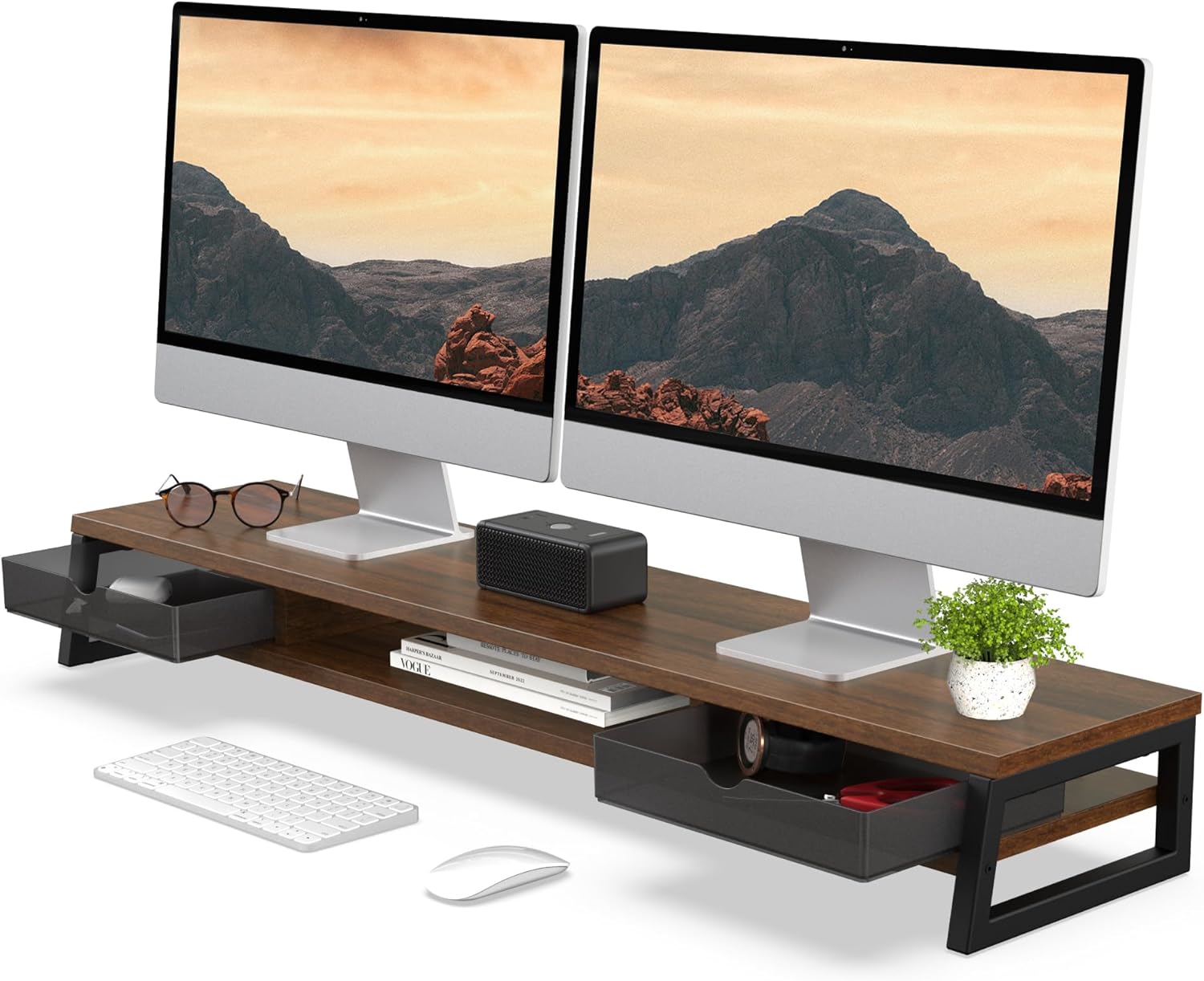
A cluttered desk usually has two separate problems: the monitor sits too low, and there’s nowhere to put pens, chargers, or a notebook without them sliding into the keyboard tray. A desk shelf riser with drawers solves both at once — it lifts your screen closer to eye level while giving you enclosed storage right underneath, instead of a loose pile of desk accessories. This guide walks through what actually matters when shopping for a desk shelf riser with drawers, including weight capacity, drawer count, riser height, and material, then breaks down 8 specific listings we pulled directly from Amazon search data so you can compare real options rather than guesswork.




Top Picks at a Glance
- Best Overall: gianotter Dual Monitor Stand Riser With Drawer and 2 Pen Holders (Black) — a heavily reviewed desk shelf riser with a single drawer and two pen holders, backed by thousands of customer ratings.
- Best Budget: OPNICE 2-Tier Computer Monitor Stand Riser with Drawer and 2 Pen Holders — a low-cost pick in this category that still holds a strong average rating.
- Best Premium: Fenge Monitor Stand with Frosted Storage Drawer, Oak (42.5 Inch Dual Monitor Riser) — a wide, two-tier riser built for dual monitors and ultrawide screens.
- Best for Two Drawers: Fenge Dual Monitor Stand Riser, 42.5in Desk Shelf with 2 Drawers, Brown — doubles the storage of a single-drawer riser without adding much desk footprint.
- Best for Extra Storage: WESTREE Dual Monitor Stand Riser with Two Drawers — an extra-large storage design aimed at people who need more than a small drawer for office supplies.
- Best for Phone and Tablet Storage: Simple Houseware Desk Dual Monitor Stand Riser with Drawer, Rustic Brown — adds a built-in phone and tablet slot alongside its drawer and organizer tray.
- Best Bamboo Design: ROCDEER Bamboo Monitor Stand Riser with Drawer — a natural-wood riser with a built-in drawer and cable management.
- Best No-Assembly Option: Epesoware Dual Monitor Riser with Two Drawer, No Assembly Required — a premium bamboo riser that arrives ready to use out of the box.
What Is a Desk Shelf Riser with Drawers (and Who Needs One)
A desk shelf riser with drawers is a raised platform that sits on top of your desk, lifts a monitor (or a laptop, or both) to a more comfortable height, and includes one or more enclosed drawers built into the base or sides. It’s a step up from a plain monitor stand, which usually just adds height with no storage at all. The drawer turns unused vertical space under the screen into somewhere to keep pens, sticky notes, a phone charger, or small accessories that would otherwise clutter the desktop.
This style of riser tends to appeal most to people working from a smaller desk, a shared table, or a home office where a separate desk organizer simply isn’t practical. Instead of stacking a monitor stand and a pen cup and a drawer unit side by side, a desk shelf riser with drawers consolidates all three functions into one footprint. It also has a simple ergonomic benefit: raising the screen toward eye level reduces the amount of neck-down tilting that happens when a monitor sits flat on the desk, which matters more the longer you’re sitting in front of it each day.
Weight Capacity and Monitor Compatibility
Before anything else, check the stated weight capacity of a desk shelf riser with drawers against the actual weight of your monitor. A single 24-inch monitor is usually light enough that almost any riser in this category handles it comfortably, but the math changes once you’re placing two monitors side by side or using one large ultrawide display. Ultrawide and curved monitors, in particular, tend to be heavier and wider than a standard flat panel, so it’s worth checking both the riser’s shelf width and its rated capacity rather than assuming a “dual monitor” label automatically means your specific screens will fit.
Dual-monitor risers are typically built wider and rated for a higher combined weight than single-monitor models, since they’re designed to support two displays plus the added stress of centering the load across the platform rather than one point. If you’re only running a single monitor, a narrower riser is often the better fit anyway — it takes up less desk depth and still leaves the drawer accessible. Either way, don’t rely on a listing’s marketing copy alone; look at the specific capacity number in pounds and compare it to your monitor’s actual weight, including the stand if it isn’t detachable.
Riser Height and Desk Ergonomics
Height is where a lot of buyers get this kind of riser wrong. The goal is to bring the top of your screen roughly level with your eyes when sitting up straight, not to lift the monitor as high as possible. A riser that’s too short barely improves on a flat desk, while one that’s too tall forces you to tilt your head back, which trades one kind of neck strain for another.
Most desk shelf risers with drawers add somewhere between two and five inches of height once you include the drawer’s added thickness underneath the shelf, and that range works for a lot of desk-and-chair combinations. If your desk is unusually low or you already use a keyboard tray, you may need less added height than someone working at a standard-height desk. It’s worth measuring your current eye level against your monitor’s top edge before ordering, since a few inches in either direction changes how the riser actually feels in daily use — and unlike a chair or a desk, a riser is a much more annoying thing to return once it’s assembled and loaded with a monitor on top.
Drawer Count, Size, and Keyboard-Storage Designs
Not every desk shelf riser with drawers is built the same way underneath. Single-drawer models are the most common and work well for smaller items — pens, notepads, USB cables, a spare charger — without adding much bulk to the riser itself. Two-drawer designs roughly double that capacity, which matters if you’re trying to consolidate more of your desk’s loose items into one place rather than spreading them across separate organizers.
Drawer depth is worth checking separately from drawer count. A shallow drawer is fine for flat items but won’t hold anything bulky, while a deeper drawer can handle a small notebook, headphones, or a mouse when it’s not in use. Some models also build in a specific slot for a phone or tablet alongside the main drawer, which is a small but genuinely useful detail if your phone tends to end up propped against your monitor or buried under papers.
A separate category worth knowing about is the keyboard-storage-underneath design, where the riser leaves enough clearance beneath the shelf — beyond just the drawer — to slide a full keyboard and mouse out of the way when they’re not in use. This isn’t the same as a drawer; it’s an open gap sized for a keyboard rather than an enclosed compartment. If keeping your desk surface completely clear when you step away matters to you, it’s worth checking whether a specific listing includes this kind of underclearance or just the drawer alone.
Material and Build: Wood, Bamboo, and Metal
Material affects both how the riser looks and how much weight it can reasonably support. Bamboo and other solid-wood builds are the most common choice in this category — they have a warm, natural look that fits well in a home office, they’re relatively light, and reputable listings rate them for the weight of one or two standard monitors without issue. The trade-off is that wood risers are generally not the strongest option available if you’re mounting something unusually heavy, so it’s still worth checking the specific capacity rating rather than assuming wood is automatically sufficient.
Metal-frame risers, or hybrid designs that combine a metal frame with a wood or composite shelf, tend to hold up to higher loads and often feel more rigid under a heavier dual-monitor setup. They can look more utilitarian than a solid-wood piece, which is a factor if aesthetics matter as much as function in your workspace. Frosted acrylic drawers show up on some of the higher-end listings as well, offering a cleaner, more modern look than a plain wood or plastic drawer front, though they’re mostly a style choice rather than a functional upgrade.
Whichever material you land on, check how the drawer itself is built — plastic drawer runners are common at lower price points and generally work fine for light use, but they’re more prone to sticking or loosening over time than metal slides with a stopper that prevents the drawer from being pulled all the way out by accident.
Desk Space Savings vs. a Plain Monitor Stand
It’s fair to ask whether a desk shelf riser with drawers is actually worth it over a cheaper monitor stand plus a separate desk organizer. For a lot of setups, the answer comes down to desk size and how much clutter you’re actually trying to solve. On a small desk, combining the monitor lift and the storage into one unit genuinely frees up space that two separate items would otherwise take, and it keeps small accessories contained instead of loose on the desktop.
On a larger desk where space isn’t tight, a plain monitor stand paired with a separate drawer organizer can work just as well, and sometimes gives you more flexibility to place the storage wherever it’s most convenient rather than fixed directly under the screen. The clearest case for a dedicated desk shelf riser with drawers is a compact workspace, a desk shared by more than one person, or simply a preference for fewer separate objects cluttering the surface. If you already have a drawer organizer you like and just need height, a plain riser might be the simpler and cheaper choice.
Cable Management and Assembly
Several listings in this category include a cable management feature — usually a cutout, channel, or clip built into the back or underside of the shelf that keeps monitor and charging cables from dangling in front of the drawer. It’s a small detail, but it makes a real difference in how tidy the desk looks once everything is set up, especially with two monitors and their accompanying cables running to the same power strip.
Assembly varies more than you’d expect for what looks like a simple product. Some desk shelf riser with drawers listings arrive fully assembled and ready to use straight out of the box, while others require attaching the shelf to a frame or installing the drawer slides yourself, typically with basic tools included in the box. If you’d rather not deal with assembly at all, it’s worth checking the listing specifically for “no assembly required” language rather than assuming based on price or material alone — some of the pricier wood options still need a short setup process.
How We Evaluated These Desk Shelf Risers with Drawers
This roundup is built from Amazon listing data rather than hands-on testing. For each product, we looked at the manufacturer’s stated dimensions, drawer count and configuration, weight capacity where listed, material, customer star rating, and the volume of reviews behind that rating. We prioritized listings with a meaningful number of reviews so the rating reflects real usage rather than a handful of early buyers, and every product name and ASIN was cross-checked directly against the Amazon search results before being included here. We did not physically load-test any of these desk shelf risers with drawers ourselves — treat the picks above as a shortlist for further comparison based on real listing data, not a guarantee of fit or performance for your specific monitor and desk.
Common Mistakes When Buying a Desk Shelf Riser with Drawers
- Not checking the riser’s weight capacity against the actual weight of a dual-monitor or ultrawide setup.
- Choosing a riser height based on looks rather than measuring actual eye level against the monitor’s top edge.
- Assuming every listing includes keyboard-storage-underneath clearance when many only include a drawer.
- Picking the lowest-priced option without checking whether the drawer uses plastic or metal runners.
- Overlooking drawer depth and ending up with a compartment too shallow for what you actually wanted to store.
- Skipping the assembly details and being surprised by a multi-step setup on a product marketed as simple.
Desk Shelf Riser with Drawers Buying Checklist
- Confirm the weight capacity covers your monitor (or monitors) with some margin.
- Measure your eye level against your monitor’s top edge to pick an appropriate riser height.
- Decide whether you need one drawer or two based on how much you’re trying to store.
- Check whether keyboard-storage-underneath clearance is included if a fully clear desktop matters to you.
- Compare wood, bamboo, and metal builds based on your monitor setup and desk aesthetic.
- Look for cable management cutouts if cord clutter is a recurring problem on your desk.
- Check the listing for assembly requirements before assuming it arrives ready to use.
Other Desk Organization Upgrades Worth Considering
A desk shelf riser with drawers solves monitor height and small-item storage at the same time, but it’s often just one piece of a broader desk setup. If you work primarily from a laptop rather than a standalone monitor, our guide to laptop risers for desks covers similar height and ergonomic considerations for a single-screen setup. If your workflow involves switching between two laptops or running a laptop alongside a second screen, it’s worth also looking at our roundup of dual laptop stands, which addresses a slightly different use case than a fixed desk shelf riser with drawers but solves a related space and organization problem.
FAQ
What is a desk shelf riser with drawers?
It’s a raised platform that sits on your desk to lift a monitor or laptop closer to eye level, with one or more built-in drawers underneath for storing pens, cables, or small accessories.
How much weight can a desk shelf riser with drawers hold?
It depends on the specific model — check the manufacturer’s stated weight capacity and compare it against your monitor’s actual weight, especially if you’re placing two monitors or one ultrawide display on the shelf.
Should I choose a desk shelf riser with one drawer or two drawers?
A single drawer is usually enough for pens, cables, and small items. A two-drawer design makes more sense if you’re trying to consolidate more of your desk clutter into one unit rather than spreading it across separate organizers.
Do all desk shelf risers with drawers have room for a keyboard underneath?
No. Some models include extra clearance sized for a keyboard and mouse in addition to the drawer, but many only include the drawer itself. Check the listing’s dimensions if under-shelf keyboard storage is a priority.
Is wood or metal better for a desk shelf riser with drawers?
Wood and bamboo builds are common, lightweight, and generally rated for one or two standard monitors. Metal-frame or hybrid designs tend to hold up to heavier dual-monitor loads and feel more rigid, though they often look more utilitarian.
Is a desk shelf riser with drawers hard to assemble?
It varies by listing. Some arrive fully assembled and ready to use, while others require attaching the shelf and drawer slides with basic included tools. Check the product description for assembly requirements before ordering.