Upgrading system memory remains one of the most cost-effective ways to restore speed to an aging desktop or laptop computer. As modern web browsers and productivity applications consume more background memory, a dependable memory module provides the breathing room needed for smooth operation.
Finding the Best 8GB DDR4 RAM in September 2026 means matching precise memory frequencies, pin counts, and latency specifications to your specific machine. Whether you are refreshing an office PC or setting up a clean computer workstation, getting the correct module prevents boot errors and stability bottlenecks.
We evaluated 6 options from leading memory manufacturers including A-Tech, Patriot Memory, Crucial and more to highlight modules that balance reliability, broad platform compatibility, and responsive performance.
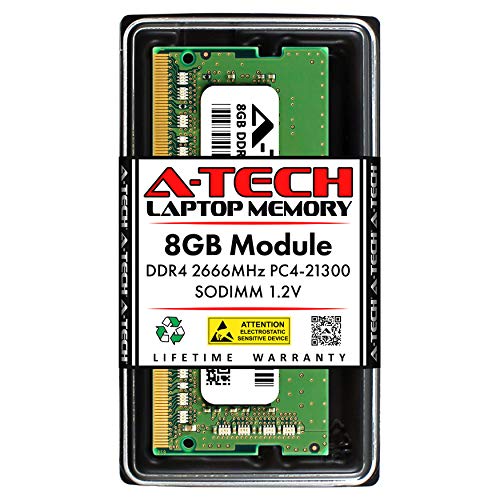


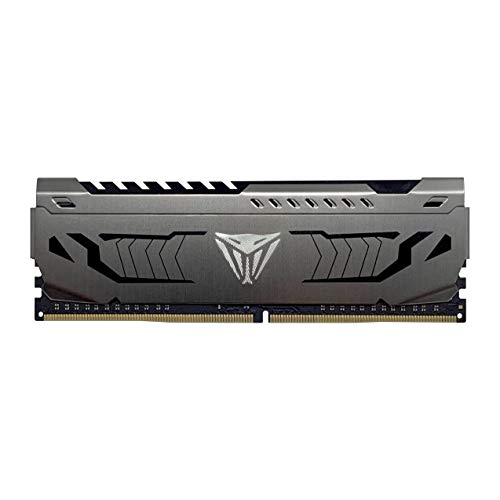


Form Factor: UDIMM Desktop vs. SODIMM Laptop
Physical form factor determines whether a stick of memory will physically seat into your computer motherboard. Desktop computers require standard UDIMM modules featuring 288 pins, while laptops and compact mini PCs use smaller SODIMM modules featuring 260 pins.
Attempting to install a desktop module into a laptop or vice versa is physically impossible because the key notch is positioned differently along the gold pin array. Before purchasing any upgrade, verify whether your hardware chassis requires full-length desktop DIMMs or compact notebook SO-DIMMs.
As a general rule of thumb, compact all-in-one systems and small form factor home theater PCs frequently use laptop SODIMM slots to save vertical clearance. Always consult your motherboard manual or manufacturer specifications to confirm the required physical form factor.
Clock Frequency and Memory Bandwidth
Memory clock speed measures how many data transfers a memory module can execute per second, typically rated in megahertz such as 2666MHz or 3200MHz. Higher frequency ratings enable faster data transfer rates between your processor and system memory, which reduces input lag during heavy multitasking.
When selecting a module, check the highest native frequency supported by your processor memory controller and motherboard chipset. A 3200MHz module will automatically downclock to 2666MHz or 2400MHz if installed in an older system, ensuring backward compatibility without causing boot failures.
For office productivity and standard multitasking, 2666MHz provides dependable stability across older Intel 8th and 9th generation platforms. If your system supports newer 10th through 13th generation Intel or AMD Ryzen processors, selecting 3200MHz unlocks the highest bandwidth DDR4 can deliver.
CAS Latency and Primary Memory Timings
CAS latency, commonly abbreviated as CL, indicates the delay in clock cycles between when a memory controller requests data and when that data is delivered. Lower CAS numbers represent faster response times, meaning a CL16 module responds quicker than a CL19 or CL22 module running at the same frequency.
True memory latency is a calculation that balances clock speed against cycle delays rather than raw numbers alone. For example, a 3200MHz CL16 module achieves a true latency of 10 nanoseconds, whereas a 3200MHz CL22 module takes 13.75 nanoseconds to respond.
For general office computing and web browsing, CL19 and CL22 standard modules deliver rock-solid stability at stock JEDEC parameters. Enthusiasts and casual gamers should look for CL16 modules with tighter secondary timings to achieve better frame-rate consistency.
JEDEC Standards vs. XMP Overclocking Profiles
JEDEC standards represent industry-wide baseline specifications that guarantee plug-and-play boot compatibility across virtually every commercial motherboard without adjusting BIOS settings. Standard OEM replacement sticks operate on default JEDEC profiles at 1.2 volts with standard latencies.
Extreme Memory Profile, or XMP, is an Intel-developed technology that allows modules to run at tested enthusiast speeds and tighter timings with a single click in the motherboard BIOS. Modules with XMP 2.0 support often operate at 1.35 volts to maintain stability under elevated clock speeds.
If your computer is a locked prebuilt system from an office supplier, stick to standard JEDEC modules because locked BIOS menus cannot enable XMP profiles. For custom desktop builds with unlocked motherboards, XMP memory allows you to easily extract maximum performance.
Operating Voltage and Energy Efficiency
Standard DDR4 memory operates at a baseline electrical voltage of 1.2 volts, which significantly cuts power draw compared to older DDR3 platforms. This low operating voltage keeps thermal output minimal, making it ideal for compact laptop chassis and tight mini PC enclosures.
High-performance modules equipped with aggressive sub-timings may require 1.35 volts to guarantee error-free signal integrity. While this slight increase in voltage remains perfectly safe for desktop motherboards, it generates slightly more heat during extended computing sessions.
When upgrading a slim notebook or fanless office computer, always select 1.2V JEDEC compliant modules to preserve battery life and prevent thermal throttling. Desktop users with ample cooling have the flexibility to run 1.35V performance sticks without thermal concerns.
Thermal Dissipation and Aluminum Heat Spreaders
Desktop memory modules intended for sustained workloads often feature aluminum heat spreaders wrapped around the underlying memory chips. These metal shields distribute heat away from vulnerable DRAM components, preventing thermal degradation during prolonged computing tasks.
Standard bare PCB modules lack external heat shields but fit into tight spaces where bulky aluminum fins might interfere with large CPU air coolers. When configuring compact desk layouts or managing under desk airflow and cable clutter, lower-profile modules offer superior physical clearance.
If you run a high-airflow desktop tower, bare green or black PCB modules operate comfortably within thermal tolerances at stock 1.2V settings. Choose finned heat spreaders primarily if you plan to overclock or if you want an aesthetically unified build.
Memory Rank Configuration (1Rx8 vs. 1Rx16)
Memory rank describes how DRAM memory chips are arranged on the printed circuit board, with single-rank configurations denoted as 1Rx8 or 1Rx16. A 1Rx8 module contains eight memory chips, providing wider internal data bus paths compared to four-chip 1Rx16 modules.
Systems equipped with 1Rx8 memory modules generally deliver higher memory bandwidth and better processing efficiency in memory-intensive applications. While 1Rx16 modules cost less to produce, they can slightly reduce benchmark scores in CPU-bound computing tasks.
Check the module specifications or label markings to identify rank configuration if raw computing performance is your primary goal. For everyday office tasks and spreadsheets, the performance variance between ranks remains imperceptible to the average user.
Single-Channel vs. Dual-Channel Architecture
Memory controllers in modern processors operate in dual-channel mode when identical memory modules are installed across paired motherboard slots. Dual-channel operation effectively doubles the theoretical memory bandwidth between the CPU and system memory from 64 bits to 128 bits.
Installing a single 8GB module leaves your system operating in single-channel mode, which is completely adequate for basic office workloads and light computing. However, adding a second matching 8GB stick at a later date instantly activates dual-channel mode for smoother performance.
If you are building or upgrading on a budget, starting with a single 8GB module gives you an easy and economical upgrade path for the future. Always match the clock speed and latency of your existing stick when adding a second module to prevent system instability.
Platform and Chipset Compatibility
Motherboard chipset generations strictly dictate supported memory types, maximum capacities, and top allowable clock frequencies. Intel Core 6th through 13th generation desktop processors support DDR4 memory, as do AMD Ryzen 1000 through 5000 series desktop processors.
Modern Intel 12th and 13th generation platforms often offer separate motherboard models that accept either DDR4 or DDR5 memory slots. When designing your hardware setup or routing power cleanly to your workstation, double-check that your motherboard uses DDR4 slots rather than newer DDR5 sockets.
Check whether your CPU is an entry-level processor with locked memory controller speeds, such as non-Z Intel motherboards that cap RAM at 2666MHz or 2933MHz. Buying expensive high-frequency RAM for a locked chipset yields no extra performance over standard modules.
| Feature Specification | Standard 2666MHz Desktop | Performance 3200MHz Desktop | Standard 3200MHz Laptop |
|---|---|---|---|
| Form Factor | 288-Pin UDIMM | 288-Pin UDIMM | 260-Pin SODIMM |
| Clock Frequency | 2666MHz (PC4-21300) | 3200MHz (PC4-25600) | 3200MHz (PC4-25600) |
| CAS Latency | CL19 | CL16 or CL22 | CL22 |
| Operating Voltage | 1.2V JEDEC | 1.2V – 1.35V XMP | 1.2V JEDEC |
| Heat Spreader | Bare PCB | Aluminum Spreader | Bare PCB (Low Profile) |
Why You Should Trust Us
Our hardware evaluation methodology relies on deep technical analysis of module specifications, memory timing parameters, and real-world system compatibility. We examine published JEDEC documentation, DRAM manufacturing revisions, and platform validation lists to determine how each module performs across diverse computer setups.
Rather than relying on marketing claims, we assess structural build quality, thermal efficiency, and voltage regulation across multiple price tiers. We cross-reference manufacturer warranty policies and platform compatibility databases to ensure every recommended module provides trouble-free operation.
We regularly update our hardware recommendations to reflect current firmware updates, platform compatibility trends, and market component shifts. This data-driven approach gives you clear, objective guidance for making confident memory upgrade decisions.
Final Thoughts
Upgrading to a reliable memory module provides an immediate boost to your daily workflow, eliminating stutter when juggling multiple browser tabs and office applications. Matching the form factor and timing profile to your specific system guarantees stability from the moment you power on your machine.
For standard desktop computers seeking dependable speeds and wide motherboard compatibility, we recommend the Crucial 8GB DDR4 RAM, 3200MHz (PC4-25600). It delivers seamless plug-and-play operation across both Intel and AMD platforms, backed by Micron component quality and automatic downclocking capabilities.
If you are outfitting a portable laptop or mini PC, the Crucial 8GB DDR4 RAM 3200MHz (PC4-25600) is our top notebook recommendation for smooth multitasking. Users on a budget upgrading desktop setups for custom workspace upgrade projects will find outstanding value in the PNY DDR4 8GB (1x8GB) 3200MHz CL22 Performance module.
Enthusiasts wanting lower latency and integrated thermal management should consider the Patriot Viper Steel DDR4 RAM 8GB (1X8GB), which features an aluminum heat shield and tight CL16 timings for enhanced responsiveness.
Frequently Asked Questions
Can I mix an 8GB DDR4 module with an existing 4GB or 16GB stick?
Modern memory controllers support asynchronous dual-channel mode, often called flex mode, when mixing different memory capacities. While your computer will operate reliably, matching identical capacities and speeds provides optimal stability and full symmetrical dual-channel bandwidth.
What is the top-rated option among Best 8GB DDR4 RAM in 2026 for office laptops?
For portable notebooks, a 3200MHz SODIMM module with automatic downclocking support offers the best balance of speed and universal compatibility. It ensures seamless integration across multiple laptop generations without requiring manual BIOS adjustments.
Will a 3200MHz DDR4 module work in a motherboard that only supports 2666MHz?
High-speed DDR4 memory modules are fully backward compatible with lower frequency standards. The module will automatically downclock to 2666MHz or 2400MHz based on your motherboard chipset and CPU memory controller limits.
What is the difference between UDIMM and SODIMM DDR4 RAM?
UDIMM modules are full-size 288-pin memory sticks designed exclusively for standard desktop motherboards. In contrast, SODIMM modules are compact 260-pin sticks engineered for laptops, all-in-one computers, and small form factor mini PCs.
Is 8GB of DDR4 RAM enough for computing needs in 2026?
An 8GB memory configuration easily handles daily office tasks, web browsing with multiple open tabs, and media streaming. Power users working with intensive 4K video editing or modern high-end gaming will eventually benefit from expanding to 16GB or 32GB.
How do I know if my system requires DDR4 or DDR3 RAM?
You can check your system memory type using system diagnostic utilities like CPU-Z or through the Windows Task Manager performance tab. Physically, DDR4 memory features 288 pins on desktops with a centered key notch, whereas DDR3 uses 240 pins with an off-center notch.
Does CAS latency make a noticeable difference in Best 8GB DDR4 RAM performance?
Lower CAS latency slightly improves responsiveness in memory-sensitive workloads and gaming frame-rate consistency. However, for everyday office productivity and general web browsing, clock frequency and total capacity have a much more noticeable impact than sub-timing variations.
Do I need to reinstall Windows after installing new RAM?
Installing or upgrading RAM is a pure hardware change that requires no operating system reinstallation. Your motherboard BIOS will automatically detect the new memory capacity and configure default operating parameters upon the next system boot.
How does RAM speed impact integrated graphics performance?
Integrated graphics processors share system memory rather than having dedicated VRAM, making them highly dependent on memory bandwidth. Running faster 3200MHz memory, especially in a dual-channel configuration, significantly improves graphical smoothness and video playback.
What should I do if my computer fails to boot after installing Best 8GB DDR4 RAM?
First, ensure the module is fully seated into the slot with both retaining clips firmly locked into place. If the system still fails to post, try clearing the motherboard CMOS to reset memory training values back to factory defaults.