

Clear visuals turn a routine slide deck into an engaging pitch that holds room attention. When team leaders or visiting clients struggle to read tiny numbers on a faded wall, meeting momentum stops immediately. Finding the right display gear ensures every chart, bullet point, and video playback remains readable under bright office lights.
Modern conference rooms no longer rely on heavy, noisy projection boxes tied down by tangled cables. Today’s commercial units feature fast wireless sharing, sharp text resolution, and high color accuracy that handles intense overhead fixtures. Upgrading your workspace with proper equipment, much like adding quality office illumination solutions, transforms how teams collaborate every day.
We evaluated 7 market choices for September 2026 across leading brands like ViewSonic, Dxyiitoo, Epson and more. This comprehensive guide highlights essential features from ANSI lumens to throw distance so you can invest with total confidence.





White and Color Lumen Output
Projector brightness dictates how clearly your audience sees presentation slides in rooms with open blinds or fluorescent lighting. Standard conference spaces often have intense overhead fixtures that easily wash out dim projection screens. Comparing measured lumens tells you whether text will pop or fade into muddy gray tones during daytime discussions.
You should check both white brightness and color brightness ratings when evaluating dynamic business hardware. Many low tier units advertise high peak white output while delivering weak color lumens, causing colorful graphs and branded charts to look dull. Technologies like 3LCD produce equal white and color brightness, ensuring consistent visual clarity across every slide format.
A practical baseline for small meeting rooms with controlled lighting starts around 2000 to 3000 lumens. For larger conference halls or spaces with unfiltered daylight, target units providing 4000 lumens or higher to keep spreadsheet gridlines crisp. Selecting adequate lumen output avoids forcing meeting participants to sit in total darkness just to take notes.
Remember that projecting larger diagonal images spreads light across a wider surface area, reducing perceived brightness. If you plan to project images exceeding 120 inches, aim for at least 3500 ANSI lumens. Balancing your screen dimensions with ambient room light ensures nobody strains their eyes during long financial reviews.
Display Technology and Color Accuracy
The core imaging engine inside a projector determines color fidelity, contrast sharpness, and overall text definition. Business meetings rely heavily on accurate corporate colors, legible font kerning, and distinct bar chart hues. Understanding how 3LCD and DLP architectures function helps you pick the right visual engine for daily slide decks.
3LCD systems use three dedicated liquid crystal chips to split and recombine the red, green, and blue color channels simultaneously. This eliminates the distracting rainbow artifacts common on single chip DLP wheels, which can cause eye fatigue during dense presentations. DLP models, however, offer strong contrast ratios and sealed optical paths that resist dust accumulation in shared office environments.
For slide presentations featuring detailed diagrams, color accuracy ensures subtle tonal differences between data series remain obvious. When evaluating display specifications, look for 100 percent RGB signal processing and high static contrast ratios. Investing in superior color handling keeps your visual materials professional and prevents misinterpretation of critical financial charts.
Native Resolution and Text Legibility
Resolution determines the total pixel count that constructs every letter, graphic line, and embedded spreadsheet cell on screen. In presentation environments, fine typography and dense numbers require sharp pixel density to remain readable from the back row. Choosing an insufficient native resolution produces blurry font edges and compressed data tables.
Standard definitions like SVGA work for basic slideshows, but modern widescreen laptops output 1080p Full HD by default. Pairing a 1080p native projector with your presentation laptop avoids annoying scaling artifacts and awkward letterboxing on slides. Higher resolutions like 4K decoding support also allow presenters to showcase detailed architectural schematics or high bitrate product videos smoothly.
A useful rule of thumb is matching your projector resolution to the native aspect ratio of your presentation templates. Most modern presentation software uses a 16:9 widescreen layout, making native Full HD the most versatile option for clean alignment. Keeping resolutions aligned protects your layout spacing and preserves sharp line graphs across the entire display.
Wireless Screen Sharing and Casting Support
Modern conference rooms require frictionless transitions between different team members presenting from varied mobile devices and operating systems. Fumbling with proprietary video adapters or crawling under meeting tables wastes valuable presentation minutes. Modern presentation projectors integrate native wireless casting protocols like Miracast, AirPlay, and dual band WiFi to streamline speaker handoffs.
Check whether the projector supports direct peer to peer mirroring or requires specialized third party apps that demand corporate network clearance. Platforms supporting Miracast let Windows laptop users press a quick shortcut to mirror their screen instantly without downloading extra drivers. Apple AirPlay compatibility allows seamless broadcasting from MacBooks, iPads, and iPhones during interactive design reviews.
For offices that frequently host external clients, choosing a projector with robust wireless flexibility prevents awkward technical delays. Ensuring the hardware supports 5GHz WiFi or WiFi 6 reduces input lag when playing embedded presentation videos. Seamless casting keeps the audience focused entirely on your talking points rather than connectivity troubleshooting.
Throw Ratio and Optical Zoom Flexibility
Throw ratio measures the mathematical relationship between the distance from the projector lens to the wall and the resulting screen width. A standard throw projector requires around ten to twelve feet of space to produce a one hundred inch diagonal image. Choosing the wrong throw ratio can force you to place the projector in an awkward spot that blocks attendee sightlines.
Optical zoom lenses provide valuable placement flexibility by letting you enlarge or reduce the projected image size without moving the hardware. Digital zoom simply crops and blows up pixels, degrading text sharpness, whereas optical zoom shifts internal glass elements to maintain Full HD clarity. A zoom range of 1.1x to 1.6x gives installers room to work around ceiling vents and light fixtures.
When outfitting smaller huddle rooms or executive offices, short throw models project massive images from just a few feet away. Calculate your room dimensions and seating distances before finalizing your hardware selection to ensure proper viewing angles. Strategic positioning keeps meeting tables clutter free, especially when paired with tidy cable organization systems in modern workspaces.
Keystone Correction and Alignment Tools
Presenters rarely have the luxury of placing a projector perfectly perpendicular to the exact center of a projection screen. When a projector sits on an angled conference table, the resulting image distorts into a trapezoid that distracts viewers. Keystone correction systems reshape the distorted geometry back into a crisp, rectangular frame.
Modern presentation units feature automatic vertical keystone adjustments alongside manual horizontal and four corner alignment controls. Four corner correction allows users to pull each corner independently, making off center table placements look perfectly square. Advanced smart models even incorporate motorized auto focus and electronic tilt stands to eliminate manual adjustments entirely.
While digital keystone adjustments slightly scale pixels along the edges, modern processing engines maintain crisp text integrity. For fixed boardroom installations, physical lens shift is preferred over digital correction because it moves the optical assembly without sacrificing resolution. Having quick alignment tools saves time during impromptu client briefings in unfamiliar meeting spaces.
Input Connectivity and Port Versatility
A business projector must accommodate diverse hardware sources ranging from desktop computers to modern ultrabooks and media streamers. Having multiple dedicated HDMI ports allows you to keep a permanent video conference system connected while leaving an open port for guest laptops. Versatile input panels prevent presentation bottlenecks when multiple speakers take turns sharing content.
Look for USB power delivery ports that supply steady current to streaming sticks, wireless HDMI transmitters, or mobile accessories. Dedicated audio out ports let you route sound to high output conference room soundbars when built in speakers fall short in large halls. Legacy VGA ports can also prove valuable in older corporate training facilities with legacy podium connections.
Presenters who travel frequently benefit from PC free projection capabilities via onboard USB reader ports. This feature allows you to plug in a USB flash drive and display slideshows, PDF files, and image decks without booting a laptop. Maintaining versatile physical connectivity ensures your team stays prepared for any presentation scenario.
Light Source Longevity and Operational Noise
Projectors utilize either traditional high pressure lamps, solid state lasers, or modern LED arrays to generate illumination. Lamp based units are economical upfront but require bulb replacements after several thousand operational hours. Laser and LED engines offer up to twenty thousand hours or more of virtually maintenance free performance, eliminating unexpected lamp failures before crucial meetings.
Solid state laser engines also turn on and shut down almost instantaneously, removing the annoying warm up and cool down waiting periods. This rapid startup capability keeps meetings moving smoothly when executives enter the conference room on a tight schedule. Laser projection also maintains steady color brightness over years of continuous corporate usage without noticeable degradation.
Cooling fan noise is another vital factor that directly affects room acoustics during intimate boardroom presentations. Projectors with loud cooling fans force speakers to raise their voices and create background hum on conference call microphones. Selecting quiet hardware, combined with acoustic optimization like sound dampening wall treatments, keeps meeting conversations clear and professional.
Audio Output and Conference Integration
While visual clarity takes priority, audible multimedia playback is essential for modern video heavy presentations and remote client calls. Built in speaker systems range from basic monitor speakers to robust dual driver stereo arrays. If your presentation relies on customer testimonial clips or product animations, clear onboard sound saves you from carrying extra equipment.
Look for two way Bluetooth functionality that allows the projector to transmit audio to external conference room speakers wirelessly. Some modern smart projectors also function as standalone Bluetooth speakers when visual projection is turned off. Having integrated audio processing ensures speech frequencies cut through room chatter without harsh harmonic distortion.
For larger meeting rooms, verify that the unit includes a standard 3.5mm stereo output or HDMI ARC connectivity for dedicated PA systems. Balancing audio quality with screen scale creates an immersive presentation environment that captures audience attention. High quality sound integration elevates your overall presentation delivery and reinforces key corporate messages.
| Light Source Type | Typical Lumen Range | Lamp Life Expectancy | Startup Speed | Best Presentation Application |
|---|---|---|---|---|
| Solid State Laser | 4000 to 5000 Lumens | 20,000+ Hours | Instant On/Off | Large Boardrooms and Bright Spaces |
| High Output Lamp | 3500 to 4500 Lumens | 6,000 to 15,000 Hours | Moderate Warm-up | Dedicated Training Rooms and Classrooms |
| Solid State LED | 2000 to 3000 Lumens | 30,000+ Hours | Fast Boot | Huddle Rooms and Mobile Sales Pitches |
| Compact Smart Hybrid | 2000 to 2500 ANSI Lumens | 25,000+ Hours | Instant Smart Boot | Flexible Workspaces and Media Reviews |
Why You Should Trust Us
Our evaluation framework focuses on verifiable hardware specifications, optical performance metrics, and real world office utility. We cross reference manufacturer technical sheets with independent brightness data to confirm lumen consistency across white and color spectrums. We also analyze long term maintenance schedules to calculate practical ownership value for growing organizations.
We categorize projection gear based on distinct operational environments, from compact mobile sales kits to permanent enterprise boardrooms. Our reviews prioritize critical business factors like text legibility, boot speeds, wireless connection stability, and input port variety. We continually audit our buying advice against the latest display innovations to keep our recommendations relevant throughout the calendar year.
Our editorial independence means we assess every model using transparent, data driven criteria without vendor bias. We examine user feedback across hundreds of business installations to identify common thermal quirks, firmware reliability, and lamp degradation patterns. You can explore our extensive collection of workplace technology guides for additional setup insights.
Final Thoughts
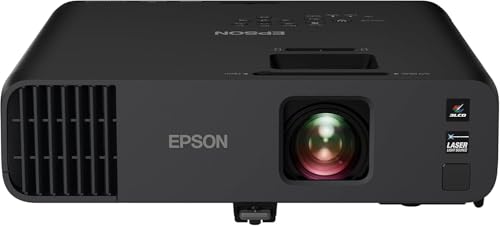
Selecting the right presentation display requires matching your room lighting, throw distances, and device ecosystems to the right optical engine. Investing in high lumen output and reliable wireless connectivity prevents technical mishaps and ensures your slides always look professional. For demanding corporate boardrooms that encounter heavy ambient light, the Epson Pro EX11000 3-Chip 3LCD Full HD 1080p represents our best overall recommendation due to its powerful 4600 lumen laser engine and vivid color accuracy.
Organizations looking for high performance on a practical office budget will find exceptional value in the Epson EpiqVision Flex CO-W01 Portable Projector. Its lightweight chassis fits easily into travel backpacks while 3000 lumens of 3LCD brightness keep data sheets sharp in client conference spaces. Pairing mobile projection gear with clean workspace setups featured in our office comfort guides creates an efficient work environment.
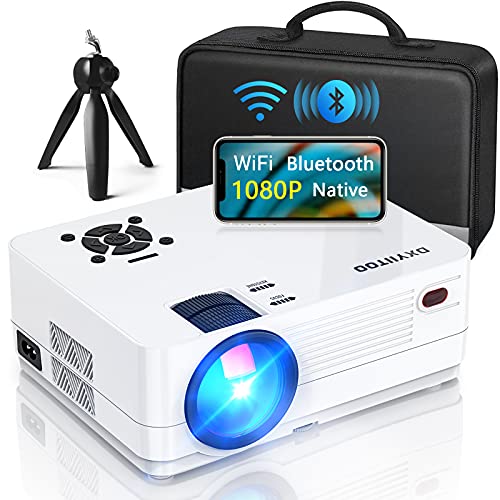
For modern teams that value built in smart streaming apps and rapid motorized alignment, the DESS C5 Pro 2200 ANSI 1080P Smart Projector delivers an adaptable hybrid solution for both workday meetings and after hours media. Meanwhile, the Epson Pro EX9270 Wireless 1080p 3-Chip 3LCD offers seamless Apple AirPlay and Miracast casting for fast team collaboration. Choosing a model tailored to your meeting style ensures every presentation leaves a positive, lasting impact.
Frequently Asked Questions
How many lumens are necessary for Best Projectors for Presentations in brightly lit conference rooms?
In rooms with standard fluorescent fixtures or open windows, you should aim for at least 3500 to 4000 ANSI lumens. This level of brightness keeps spreadsheets and text legible without requiring the room to be darkened. Dimmer projectors under 2500 lumens will often look washed out under direct office illumination.
What is the main difference between 3LCD and DLP technology in presentation projectors?
3LCD technology utilizes three dedicated micro liquid crystal chips to process red, green, and blue light simultaneously, delivering equal white and color brightness. Single chip DLP units rely on a spinning color wheel, which can occasionally produce subtle rainbow artifacts on white slide backgrounds. 3LCD systems generally provide superior color fidelity for branded graphics and presentation charts.
Can you wirelessly cast presentation slides directly from a smartphone or tablet?
Yes, many modern business projectors include native support for Apple AirPlay, Miracast, and standard Wi-Fi screen mirroring. This functionality allows presenters to share slides and media directly from iOS, Android, macOS, or Windows devices without physical cables. Checking protocol compatibility ensures smooth transitions between different presenter devices.
How does native resolution impact spreadsheet legibility during team meetings?
Native resolution determines the pixel density available to render fine text, column borders, and small data figures. A native 1080p Full HD projector ensures that small font sizes and dense numerical tables remain sharp across the entire screen. Lower resolutions like SVGA can cause character blurring and horizontal distortion on complex spreadsheets.
Why is laser projection preferred over traditional lamp bulbs in modern meeting spaces?
Solid state laser light engines provide around 20000 hours of operation without requiring expensive bulb replacements. They also offer nearly instantaneous power on and off cycles, eliminating the long warm up periods common with traditional lamps. This instant readiness saves valuable minutes at the beginning of fast paced meetings.
What throw ratio should you select for compact huddle rooms?
For compact spaces where the projector sits close to the wall, look for a short throw ratio between 0.5:1 and 1.0:1. This enables the projector to produce an 80 to 100 inch image from just a few feet away. Standard throw projectors require ten to twelve feet of throw distance, which can cause seating interference in small rooms.
How do automatic keystone correction features simplify client presentations?
Automatic keystone sensors detect the angle of projection and instantly square the image geometry without manual menu navigation. This feature is especially beneficial for travelling professionals who need to set up quickly in unfamiliar client conference rooms. Advanced four corner keystone correction also compensates for off center table placement.
Can business presentation projectors connect to external conference room audio systems?
Most commercial projectors include standard 3.5mm analog audio outputs, HDMI ARC connections, or Bluetooth transmitter support for external sound integration. These ports allow you to route video sound directly through room soundbars or ceiling speakers. Dedicated audio connections ensure video presentations are clearly audible across large auditoriums.
How do you prevent presentation input lag when streaming embedded videos over Wi-Fi?
Utilizing high speed 5GHz Wi-Fi networks or Wi-Fi 6 compatible hardware minimizes transmission latency when mirroring heavy media files. Closing background bandwidth heavy apps on your transmitting laptop also helps maintain consistent frame rates. For critical multimedia pitches, keeping a direct HDMI cable on hand provides an infallible backup.
What maintenance steps keep office projectors running reliably over 2026?
Regularly inspecting and cleaning the air intake filters prevents internal thermal buildup that can degrade the optical engine. Keeping the glass lens wiped with a microfiber cloth preserves image clarity and prevents focus distortion. Laser models require significantly less maintenance because their optical paths are completely sealed against dust.


