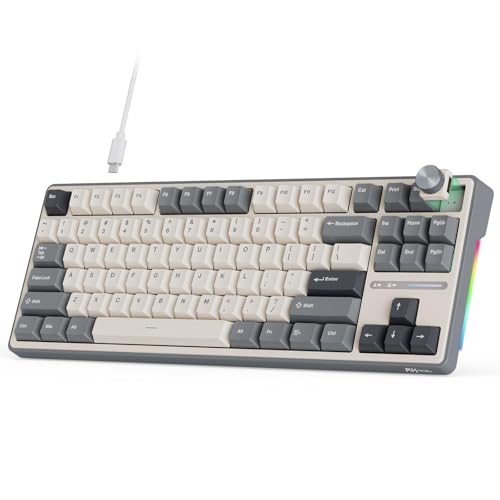
A tenkeyless keyboard is a full mechanical or membrane keyboard with the numpad removed, shrinking the board to roughly 87 keys instead of the usual 104-108. That single change frees up several inches of desk space on your dominant side, which lets your mouse sit closer to the center of your body instead of way out to the right. If you don’t type long strings of numbers every day, a tenkeyless keyboard is often the simplest upgrade you can make to a cramped desk.
Quick Answer: For most people upgrading from a full-size board, the Logitech G413 TKL SE Mechanical Gaming Keyboard is the pick we’d point to first — it’s a true 87-key tenkeyless layout with tactile switches, anti-ghosting, and a compact footprint at a price that doesn’t ask you to compromise. If you want wireless multi-device switching for office work, the Keychron K8 Tenkeyless Wireless Mechanical Keyboard covers that instead.



Top Picks at a Glance
- Best Overall: Logitech G413 TKL SE Mechanical Gaming Keyboard
- Best Budget: SteelSeries Apex 3 TKL RGB Gaming Keyboard
- Best for Mac & Multi-Device: Keychron K8 Tenkeyless Wireless Mechanical Keyboard
- Best Hot-Swappable: Keychron C1 Wired Mechanical Keyboard TKL 87-Key
- Best Premium: Corsair K70 PRO TKL RGB Tenkeyless Mechanical Wired Gaming Keyboard
- Best for Compact Setups: HyperX Alloy Origins Core
- Best for Macros & Gaming: Razer BlackWidow V3 TKL Mechanical Gaming Keyboard
- Best with Rotary Knob: RK ROYAL KLUDGE R87 Pro Wired Mechanical Keyboard TKL
What “Tenkeyless” Actually Means
Tenkeyless describes a keyboard that leaves off the “ten-key” cluster — the block of number keys, plus/minus and enter keys grouped on the far right of a full-size board. Remove that cluster and you’re left with roughly 87 keys: the main alphanumeric block, function row, and the arrow/navigation cluster (Home, End, Page Up, Page Down, Insert, Delete). That’s why the shorthand TKL gets used almost interchangeably with this layout in product listings.
It helps to compare a tenkeyless keyboard against the other common layouts. A full-size board runs 104-108 keys and keeps the numpad intact. A 75% layout goes further by squeezing the arrow cluster and navigation keys closer together to save even more width. A 60% layout drops the function row and arrow keys too, relying on key combinations for anything not printed on the front. Tenkeyless sits in the middle — you lose the numpad, but you keep every other key in a familiar, full-travel layout, so there’s almost no relearning involved.
Why People Choose a Tenkeyless Keyboard
The most obvious reason to buy one is desk space. Cutting the numpad off a standard board typically saves two to three inches of width — not dramatic on its own, but it’s exactly the amount of room most people are missing when their mouse feels cramped against a monitor stand or a stack of papers.
The second, often bigger reason is mouse position. On a full-size keyboard, your mouse sits far to the right of your body’s centerline because it has to clear the numpad. Switch to a tenkeyless keyboard and the mouse can move several inches inward, closer to being in front of your shoulder instead of out past it. Over a full workday, that shorter, more neutral reach can meaningfully reduce shoulder and upper-arm strain, which is a big part of why competitive gamers standardized on this layout years before office workers caught on. It’s not a guaranteed fix for existing pain — if wrist or forearm discomfort is the main issue, a split or tented ergonomic board addresses that more directly — but for reach-related shoulder fatigue, a tenkeyless keyboard is one of the simplest, lowest-effort changes you can make.
Beyond ergonomics, a smaller board also just looks and feels tidier on a small desk, in a dorm room, or in a setup where the keyboard travels in a bag between locations.
Who Should (and Shouldn’t) Buy a Tenkeyless Keyboard
A tenkeyless keyboard is a strong fit for most gamers, since nearly every competitive title benefits from extra mouse-swing room and none of them require heavy numeric entry mid-match. It also works well for general writers, programmers, students, and anyone whose daily typing is mostly words rather than digits — which describes the majority of desk workers.
Where this layout makes less sense is any role built around repetitive numeric entry: bookkeeping, accounting, financial modeling, retail point-of-sale work, or data entry where a dedicated numpad genuinely speeds you up. If that’s your daily reality, a full-size board — or a tenkeyless keyboard paired with a separate USB numpad you plug in only when needed — will serve you better than forcing yourself to use the number row along the top all day.
It’s also worth thinking about how you actually split your time. Plenty of people spend most of the week writing, browsing, or coding, then only occasionally open a spreadsheet. In that case, a compact USB numpad you keep in a drawer costs less desk space overall than a permanent full-size board, while still giving you fast numeric entry on the days you need it. It’s a middle path that lets you keep the shorter mouse reach most of the time without giving up numbers entirely.
Tenkeyless vs. Low-Profile, Hot-Swappable, and Backlit Keyboards
It’s easy to lump every “compact” or feature-rich keyboard into one mental bucket, but tenkeyless describes only the layout — how many keys are on the board and how wide it is. It says nothing about the case height, the switches, or the lighting, and a tenkeyless keyboard can be built with any combination of those extras.
- Low-profile refers to the height of the keys and case, not the number of keys. A tenkeyless board can be tall and chunky or thin and low-profile — those are separate specs. If flat height matters more to you than desk width, our guide to low-profile keyboards covers that axis in depth.
- Hot-swappable describes whether the switches under each keycap can be pulled and replaced without soldering. Several boards in this guide are hot-swappable tenkeyless keyboards, but plenty of full-size and 75% boards are too — it’s an independent feature. For a deeper dive on socket types and switch options, see our hot-swappable keyboards guide.
- Backlighting is purely visual — RGB or single-color illumination under the keycaps. A tenkeyless board with no lighting types identically to one with full RGB. If lighting is a priority, our backlit keyboards guide focuses specifically on that.
If you travel with your keyboard between a home office and a coworking space, or just want to keep it dust-free in a bag, it’s also worth pairing a tenkeyless keyboard with a purpose-built case — our keyboard cases guide covers sizing and protection for boards this size.
How We Evaluated These Tenkeyless Keyboards
We started by confirming layout first: every board on this list is a genuine 87-key tenkeyless layout, not a 75% or 65% board mislabeled as “compact.” From there, we looked at build quality around the arrow and navigation cluster, since that’s the section most likely to feel wobbly on cheaper boards — stabilizers there get less attention from manufacturers than the main typing area. We also compared connectivity (wired-only versus wireless and Bluetooth multi-device switching), switch options including which models offer hot-swap sockets, and how each keyboard’s price lines up against its feature set, from entry-level gaming boards to premium models with adjustable switches and faster polling rates. Keycap material and stock switch feel factored in too, since a board that reads well on a spec sheet can still feel mushy or scratchy in daily use, and that’s usually where cheaper builds cut corners first.
Common Mistakes When Buying a Tenkeyless Keyboard
- Assuming “compact” means tenkeyless. Listings often use compact loosely — the board could actually be a 75% or 65% layout with a different key arrangement than you expect.
- Ignoring the nav cluster build quality. Because the arrow keys and navigation cluster sit at the edge of the board, cheap stabilizers there are more noticeable than they would be on a full-size keyboard.
- Buying tenkeyless for number-heavy work. If you rely on a numpad daily, switching layouts without a plan for numeric entry (like a plug-in numpad) will slow you down.
- Overlooking OS and software compatibility. Some boards ship with Windows-first software; check Mac support and per-key remapping if you’re on macOS.
- Skipping the desk-space math. Measure your actual desk width and mouse-arm clearance before assuming a tenkeyless keyboard will solve a cramped setup — in a few cases the issue is monitor placement, not keyboard width.
Buying Checklist
- Confirm the listing is a true tenkeyless (87-key) layout, not 75% or 65%.
- Check connectivity: wired, wireless 2.4GHz, Bluetooth, or all three for multi-device use.
- Decide if you want hot-swappable switches for future customization.
- Look at reviews specifically mentioning arrow-key or nav-cluster stability.
- Verify OS compatibility and software support for your platform.
- Match your budget to the feature tier — entry-level boards cover the basics well, while premium models add adjustable switches and faster response.
- Consider whether you need a companion numpad or case for travel.
Frequently Asked Questions
What does tenkeyless mean on a keyboard?
Tenkeyless means the keyboard omits the ten-key numpad cluster found on the right side of a full-size board. It keeps the main letter keys, function row, and arrow/navigation cluster, typically landing around 87 keys total.
How much desk space does a tenkeyless keyboard save?
Removing the numpad usually saves two to three inches of width compared to a full-size board. That’s often enough to let your mouse sit closer to your body’s centerline, which is the main practical benefit for most desks.
Are tenkeyless keyboards good for gaming?
Yes — this layout is one of the most common choices among gamers because the extra desk space lets the mouse move more freely without bumping into the keyboard, and few games require frequent numeric entry.
Will I lose functionality without a numpad?
Mostly no. You can still enter numbers using the top row, and many boards include a function-layer numpad activated by a key combination. The main group that notices the loss is people doing sustained numeric data entry, like accounting or spreadsheet-heavy work.
Is a tenkeyless keyboard the same as a 75% or compact keyboard?
No. Tenkeyless specifically means the numpad is removed while the function row and arrow keys stay in their normal full-size positions. A 75% layout compresses those remaining keys closer together to save more space, and a 65% layout drops the function row entirely — both are smaller than a typical TKL board.
Can a tenkeyless keyboard also be low-profile, hot-swappable, or backlit?
Yes. Layout, height, switch type, and lighting are independent specs. A tenkeyless keyboard can combine any of those features — check each spec separately rather than assuming one implies the others.
Choosing among tenkeyless keyboards ultimately comes down to matching the layout to how you actually work. If your day is mostly typing and mouse movement, this layout is likely to free up desk space and shorten your reach to the mouse without asking you to give up anything you use often. If numbers are a big part of your workflow, weigh that trade-off honestly before switching. Compare the 8 picks above against your desk size, connectivity needs, and switch preferences to land on the tenkeyless keyboard that fits your 2026 setup.