The best tablets for work share four traits: a keyboard case that’s actually usable for typing, a stylus for note-taking and markup, enough multitasking headroom to run two or three apps without stalling, and battery life that survives a full day away from an outlet. None of that shows up clearly on a spec sheet, which is why so many people buy a tablet expecting it to behave like a laptop and end up frustrated within a week. This guide breaks down what separates a genuinely capable work tablet from one that’s better suited to streaming and casual browsing, and it compares 8 real, currently listed Amazon options across price points, operating systems, and use cases so you can match a tablet to how you actually work.






![AGM PAD P2 Active Rugged Android 14 Tablet with Case, Waterproof & Drop-Proof, Widevine L1 & GMS Certified, 11" 90Hz FHD 480 NITS Display, MTK G99, 8000 mAh, 16(8+8) + 256GB[TF 2TB], GPS, Compass, OTG](https://m.media-amazon.com/images/I/411JDlJ3WrL._SL500_.jpg "AGM PAD P2 Active Rugged Android 14 Tablet with Case, Waterproof & Drop-Proof, Widevine L1 & GMS Certified, 11\" 90Hz FHD 480 NITS Display, MTK G99, 8000 mAh, 16(8+8) + 256GB[TF 2TB], GPS, Compass, OTG")
Top Picks at a Glance
- Best Overall: Samsung Galaxy Tab S8 11” 128GB with S Pen
- Best for Note-Taking & Markup: Lenovo Idea Tab Pro with Google Gemini
- Best Large Display for Multitasking: Lenovo Idea Tab Plus
- Best Budget: Lenovo Idea Tab
- Best Ultra-Budget: DigiLand 11 Inch Android Tablet for Work & Productivity
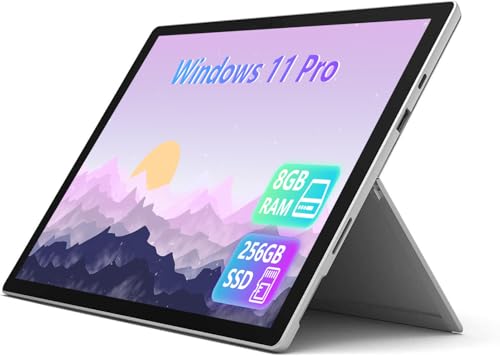
- Best for Full Windows Apps: Microsoft Surface Pro 7+ (Renewed)
- Best Rugged Windows Tablet: Fusion5 10.1” Windows 11 Professional Rugged Tablet PC
- Best Rugged Android for Field Work: AGM PAD P2 Active Rugged Tablet
Can a Tablet Really Replace Your Laptop for Work?
The honest answer is: partly, and it depends entirely on what your job actually requires day to day. Tablets for work excel at email, video calls, reading and annotating documents, note-taking in meetings, and light spreadsheet or document editing. Where they still fall short of a laptop is heavy multitasking — running several full desktop applications side by side, working with large files, or using specialized software that was never built for a touchscreen. If your work involves video editing, CAD, complex spreadsheets with dozens of open tabs, or software that only ships as a Windows or Mac desktop app, a laptop is still the safer primary tool. If your work is mostly communication, note-taking, reading, and moving between meetings, a tablet can genuinely carry the load, and it does so in a package that’s lighter and faster to open than any laptop. The right approach for most people is treating a tablet as a purpose-built secondary device rather than expecting it to do everything a laptop does — which is also why this guide focuses specifically on the features that make a tablet usable for work, not a general “best tablets” list built around media consumption.
Keyboard Case Compatibility — The First Thing to Check
Before anything else, look at how a tablet handles typing, because this single factor decides whether it’s realistic to use for work at all. Some tablets for work, like the Lenovo Idea Tab, Lenovo Idea Tab Plus, and Lenovo Idea Tab Pro with Google Gemini, ship with a folio case and pen included, which keeps your total cost predictable. Others, including the Samsung Galaxy Tab S8 and the Microsoft Surface Pro 7+, are sold as the tablet alone, with a keyboard cover available separately — and that add-on cost can be substantial, so factor it into your budget before comparing sticker prices. Detachable keyboard cases with a real hinge and trackpad tend to feel closest to laptop typing, while thin Bluetooth folio keyboards are more portable but less comfortable over long typing sessions. If your work involves drafting long emails or documents, prioritize a tablet with a keyboard case that has real key travel and a trackpad, not just a flat membrane keyboard bundled in as an afterthought.
Stylus Support for Note-Taking and Markup
A stylus turns a tablet from a screen you tap into a tool you can actually write and draw on, and for a lot of office and field work, that’s the feature that matters most. The Samsung Galaxy Tab S8 ships with its S Pen included, and the Lenovo Idea Tab, Idea Tab Plus, and Idea Tab Pro with Google Gemini all include a pen in the box as well — meaning four of the tablets for work on this list are ready for handwritten notes, PDF markup, and signing documents without an extra purchase. Look for active pen support with pressure sensitivity and palm rejection if you’ll be taking notes by hand during meetings, sketching quick diagrams, or marking up contracts and PDFs; a passive stylus without palm rejection will register your palm as a touch and make handwriting frustrating. If note-taking and document markup are central to your job, a bundled pen is worth weighting heavily when comparing tablets for work, since a quality active stylus purchased separately can cost nearly as much as a budget tablet.
Multitasking on a Tablet vs. a Laptop
Split-screen and floating-window multitasking have improved a lot on tablets, but it’s worth understanding what these features can and can’t do before you rely on them for work. On Android tablets, split-screen typically lets you run two apps side by side — a video call next to a notes app, for example — and some models add a desktop-style mode (Samsung’s DeX is the best-known example) that resizes apps into resizable windows closer to a laptop experience. Windows tablets like the Microsoft Surface Pro 7+ and the Fusion5 rugged tablet run the full Windows 11 desktop, so multitasking works exactly like it would on a laptop, with real overlapping windows and a taskbar — the trade-off is that Windows tablets are generally heavier, warmer, and shorter on battery life than their Android counterparts. If your work rarely goes beyond two apps at once, an Android tablet’s split-screen is plenty. If you regularly juggle four or five windows, a Windows tablet for work will feel far less limiting, even though it costs more up front.
Battery Life and Portability — Where Tablets for Work Win
This is the category where tablets clearly outperform laptops, and it’s often the actual reason people choose one. A tablet weighs a fraction of what most laptops do, slips into a bag or even a large pocket, and wakes instantly rather than booting — all of which matters when you’re moving between meetings, working from a train, or taking notes standing up. Android tablets for work, including the budget-friendly DigiLand 11 Inch Android Tablet for Work & Productivity and the rugged AGM PAD P2 Active Rugged Tablet, generally deliver longer battery life per charge than Windows tablets, because their processors are built around mobile-class efficiency rather than full desktop performance. If your day involves a lot of movement and unpredictable access to power outlets — sales calls, site visits, conference travel — prioritize an Android or lightweight tablet over a heavier Windows model, even if it means giving up some multitasking power. Portability is the strongest case for choosing a tablet at all, so don’t undercut it by picking the bulkiest, heaviest option on the list.
Android, Windows, or a Pen-First Tablet — Which OS Fits Your Work?
The operating system shapes almost everything else about how a tablet performs for work. Android tablets for work, like the Samsung Galaxy Tab S8 and the Lenovo Idea Tab lineup, run a huge library of mobile-optimized apps, tend to be lighter and cheaper, and now include desktop-style features on higher-end models, but they can behave differently than the desktop version of the same software — a spreadsheet app might reformat slightly, or a niche work tool might not have a mobile version at all. Windows tablets, like the Microsoft Surface Pro 7+ and the Fusion5 rugged tablet, run the exact same software you’d use on a desktop PC, which matters if your job depends on a specific Windows-only program, but you’ll pay more, carry more weight, and get less battery life in exchange. Neither is a universal right answer: choose Android if your work fits within mobile-app equivalents and portability matters most, and choose Windows if you need guaranteed compatibility with existing desktop software and don’t mind the extra bulk and cost.
Rugged and Business Tablets for Field Work
Not every work tablet lives on a desk or in a laptop bag. If your job involves outdoor sites, warehouses, delivery routes, or anywhere a dropped or splashed device is a real risk, a rugged tablet for work is worth the added bulk. The Fusion5 10.1” Windows 11 Professional Rugged Tablet PC and the AGM PAD P2 Active Rugged Tablet are both built around drop resistance and, in the AGM’s case, waterproofing, at the cost of being noticeably thicker and heavier than a consumer tablet. That trade-off makes sense for field technicians, inspectors, and delivery staff, but it works against the core appeal of a tablet for anyone whose job is mostly indoor, desk-adjacent work — in that case, a lighter consumer model will serve you better day to day. Match the ruggedization level to your actual working conditions rather than buying more durability than your job requires.
How We Evaluated These Tablets for Work
Every tablet on this list was pulled from current Amazon listings and compared against the same set of work-relevant criteria: whether a keyboard case and stylus are included or sold separately, the operating system and its practical app support, RAM and storage relative to multitasking demands, stated battery life, build quality, and the volume and rating of verified customer reviews. We deliberately excluded tablets marketed primarily around gaming or media streaming, even when they were well reviewed, because this list is built for people evaluating tablets for work specifically — screen size for document reading, keyboard support, and stylus availability were weighted far more heavily here than gaming benchmarks or speaker quality. Pricing, storage tier, and available color options were noted but did not override functional fit for work tasks.
Common Mistakes When Buying a Tablet for Work
- Buying the tablet alone and forgetting that the keyboard case is sold separately on several models, which can add $100 or more to the real cost.
- Assuming split-screen multitasking on Android is equivalent to full multi-window desktop use — it usually caps out at two apps at a time.
- Choosing storage based on the tablet’s advertised price tier rather than how many apps, documents, and offline files you’ll actually keep on the device.
- Skipping stylus support because “I don’t draw,” then finding handwritten meeting notes and PDF markup are the features they miss most.
- Picking a Windows tablet for work without checking battery life, then being surprised it needs a charger halfway through the day.
- Buying a rugged tablet for office-only work, adding unnecessary weight and bulk that undercuts the portability tablets are supposed to offer.
Buying Checklist
- Confirm whether a keyboard case is included or needs to be purchased separately, and add that cost to your budget before comparing prices.
- Check whether a stylus is bundled, and whether it supports pressure sensitivity and palm rejection if you plan to take handwritten notes.
- Decide between Android and Windows based on whether you need guaranteed compatibility with specific desktop software.
- Match RAM and storage to how many apps and files you’ll realistically run at once — 8GB RAM is a reasonable floor for multitasking.
- Prioritize battery life and weight if your job involves moving between locations rather than sitting at one desk.
- Consider a rugged model only if your actual working conditions involve drops, dust, or moisture — otherwise a standard consumer tablet will be lighter and cheaper.
- If you decide a tablet won’t cover your full workload, compare our guide to laptops for working from home before committing to either device.
Once you’ve settled on a tablet, how you use it at your desk matters almost as much as the device itself. Propping the screen up at eye level makes video calls and long reading sessions far more comfortable than holding the tablet flat on a desk — our guide to tablet desk mounts covers clamp and weighted-base options if you want the tablet positioned hands-free while you work.
FAQ
Do I need to buy a keyboard case separately?
It depends on the model. Several tablets for work on this list, including the Lenovo Idea Tab, Idea Tab Plus, and Idea Tab Pro with Google Gemini, include a folio case and pen in the box. Others, like the Samsung Galaxy Tab S8 and Microsoft Surface Pro 7+, sell the keyboard case as an accessory, so check that before comparing prices across models.
Is a tablet powerful enough to replace a laptop for spreadsheets and email?
For email, note-taking, and moderate spreadsheet work, most mid-range and higher tablets for work handle the job well. If you regularly work with large, complex spreadsheets, run several desktop-only applications at once, or need pixel-perfect formatting compatibility, a laptop is still the more reliable choice.
What’s the difference between Android and Windows tablets for work?
Android tablets are generally lighter, cheaper, and longer-lasting on battery, running mobile-optimized versions of common work apps. Windows tablets run the full desktop operating system, so any software that works on a Windows laptop will work the same way, but they typically cost more, weigh more, and have shorter battery life.
How much battery life should a tablet for work have?
Look for a tablet that comfortably covers a full workday, roughly 8 to 10 hours of mixed use, without needing a midday charge. Android tablets for work tend to lead in this category; Windows tablets often need a charger nearby by the afternoon.
Is a stylus necessary if I don’t plan to draw?
A stylus is useful for more than drawing — handwritten meeting notes, marking up PDFs, and signing documents are common work tasks where a pen is faster and more natural than typing or tapping. If any of those apply to your role, prioritize a tablet with a bundled or supported active stylus.
Should I buy a rugged tablet for office work?
Generally no. Rugged tablets for work add weight and thickness to survive drops, dust, and moisture, which works against the portability that makes a tablet appealing for desk-based or hybrid office work. Save the rugged category for field, warehouse, or outdoor jobs where that durability is actually needed.